
PulsePro Interval Timer
HIIT, Tabata and EMOM rounds
Diseñada para iPhone, iPad
Gratis · Compras en la aplicación
- Clasificación por edad4+
- CategoríaSalud y forma física
- DesarrolladorToshihiro Nakao
- IdiomasInglés+ 1 más
- Tamaño2,9 MB
Enlaza a la página oficial de App Store
Download.org no aloja ningún archivo de PulsePro Interval Timer. El botón abre la página de la aplicación en App Store, donde la publica Toshihiro Nakao. Ficha comprobada por última vez el 17/11/2026.
Capturas de pantalla




Acerca de
El desarrollador no ha proporcionado este texto en tu idioma.
Leave your phone on the floor and still read the clock.
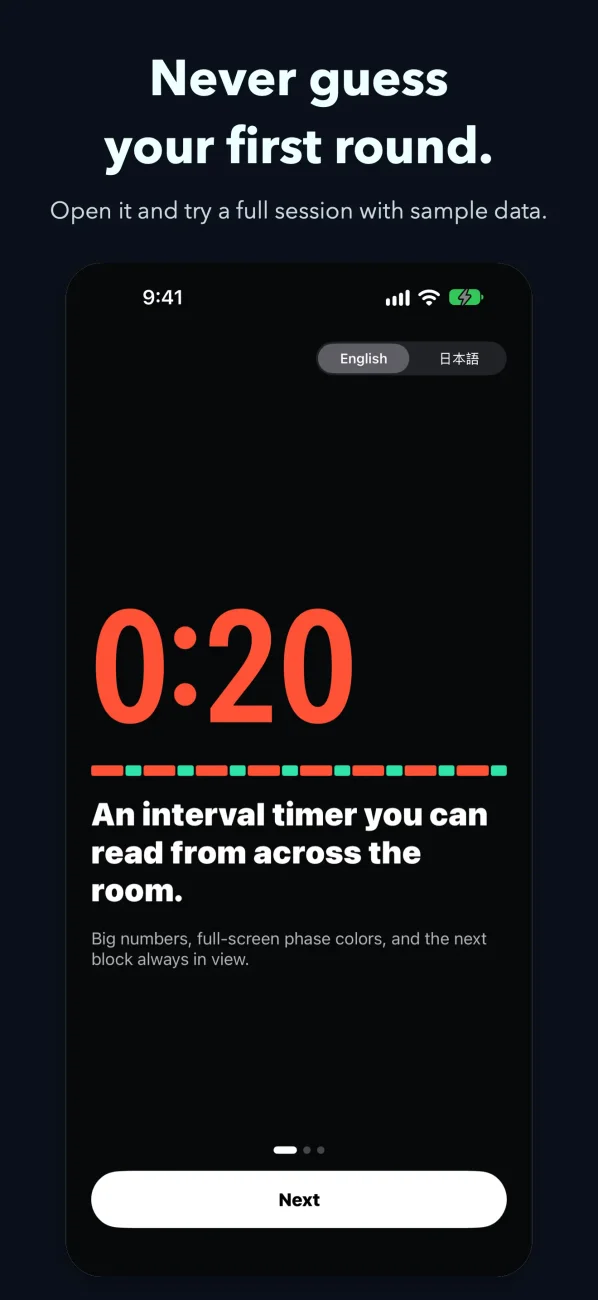
PulsePro fills the screen with the number and paints the whole display a different color for work and rest.
Tabata, HIIT, EMOM, AMRAP — build any of them to the second.
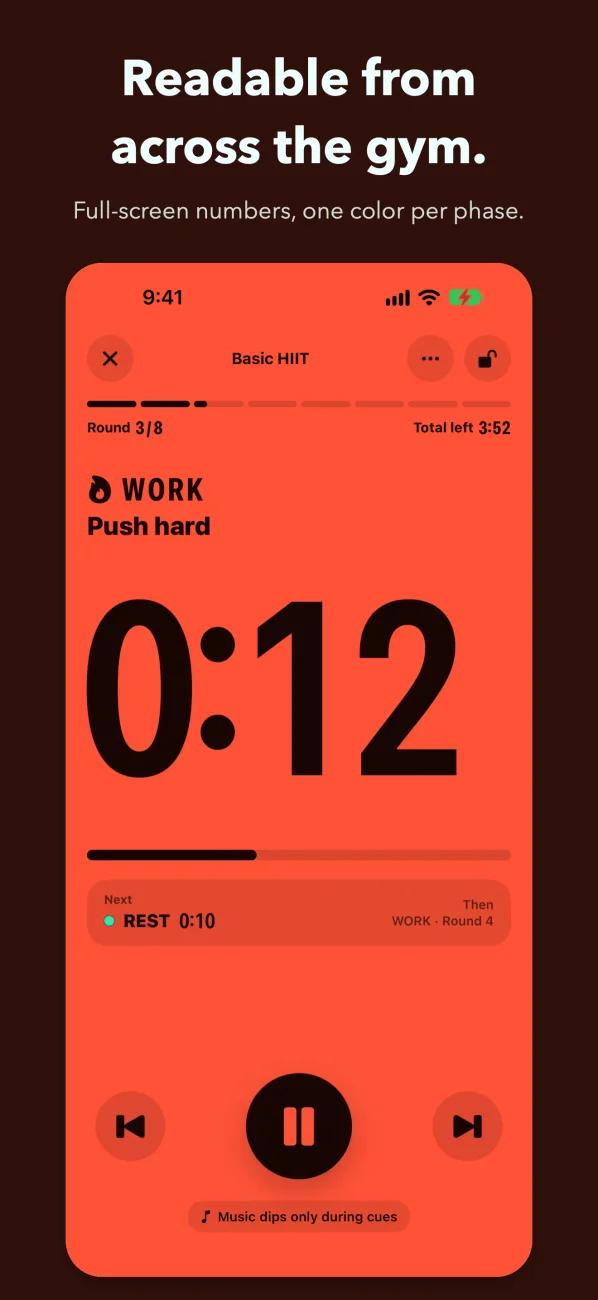
A plain stopwatch never tells you whether you are meant to be moving or resting, or how many rounds are left. PulsePro changes the entire screen color per phase and puts the countdown in the largest type that fits. From across the room, mid-burpee, one glance is enough.
[Readable from a distance]
- The whole screen changes color per phase (warm up / work / rest / cool down)
- Full-screen countdown, with the round shown as "3/8" at all times
- "Next" and "Then" sit under the clock, so nothing catches you off guard
- Turn the phone sideways for a stripped-back layout built for the gym
- The countdown also runs on the Lock Screen and in the Dynamic Island
[Built to the second]
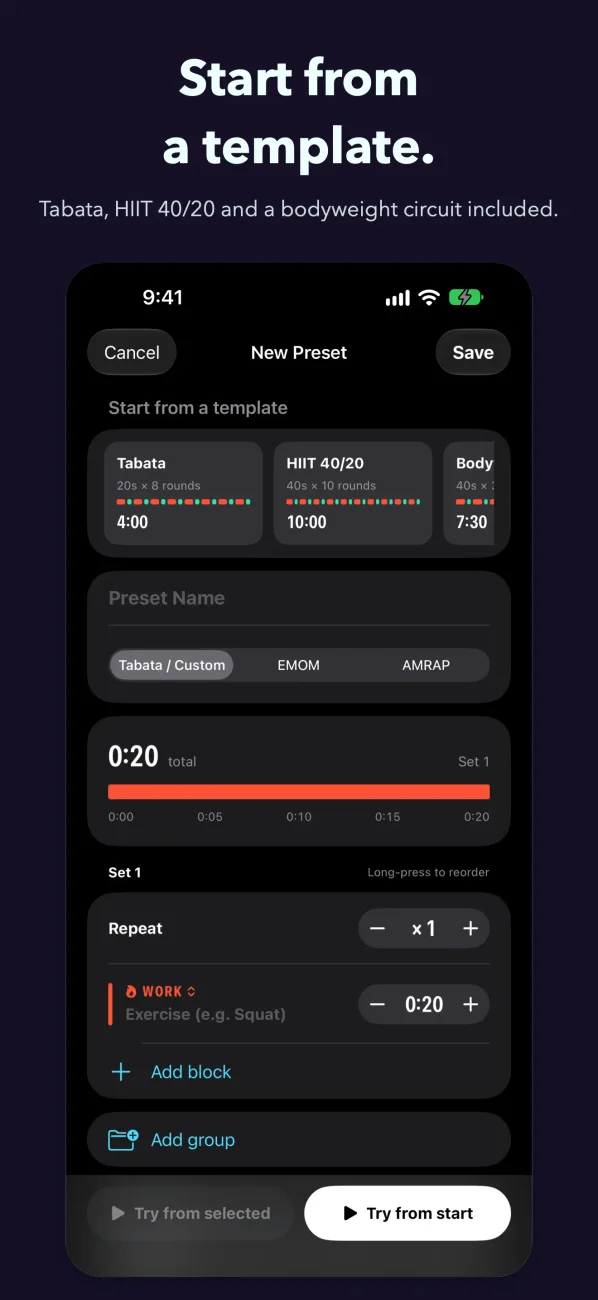
- Arrange warm up, work, rest and cool down in any order
- Set a repeat count per group (20s work + 10s rest, eight rounds)
- EMOM (start every minute) and AMRAP (as many rounds as you can) included
- Templates for Tabata, HIIT 40/20 and a bodyweight circuit
- Hit "try" while editing to run what you just built
[Cues you can hear, or see]
- Spoken cues (English or Japanese) or four sound effects
- Separate halfway and last-ten-seconds cues
- Music ducks only while a cue plays, then comes straight back
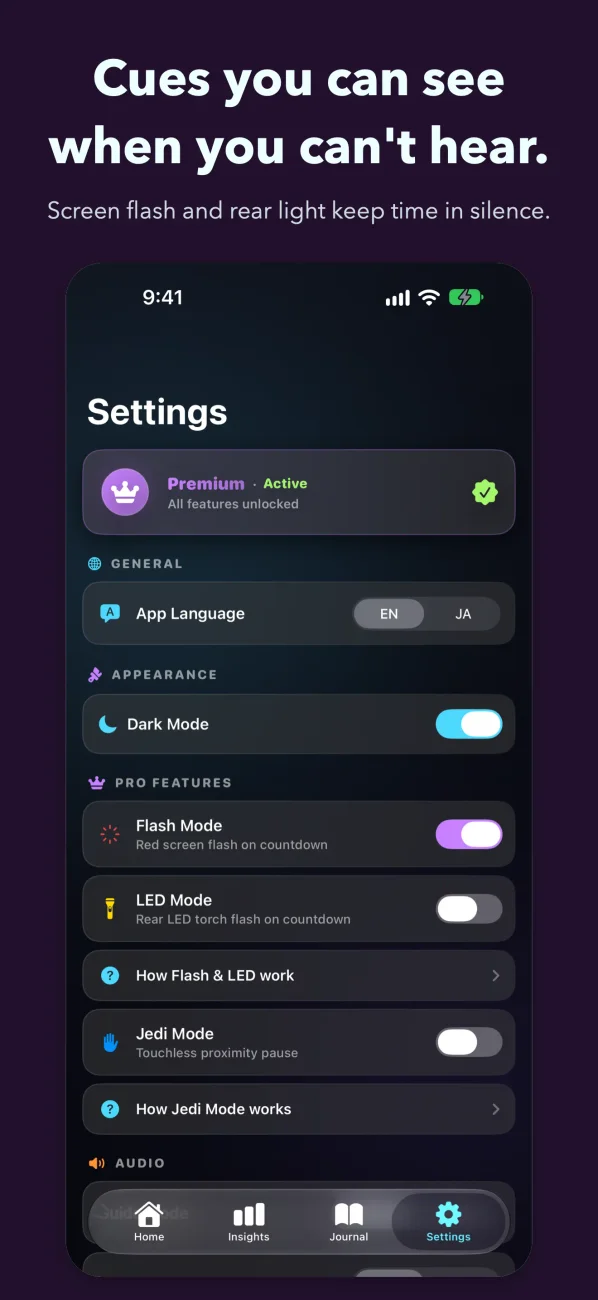
- Screen flash and rear light cues for headphones and noisy gyms
- Wave your hand over the phone to pause, for sweaty hands and gloves
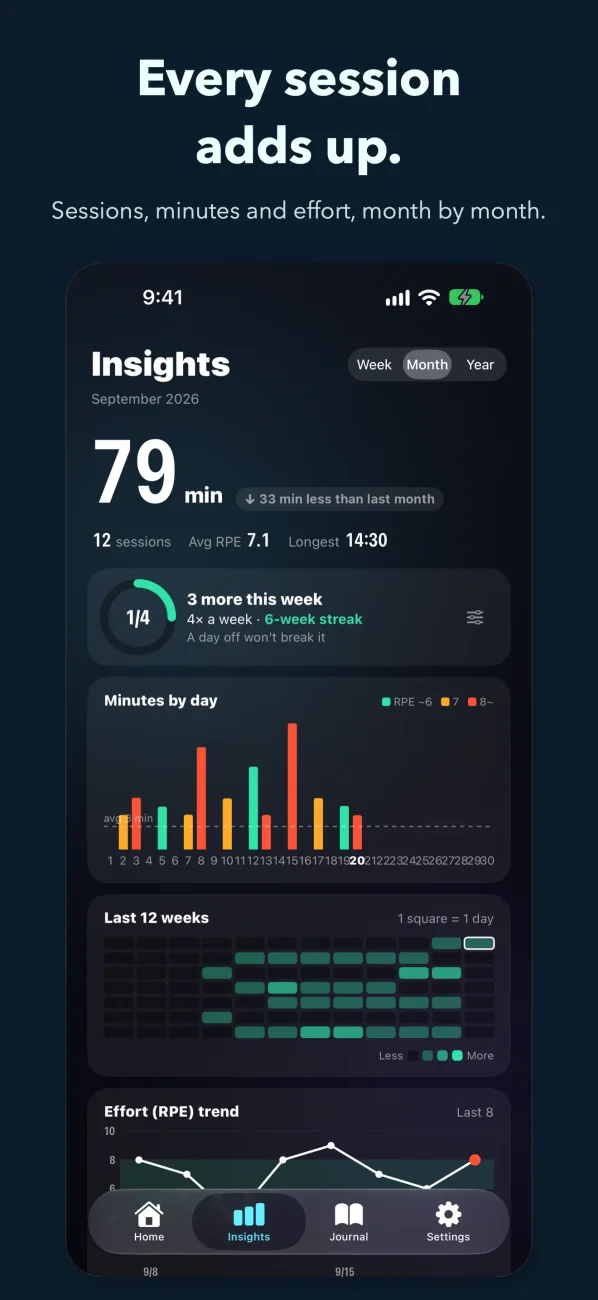
[Everything you finish adds up]
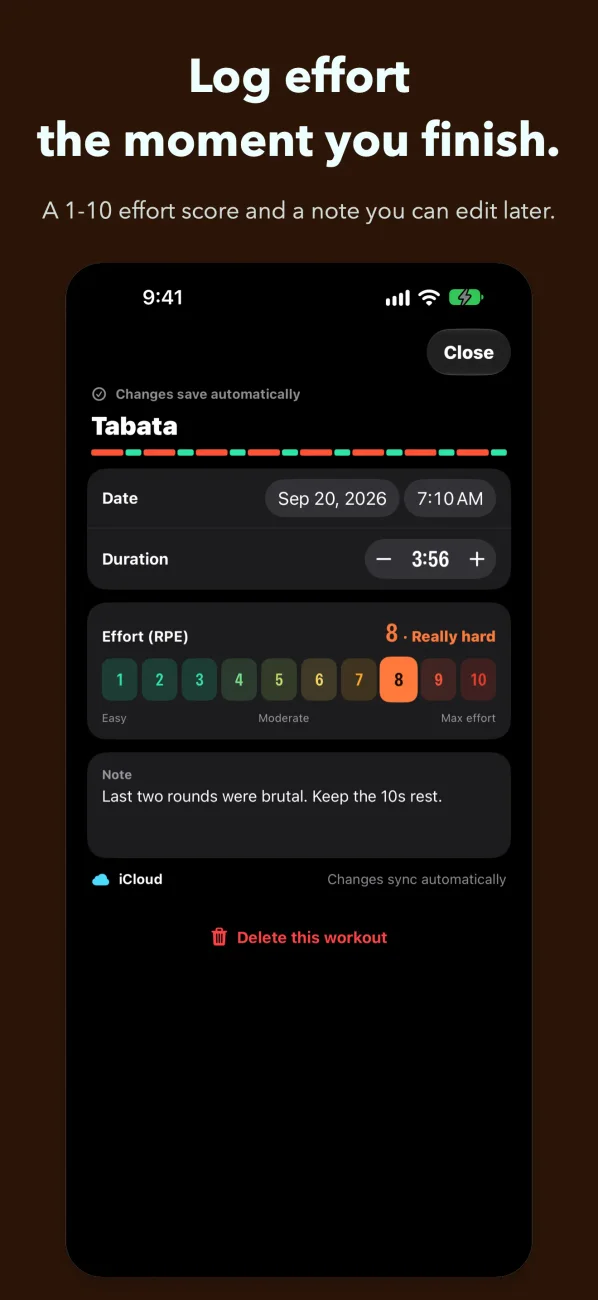
- Log effort (RPE 1-10) and a note the moment you stop
- Weekly, monthly and yearly totals, a twelve-week heat map, and an effort trend
- Browse by calendar or list, and search by preset name or note
- Set a weekly target and watch the streak build
- Export the whole log to CSV for any spreadsheet
[One tap from the Home Screen]
- Start a favorite session from a widget or Control Center
- Start it with Shortcuts or your voice assistant
- Save finished sessions to Apple Health as HIIT workouts (optional)
[About Pro]
One purchase. No subscription.
The core timer, Lock Screen countdown, history, insights and Health saving all stay available without it.
Pro removes the preset and block limits and unlocks EMOM/AMRAP, iCloud sync, the flash and light cues, and hands-free pause.
When you cannot hear and cannot get close, the clock still has to be right.
PulsePro keeps time so you can keep moving.
Novedades
Versión 2.0.0 · 21/9/2026
- Added a short walkthrough for new users, with optional sample sessions so the insights and history screens make sense right away (removable in one tap later)
- Rebuilt Insights: week / month / year, a twelve-week heat map, an effort (RPE) trend, and a per-preset breakdown
- Rebuilt the Journal: pick a day from the calendar, search by preset name or note, and select several records to delete at once
- Records now carry an effort score (RPE 1-10) and a note. Both are editable and save themselves
- Set a weekly target and see how the streak is holding up in Insights
- iCloud sync is now part of Pro. Without it your records still live on the device and still export to CSV
- Reviewed every English and Japanese string across the app, the widget and system-facing text
Privacidad de la aplicación
Lo que Toshihiro Nakao declara en App Store sobre cómo esta aplicación gestiona los datos.
-
Datos no vinculados a ti
Pueden recopilarse, pero no se vinculan a tu identidad.
- Datos de uso
- Diagnóstico
Las prácticas de privacidad pueden variar, por ejemplo, según las funciones que uses o tu edad.
Información
- Vendedor
- Toshihiro Nakao
- Categoría
- Salud y forma física
- Versión
- 2.0.0
- Actualizado
- 21/9/2026
- Publicado
- 27/3/2026
- Tamaño
- 2,9 MB
- Requiere
- iOS 18.0 o posterior
- Clasificación por edad
- 4+
- Precio
- Gratis
- Compras en la aplicación
- Sí
- Idiomas
- Inglés, Japonés
- Copyright
- © 2026 Toshihiro Nakao
Quizá también te guste
-
 Boxing Timer: Rounds & HIITSalud y forma física
-
 Strong Tabata and HIIT timerSalud y forma física
-
 HIGHER MovementSalud y forma física
-
 Fury – Temporizador de rondasBoxeo, HIIT, Tabata, CrossFit
-
 Temporizador HIIT: Tabata BoxIntervalos, Crossfit y EMOM
-
 SKILL Fitness Studio NewSalud y forma física
-
 Gym Timer Pro: Cronómetro HIITTabata, EMOM, AMRAP y circuito
-
 Round: Temporizador HIITTabata, gimnasio y fuerza
-
 Tabata Timer: HIIT IntervalsSalud y forma física
-
 Collegiate Fit ExpoSalud y forma física