Quick Note: Sticky Notes Menu
Floating Memo, Todo & Widget
Diseñada para iPhone, iPad, Mac
Gratis · Compras en la aplicación
- Clasificación por edad4+
- CategoríaProductividad
- DesarrolladorKauntey Suryawanshi
- IdiomasInglés+ 5 más
- Tamaño17,6 MB
Enlaza a la página oficial de App Store
Download.org no aloja ningún archivo de Quick Note: Sticky Notes Menu. El botón abre la página de la aplicación en App Store, donde la publica Kauntey Suryawanshi. Ficha comprobada por última vez el 23/11/2026.
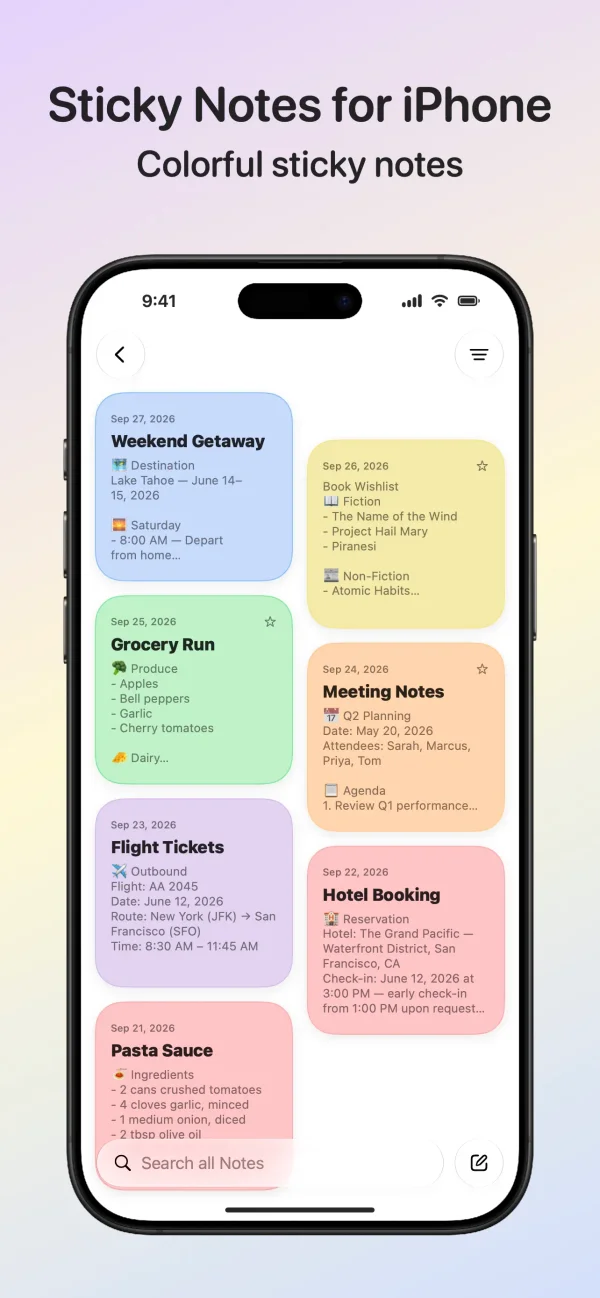
Capturas de pantalla
Acerca de
El desarrollador no ha proporcionado este texto en tu idioma.
Your notes in your pocket, and on your Mac. Jot something down on your iPhone and it's waiting on your Mac before you sit down.
Quick Note is a fast, focused notepad with rich text, folders, and instant search. iCloud sync keeps every note current across iPhone, iPad, and Mac.
■ QUICK TO CAPTURE
Open the app and start typing. No launch screen. No login. Just your note.
■ RICH TEXT ABOVE THE KEYBOARD
A formatting bar sits right on top of the keyboard, so styling never interrupts your typing.
• Headings, Bold, Italics, Strikethrough
• Highlight and named links
• Bullet, Dashed, Numbered, and Checklists
■ ORGANIZE YOUR WAY
• Folders — group related notes together
• Favorites — keep your most-used notes at the top
• Note colors — tell topics apart at a glance
• Search — find any note by title or content in an instant
• Trash — deleted notes stay recoverable
■ SYNCS WITH YOUR MAC
On the Mac, Quick Note lives in the menu bar and floats above your work. Everything you write on iPhone shows up there, and everything you write there shows up here — automatically, over iCloud.
■ SET UP THE WAY YOU LIKE
• Pick a default note color, or let it be random
• Sort your notes the way you think
• Spell checking as you type
• Adjustable text size
Quick Note Pro unlocks unlimited notes, folders, and every note color. It's a one-time purchase — never a subscription — and it covers iPhone, iPad, and Mac together.
Questions or feedback? k.suryawanshi@gmail.com
Novedades
Versión 1.3.0 · 17/11/2026
Introducing Ask My Notes: ask about anything you've written and get answers drawn from your notes, generated by Apple Intelligence. Tap Ask My Notes at the top of the screen, or touch and hold Quick Note on your Home Screen, and try:
“What are the key points from my lecture notes?”
“Summarize my meeting notes”
Requires iOS 27 or iPadOS 27 with Apple Intelligence.
Images in Notes: paste or drag images into any note, from Photos, Safari and more.
Drag to Organize: on iPad, drag notes onto a folder or the Trash in the sidebar to move them.
Privacidad de la aplicación
Lo que Kauntey Suryawanshi declara en App Store sobre cómo esta aplicación gestiona los datos.
-
Datos no vinculados a ti
Pueden recopilarse, pero no se vinculan a tu identidad.
- Datos de uso
- Diagnóstico
Las prácticas de privacidad pueden variar, por ejemplo, según las funciones que uses o tu edad.
Información
- Vendedor
- Kauntey Suryawanshi
- Categoría
- Productividad
- Versión
- 1.3.0
- Actualizado
- 17/11/2026
- Publicado
- 17/2/2020
- Tamaño
- 17,6 MB
- Requiere
- iOS 18 o posterior
- Clasificación por edad
- 4+
- Precio
- Gratis
- Compras en la aplicación
- Sí
- Idiomas
- Inglés, Francés, Alemán, Italiano, Japonés, Chino simplificado
- Copyright
- Copyright © 2026 Kaunteya Suryawanshi. All Rights reserved.
Quizá también te guste
-
 Sticky Notes - PostyListas, Notas y Widgets
-
 Desktop Note - Notes & PhotosAlways-on-desktop sticky note
-
 Notes: Aesthetic NotesProductividad
-
 All NotesNotas, listas y fotos
-
 Notepad – Private NotesProductividad
-
 Notes - Notepad, NotebookProductividad
-
 Serious NotebookCuaderno digital privado
-
 Sync Sticky NotesProductividad
-
 Quick Note: Notas y blocWidget, recordatorios, lista
-
 Comet NotesProductividad