- Clasificación por edad4+
- CategoríaMúsica
- DesarrolladorNobuya Meguro
- IdiomasInglés+ 1 más
- Tamaño4,3 MB
Enlaza a la página oficial de App Store
Download.org no aloja ningún archivo de ScrollScores. El botón abre la página de la aplicación en App Store, donde la publica Nobuya Meguro. Ficha comprobada por última vez el 24/11/2026.
Capturas de pantalla


Acerca de
El desarrollador no ha proporcionado este texto en tu idioma.
ScrollScores is a sheet-music viewer for iPad. The score scrolls by itself at the tempo of the piece, so you never have to stop playing to turn a page.
■ Tempo-linked auto-scroll
• Set the tempo (BPM) and the score glides along at the tempo of the piece
• Fine-tune a speed factor (0.5×–2.0×) per song; every setting is remembered per song
• Change tempo by tracing the tempo dial with a finger. A sample-accurate metronome is built in
• For pieces that change tempo or meter midway, touch and hold the score to place a tempo setting there. Time signatures such as 3/4 and 6/8 are supported
• Start with a countdown (3 / 5 / 10 s). While scrolling, all controls disappear so only the music remains
• Tap anywhere to pause and resume
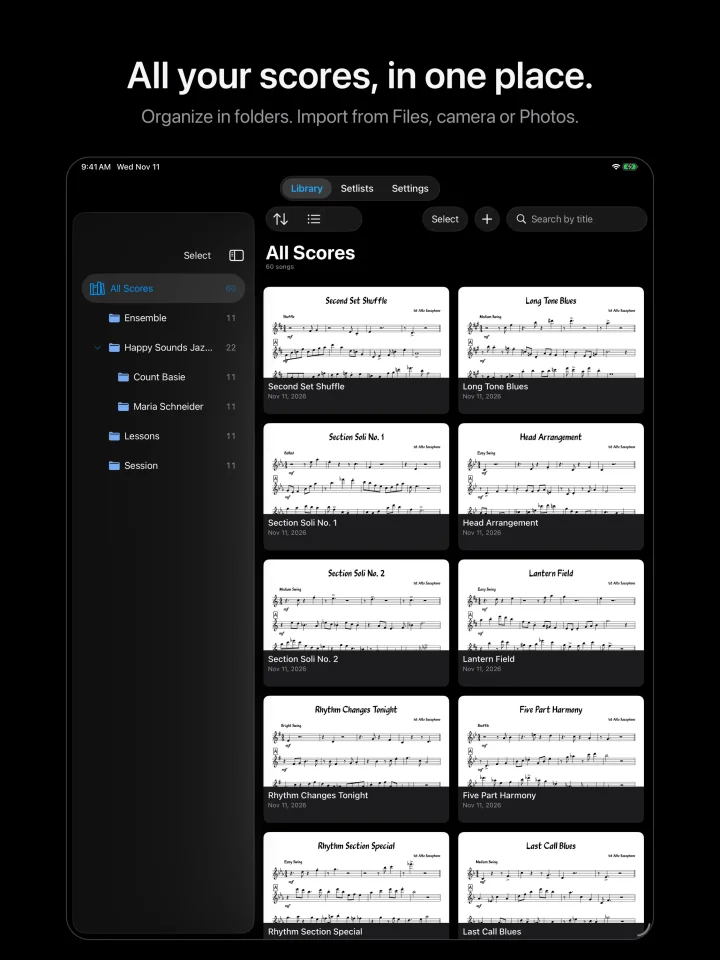
■ Organize with folders
• Create folders in your library to organize scores, and nest folders inside folders
• Two-pane layout: a folder tree on the left, your scores on the right. Hide the left column or resize it
• Use "Select" to move or delete several scores or folders at once
• Import an entire folder from the Files app — subfolders become folders too
• Search inside a folder to see only the songs in it
■ Page editing
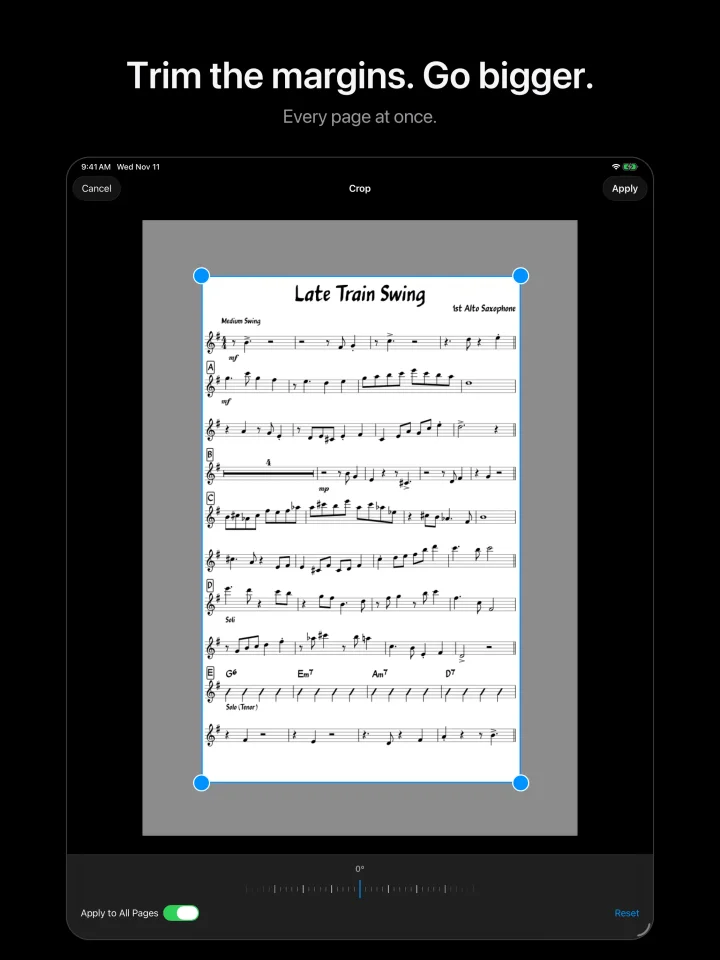
• Duplicate, delete, reorder, crop, rotate, split (two-page spread → two pages) and extract pages
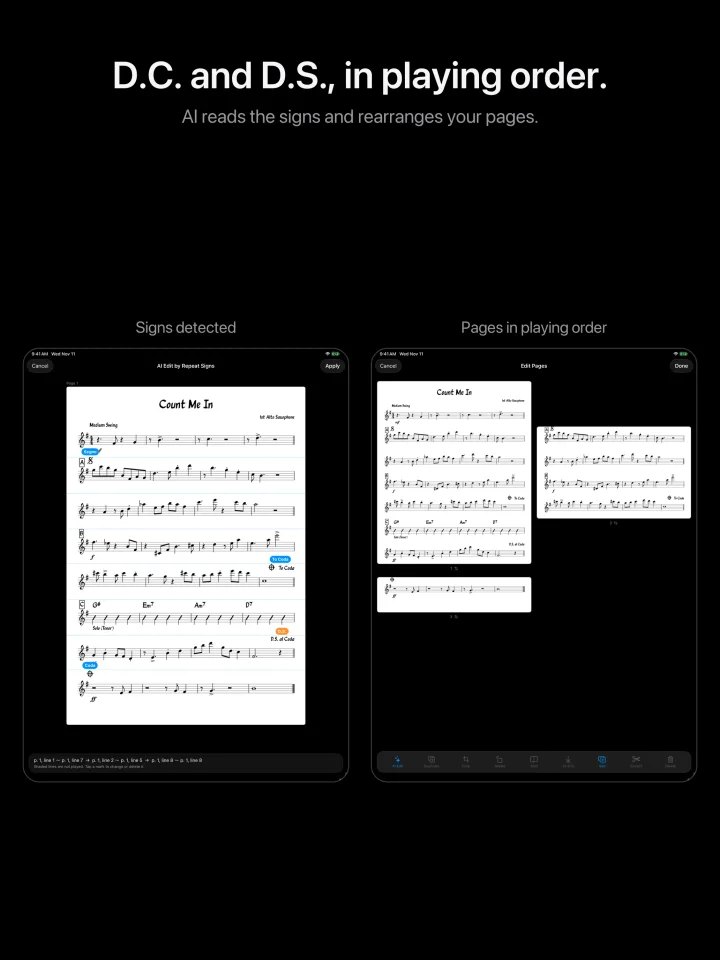
• Lay out D.S. / D.C. repeats in playing order, or trim margins so the music appears larger
• "AI Edit" reads the D.C., D.S. and coda signs in your score and rearranges the pages in playing order — review and correct the result before applying
• Annotations follow every page operation automatically
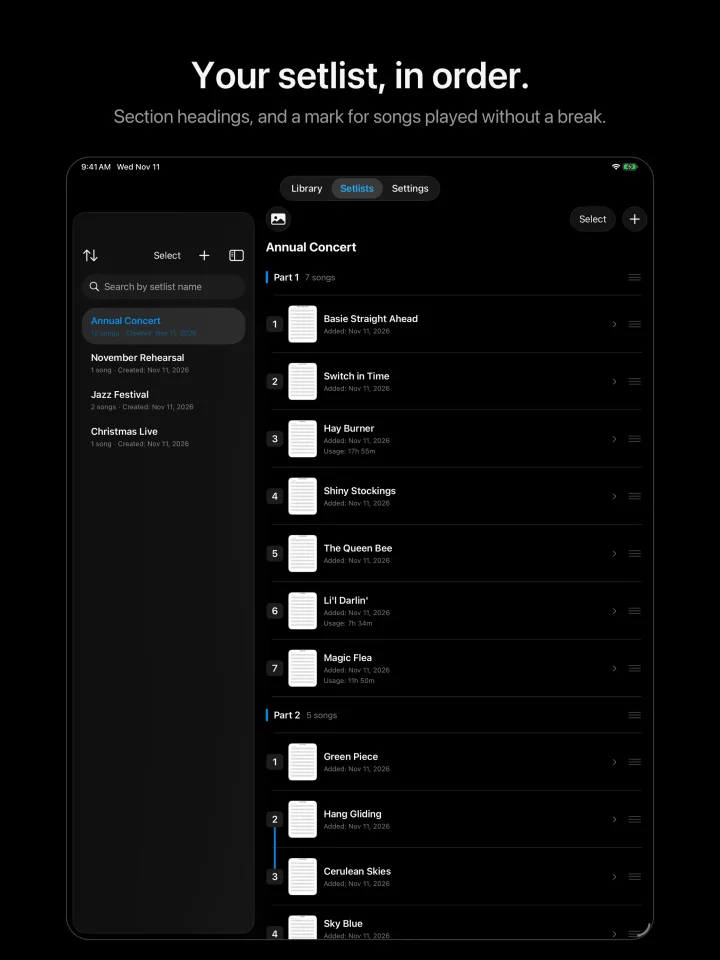
■ Setlists
• Arrange scores in performance order and move to the previous/next song with one tap
• Divide songs with section headings such as "Part 1" or "Encore" — numbering restarts in each section
• Mark songs that continue straight into the next one; the last page tells you what comes next
• Drag to reorder, duplicate setlists
• Or simply pull past the first/last page to switch songs (pull distance and on/off can be changed in Settings)
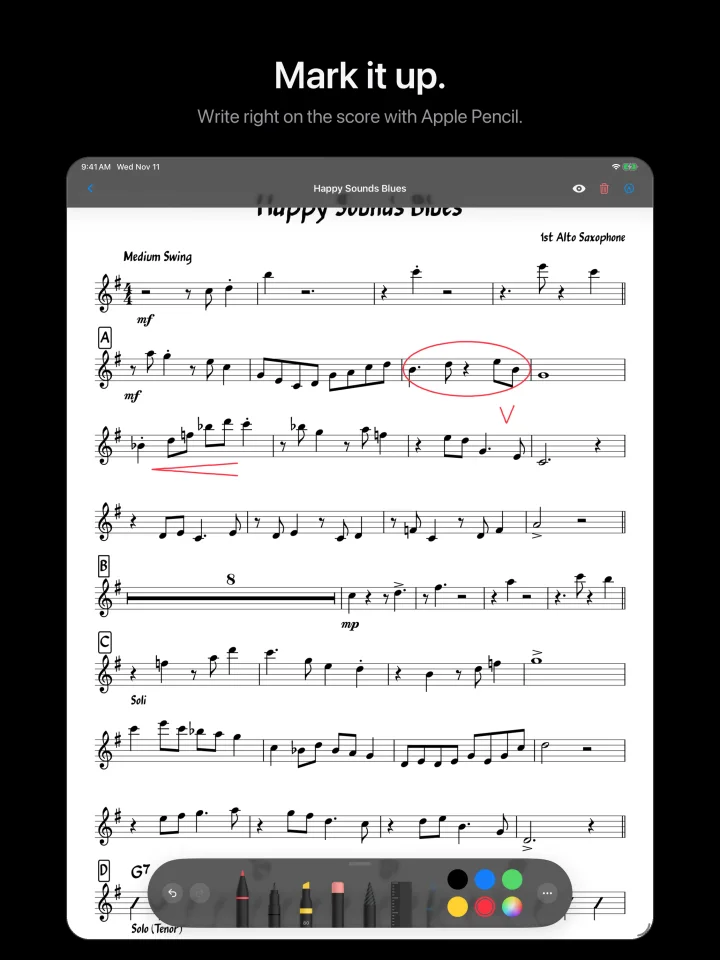
■ Annotate with Apple Pencil
• Natural handwriting powered by PencilKit — fingers work too
• Annotations are saved with the score and stay in place when you rotate the iPad
• Show/hide annotations, clear all
■ Turn pages with a foot pedal
• Bluetooth foot pedals (keyboard-type) scroll a full screen or half a screen (set separately for portrait and landscape)
• Press twice quickly to jump to the previous or next song
■ Add scores from anywhere
• Import PDFs from the Files app (iCloud Drive, Dropbox, Google Drive, OneDrive)
• Scan paper scores with the camera or import from Photos (black-and-white enhancement, uniform width)
• PDFs dropped into the app's Documents folder from Finder on Mac are imported automatically
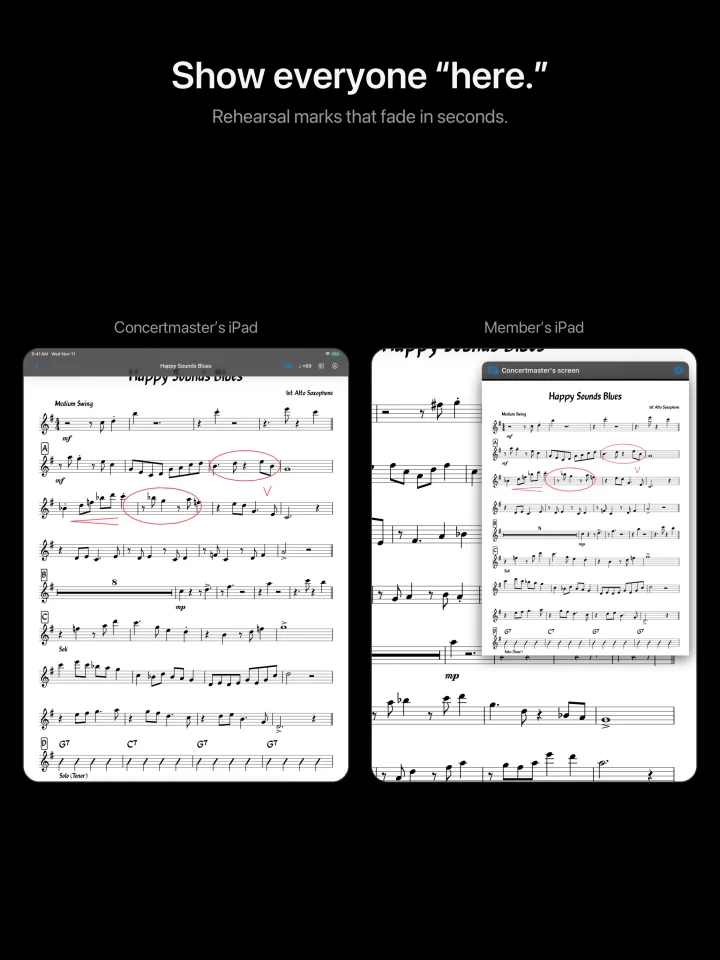
■ Screen sharing for rehearsals
• Share the score on your screen — plus pointer strokes that fade after a few seconds — with the other iPads in the room, so everyone instantly sees “here”
• Local network / direct device-to-device only. No internet required, nothing is stored
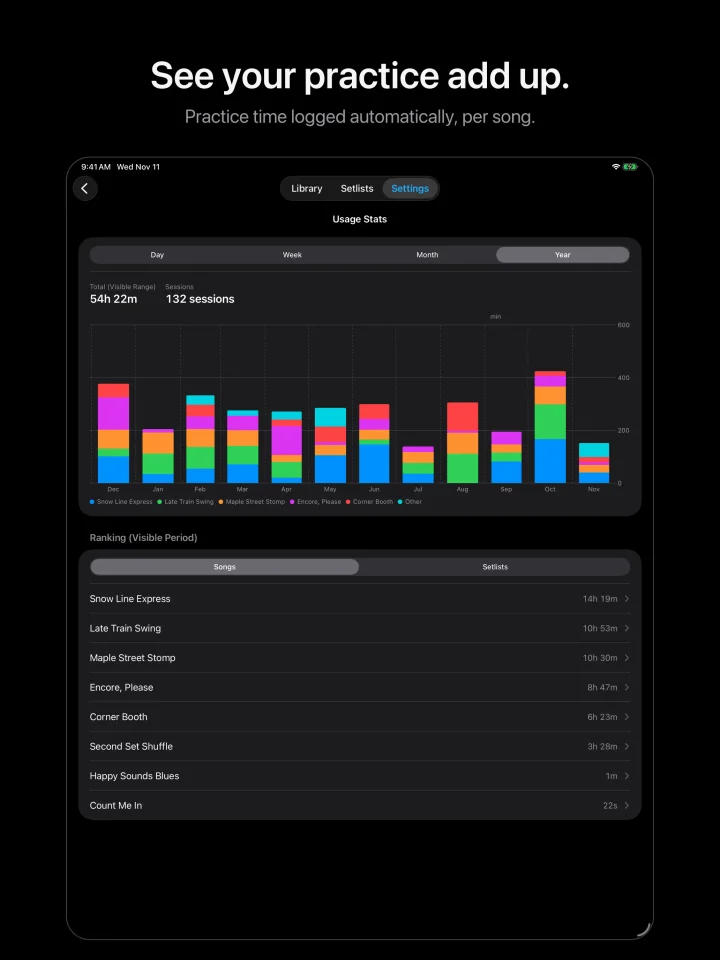
■ Usage statistics
• Practice time is recorded per song automatically. Review it by day, week, month or year, with rankings
■ iCloud sync
• Score PDFs, annotations, setlists, folders and tempo settings sync automatically between iPads signed in to the same Apple Account
• Your data lives only in your private iCloud database; the developer cannot access it
■ Simple and private
• No account, no ads, no tracking, one-time purchase
• English and Japanese. Light/dark appearance, score background colors (white / cream / dark)
• Requires iPadOS 16.4 or later — works on iPads that cannot run iPadOS 17
For everyone who uses sheet music.
Novedades
Versión 1.4 · 23/11/2026
■ Adjust the pull gesture that switches to the previous or next song
• Settings has a new "Switching Scores" section
• Choose the "Pull Distance" from four levels: Short, Standard, Long and Very Long. If songs switch by accident, pick a longer one
• Turn off "Pull Score to Switch Score" and pulling no longer switches songs (the buttons and the foot pedal still work as before)
• The pull distance now follows the height of the screen, so it feels the same on any iPad size and in portrait or landscape. "Standard" is a little longer than before; choose "Short" for a feel close to the previous version
Privacidad de la aplicación
Lo que Nobuya Meguro declara en App Store sobre cómo esta aplicación gestiona los datos.
-
No se recopilan datos
El desarrollador no recopila ningún dato de esta aplicación.
Las prácticas de privacidad pueden variar, por ejemplo, según las funciones que uses o tu edad.
Información
- Vendedor
- Nobuya Meguro
- Categoría
- Música
- Versión
- 1.4
- Actualizado
- 23/11/2026
- Publicado
- 3/11/2026
- Tamaño
- 4,3 MB
- Requiere
- iOS 16.4 o posterior
- Clasificación por edad
- 4+
- Precio
- 6,99 €
- Idiomas
- Inglés, Japonés
- Copyright
- © 2026 Nobuya Meguro