SimplComp
Simple Compressor AUv3
Diseñada para iPhone, iPad, Mac, iPod touch
1,99 €
- Clasificación por edad4+
- CategoríaMúsica
- DesarrolladorRob Jackson
- Tamaño17,5 MB
Enlaza a la página oficial de App Store
Download.org no aloja ningún archivo de SimplComp. El botón abre la página de la aplicación en App Store, donde la publica Rob Jackson. Ficha comprobada por última vez el 12/11/2026.
Capturas de pantalla
Acerca de
El desarrollador no ha proporcionado este texto en tu idioma.
Introduction
SimpleComp is very simple general purpose compressor that’s easy to use and very light on CPU. Sometimes you just need some basic dynamics processing that doesn’t add “character”, or that relies on sophisticated techniques or performance expensive DSP.
SimplComp was designed for those times!
SimpleComp is an AUv3 effects plugin that can run standalone, or in any AUv3 compatible host such as Logic Pro, GarageBand or AUM. SimpleComp currently runs on iPadOS / iOS (iPad & iPhone) and macOS (Intel & Silicon) and is available as a Universal Purchase from the Apple App Store.
If you’re planning on using SimpleComp on Mac / desktop, please ensure that your favourite DAW / host supports AUv3 (not just AU).
Parameters
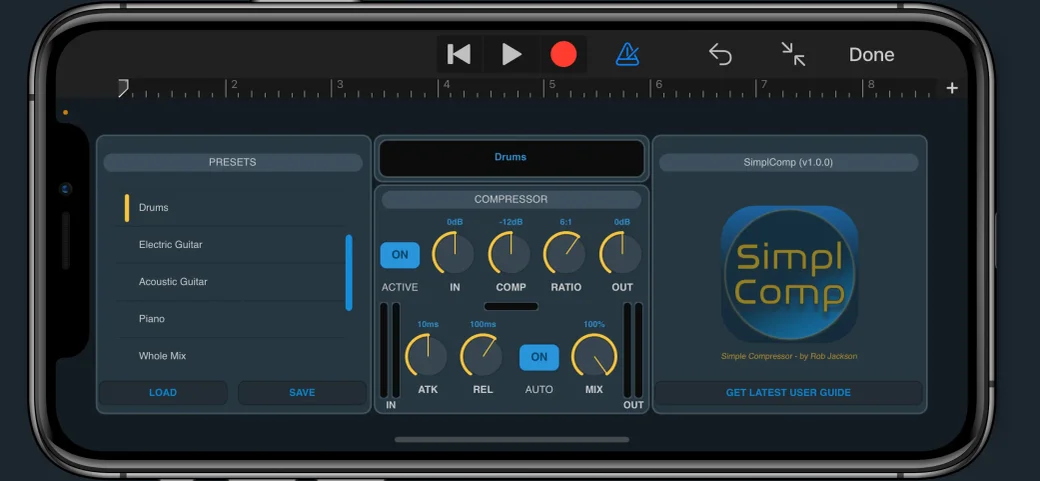
ACTIVE - toggles the effect on or off.
IN - sets the level of the incoming signal. Typically you would leave this as 0dB, i.e unity gain. The meters to the left of the panel show the level of the incoming signal.
COMP - sets the compression threshold. Note that unlike many compressor plugins, the threshold is reduced as you turn up the control, so as you turn it up, you get more compression effect. The bar meter below this control will give an indication of how much over the threshold the input signal is.
RATIO - sets the compression ratio. A higher ratio results in a more noticeable “squashing” effect on the signal.
OUT - sets the level of the output signal. You may need to adjust this is you wish to manually make up the gain lost by the compression effect, e.g. when AUTO is off (see below).
ATK - sets the attack time of the compressor.
REL - sets the release time of the compressor.
AUTO - toggles automatic makeup gain. When switched on, SimplComp will automatically adjust the gain to compensate for the gain reduction that occurs when compression is applied. This is calculated using the compression threshold and ratio.
MIX - sets the balance between the compressed and original / dry signal. This allows SimplComp to be used for parallel compression.
Factory Presets
There are a few factory presets included to get you going. The overall compression will be dependent on the level of the input signal so you will need to select an appropriate factory preset as a starting point, then adjust the COMP parameter up or down for more or less compression indicated by the bar meter below the control.
Novedades
Versión 1.0.1 · 3/11/2026
Small text scaling / layout fix at small screen sizes.
Fixed typo in user guide / App Store description.
Privacidad de la aplicación
Lo que Rob Jackson declara en App Store sobre cómo esta aplicación gestiona los datos.
-
No se recopilan datos
El desarrollador no recopila ningún dato de esta aplicación.
Las prácticas de privacidad pueden variar, por ejemplo, según las funciones que uses o tu edad.
Información
- Vendedor
- Rob Jackson
- Categoría
- Música
- Versión
- 1.0.1
- Actualizado
- 3/11/2026
- Publicado
- 8/9/2026
- Tamaño
- 17,5 MB
- Requiere
- iOS 15.0 o posterior
- Clasificación por edad
- 4+
- Precio
- 1,99 €
- Copyright
- © 2026 Rob Jackson