SimplComp
Simple Compressor AUv3
Dirancang untuk iPhone, iPad, Mac, iPod touch
Rp 39ribu
- Batasan usia4+
- KategoriMusik
- PengembangRob Jackson
- Ukuran17,5 MB
Tertaut ke halaman resmi App Store
Download.org tidak menyimpan file SimplComp apa pun. Tombol ini membuka halaman aplikasi di App Store, tempat Rob Jackson menerbitkannya. Halaman terakhir diperiksa pada 12/11/2026.
Tangkapan layar
Tentang
Pengembang belum menyediakan teks ini dalam bahasa Anda.
Introduction
SimpleComp is very simple general purpose compressor that’s easy to use and very light on CPU. Sometimes you just need some basic dynamics processing that doesn’t add “character”, or that relies on sophisticated techniques or performance expensive DSP.
SimplComp was designed for those times!
SimpleComp is an AUv3 effects plugin that can run standalone, or in any AUv3 compatible host such as Logic Pro, GarageBand or AUM. SimpleComp currently runs on iPadOS / iOS (iPad & iPhone) and macOS (Intel & Silicon) and is available as a Universal Purchase from the Apple App Store.
If you’re planning on using SimpleComp on Mac / desktop, please ensure that your favourite DAW / host supports AUv3 (not just AU).
Parameters
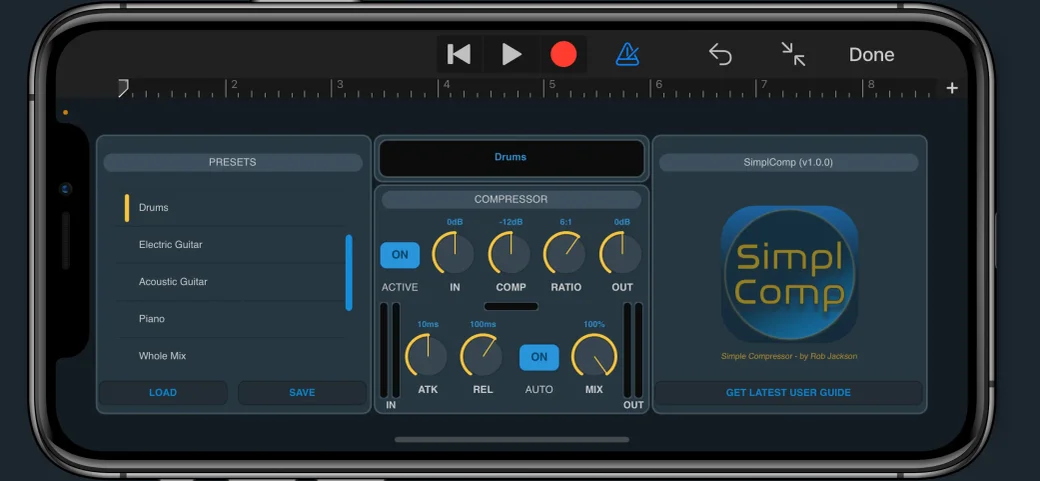
ACTIVE - toggles the effect on or off.
IN - sets the level of the incoming signal. Typically you would leave this as 0dB, i.e unity gain. The meters to the left of the panel show the level of the incoming signal.
COMP - sets the compression threshold. Note that unlike many compressor plugins, the threshold is reduced as you turn up the control, so as you turn it up, you get more compression effect. The bar meter below this control will give an indication of how much over the threshold the input signal is.
RATIO - sets the compression ratio. A higher ratio results in a more noticeable “squashing” effect on the signal.
OUT - sets the level of the output signal. You may need to adjust this is you wish to manually make up the gain lost by the compression effect, e.g. when AUTO is off (see below).
ATK - sets the attack time of the compressor.
REL - sets the release time of the compressor.
AUTO - toggles automatic makeup gain. When switched on, SimplComp will automatically adjust the gain to compensate for the gain reduction that occurs when compression is applied. This is calculated using the compression threshold and ratio.
MIX - sets the balance between the compressed and original / dry signal. This allows SimplComp to be used for parallel compression.
Factory Presets
There are a few factory presets included to get you going. The overall compression will be dependent on the level of the input signal so you will need to select an appropriate factory preset as a starting point, then adjust the COMP parameter up or down for more or less compression indicated by the bar meter below the control.
Yang baru
Versi 1.0.1 · 3/11/2026
Small text scaling / layout fix at small screen sizes.
Fixed typo in user guide / App Store description.
Privasi aplikasi
Yang dinyatakan Rob Jackson di App Store tentang cara aplikasi ini menangani data.
-
Data tidak dikumpulkan
Pengembang tidak mengumpulkan data apa pun dari aplikasi ini.
Praktik privasi dapat bervariasi, misalnya berdasarkan fitur yang Anda gunakan atau usia Anda.
Informasi
- Penjual
- Rob Jackson
- Kategori
- Musik
- Versi
- 1.0.1
- Diperbarui
- 3/11/2026
- Dirilis
- 8/9/2026
- Ukuran
- 17,5 MB
- Memerlukan
- iOS 15.0 atau yang lebih baru
- Batasan usia
- 4+
- Harga
- Rp 39ribu
- Hak cipta
- © 2026 Rob Jackson