
- Clasificación por edad4+
- CategoríaRedes sociales
- DesarrolladorCodeCornerApps LLC
- IdiomasInglés
- Tamaño17,2 MB
Es posible que StreamCot: Live Streaming App no esté disponible en App Store en este momento
No se pudo acceder a la ficha de la tienda en nuestra última comprobación. El enlace sigue llevando a la página oficial de App Store.
Capturas de pantalla
Acerca de
El desarrollador no ha proporcionado este texto en tu idioma.
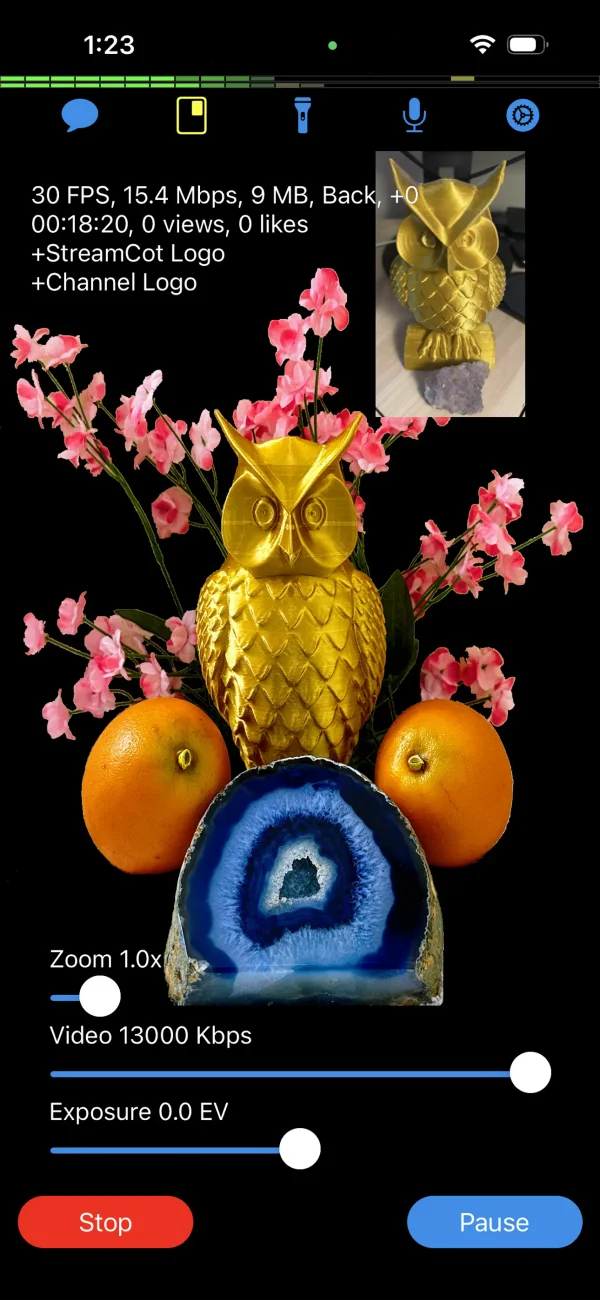
Everyone has a story, make them shine in 4K StreamCot Vision, and capture those memories for life!
StreamCot is the first 4K live streaming app that broadcasts to YouTube and Facebook in StreamCot Vision, optimizes engagement with Picture-in-Picture, and supports custom overlays to grow your brand!
StreamCot enables streaming audiovisual live content with the best quality live product on the market from your mobile device in real-time to YouTube and Facebook simultaneously.
STREAMCOT COLOR VISION
Provides a visually stunning, rich color enhancement and minimizes the need for post-processing.
PICTURE-IN-PICTURE
Optimize engagement with viewers by interacting with picture-in-picture, showing you and your environment in front and back views simultaneously.
CUSTOM OVERLAYS
Grow your brand with your custom overlays.
SIMULCASTING
Live streaming with StreamCot Vision to YouTube in up to 4K 2160p UHD and Facebook in up to 1080p FHD.
FAILSAFE STREAM BACKUP
When using StreamCot Relay, this provides the option to have a failsafe stream backup.
During periods of unstable network or disconnection, your stream won't go offline.
StreamCot Relay automatically switches between your live primary stream and StreamCot backup stream.
IN-APP LIVE CHAT
When live streaming to YouTube via StreamCot Relay, the live chat feature is toggleable to view for ease of interaction with viewers.
ADAPTIVE NETWORKING
Minimize lagging and downtime by automatically adjusting the average bitrate and/or frame rate based on your connection quality.
CAMERA VIEW USAGE
You can flip the front and back cameras with a quick triple-tap.
You can adjust the camera's focus area with a single tap.
You can lock the camera's manual focus, exposure, and white balance with a single long tap.
Tap the Picture-in-Picture button to enable or disable front and back cameras.
Pinch-to-zoom.
TECHNICAL FEATURES
Select live or record mode
Live mode RTMP/RTMPS H.264 video and AAC audio
Standard Camera HDR option
Dolby Vision HDR support in record mode
Dual/Triple camera support
Cinematic capture video stabilization support
Mirror front camera support
Binaural audio stereo recording
Advanced audio-video synchronizer
Microphone directionality support
Select between: follow camera, back, and front
External microphone support
Audio level meter
Flashlight support for better visuals while live streaming
Lock rotation while live streaming
Happy 4K live streaming!
Privacy Policy: https://streamcot.com/privacy
Terms of Service: https://streamcot.com/terms
Novedades
Versión 1.3.0 · 27/4/2026
Bug fixes and performance improvements.
Privacidad de la aplicación
Lo que CodeCornerApps LLC declara en App Store sobre cómo esta aplicación gestiona los datos.
-
Datos vinculados a ti
Pueden recopilarse y vincularse a tu identidad.
- Compras
- Información de contacto
- Identificadores
- Datos de uso
-
Datos no vinculados a ti
Pueden recopilarse, pero no se vinculan a tu identidad.
- Contenido del usuario
- Identificadores
- Diagnóstico
Las prácticas de privacidad pueden variar, por ejemplo, según las funciones que uses o tu edad.
Información
- Vendedor
- CodeCornerApps LLC
- Categoría
- Redes sociales
- Versión
- 1.3.0
- Actualizado
- 27/4/2026
- Publicado
- 29/1/2023
- Tamaño
- 17,2 MB
- Requiere
- iOS 16.1.1 o posterior
- Clasificación por edad
- 4+
- Compras en la aplicación
- Sí
- Idiomas
- Inglés
- Copyright
- © 2022 CodeCornerApps LLC
Quizá también te guste
-
 Semana Santa Festividade LivesLabs to Stream Like a Champ
-
 TwitCasting LiveRedes sociales
-
 Royal Live-Live Stream&Go LiveRedes sociales
-
 HaloLive-Live stream & ChatRedes sociales
-
 TikLive: Video en VivoTransmite, mira y haz amigos
-
 Firefly Live-Live BroadcastingTransmisión & Video-Chat en
-
 POYO – Jornada SocialDescubre personas e intereses
-
 Streamlabs ControllerRedes sociales
-
 Spark Live - Live StreamingRedes sociales
-
 YouNow: Live stream en vivoLive, Video Chat, Make Friends