
- Age rating4+
- CategorySocial Networking
- DeveloperCodeCornerApps LLC
- LanguagesEnglish
- Size17.2 MB
Links to the official App Store page
Download.org hosts no file of StreamCot: Live Streaming App. The button opens its official App Store page, published by CodeCornerApps LLC. Listing last checked on Nov 14, 2026.
Screenshots
About
Everyone has a story, make them shine in 4K StreamCot Vision, and capture those memories for life!
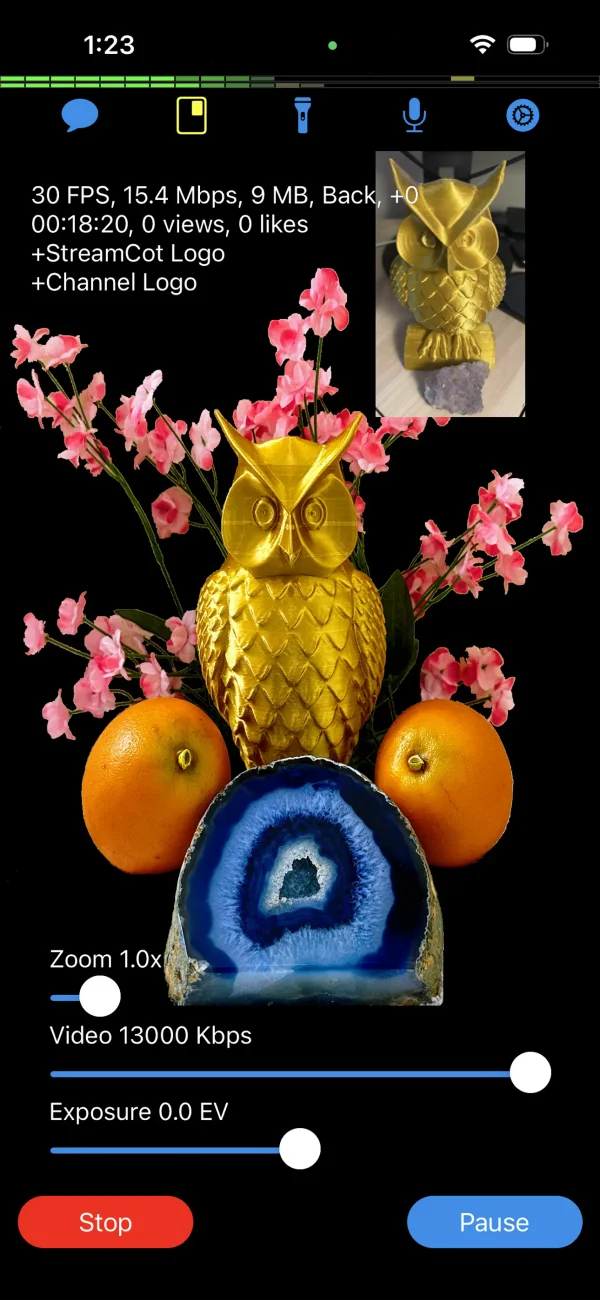
StreamCot is the first 4K live streaming app that broadcasts to YouTube and Facebook in StreamCot Vision, optimizes engagement with Picture-in-Picture, and supports custom overlays to grow your brand!
StreamCot enables streaming audiovisual live content with the best quality live product on the market from your mobile device in real-time to YouTube and Facebook simultaneously.
STREAMCOT COLOR VISION
Provides a visually stunning, rich color enhancement and minimizes the need for post-processing.
PICTURE-IN-PICTURE
Optimize engagement with viewers by interacting with picture-in-picture, showing you and your environment in front and back views simultaneously.
CUSTOM OVERLAYS
Grow your brand with your custom overlays.
SIMULCASTING
Live streaming with StreamCot Vision to YouTube in up to 4K 2160p UHD and Facebook in up to 1080p FHD.
FAILSAFE STREAM BACKUP
When using StreamCot Relay, this provides the option to have a failsafe stream backup.
During periods of unstable network or disconnection, your stream won't go offline.
StreamCot Relay automatically switches between your live primary stream and StreamCot backup stream.
IN-APP LIVE CHAT
When live streaming to YouTube via StreamCot Relay, the live chat feature is toggleable to view for ease of interaction with viewers.
ADAPTIVE NETWORKING
Minimize lagging and downtime by automatically adjusting the average bitrate and/or frame rate based on your connection quality.
CAMERA VIEW USAGE
You can flip the front and back cameras with a quick triple-tap.
You can adjust the camera's focus area with a single tap.
You can lock the camera's manual focus, exposure, and white balance with a single long tap.
Tap the Picture-in-Picture button to enable or disable front and back cameras.
Pinch-to-zoom.
TECHNICAL FEATURES
Select live or record mode
Live mode RTMP/RTMPS H.264 video and AAC audio
Standard Camera HDR option
Dolby Vision HDR support in record mode
Dual/Triple camera support
Cinematic capture video stabilization support
Mirror front camera support
Binaural audio stereo recording
Advanced audio-video synchronizer
Microphone directionality support
Select between: follow camera, back, and front
External microphone support
Audio level meter
Flashlight support for better visuals while live streaming
Lock rotation while live streaming
Happy 4K live streaming!
Privacy Policy: https://streamcot.com/privacy
Terms of Service: https://streamcot.com/terms
What’s new
Version 1.3.0 · Apr 27, 2026
Bug fixes and performance improvements.
App privacy
What CodeCornerApps LLC declares on the App Store about how this app handles data.
-
Data linked to you
May be collected and linked to your identity.
- Purchases
- Contact info
- Identifiers
- Usage data
-
Data not linked to you
May be collected but is not linked to your identity.
- User content
- Identifiers
- Diagnostics
Privacy practices may vary, for example with the features you use or your age.
Information
- Seller
- CodeCornerApps LLC
- Category
- Social Networking
- Version
- 1.3.0
- Updated
- Apr 27, 2026
- Released
- Jan 29, 2023
- Size
- 17.2 MB
- Requires
- iOS 16.1.1 or later
- Age rating
- 4+
- Price
- Free
- In-app purchases
- Yes
- Languages
- English
- Copyright
- © 2022 CodeCornerApps LLC
You might also like
-
 ViuLive: Multicam Live StreamMany Cams Game Live Streaming
-
 TwitCasting LiveBroadcast Video & Radio
-
 Royal Live-Live Stream&Go LiveMeet People & Make Friends!
-
 HaloLive-Live stream & ChatHaloLive-Live stream & Chat
-
 TikLive:Live Stream&Video chatGo live, Watch & Make Friends
-
 FIREFLY LIVE - Go Live StreamNight Showdown PK Special
-
 POYO-Live stream,Go LiveEnjoy social interaction
-
 Streamlabs ControllerControl your live stream!
-
 Spark Live - Live StreamingLive, Video Chat, Make Friends
-
 YouNow: Live Stream, Go LiveLive, Video Chat, Make Friends