
Video Maker+
Make a video and add music
Diseñada para iPhone, iPad, iPod touch
Gratis · Compras en la aplicación
- Clasificación por edad4+
- CategoríaProductividad
- DesarrolladorJanek Soomets
- IdiomasInglés
- Tamaño534,0 KB
Enlaza a la página oficial de App Store
Download.org no aloja ningún archivo de Video Maker+. El botón abre la página de la aplicación en App Store, donde la publica Janek Soomets. Ficha comprobada por última vez el 18/11/2026.
Capturas de pantalla


Acerca de
El desarrollador no ha proporcionado este texto en tu idioma.
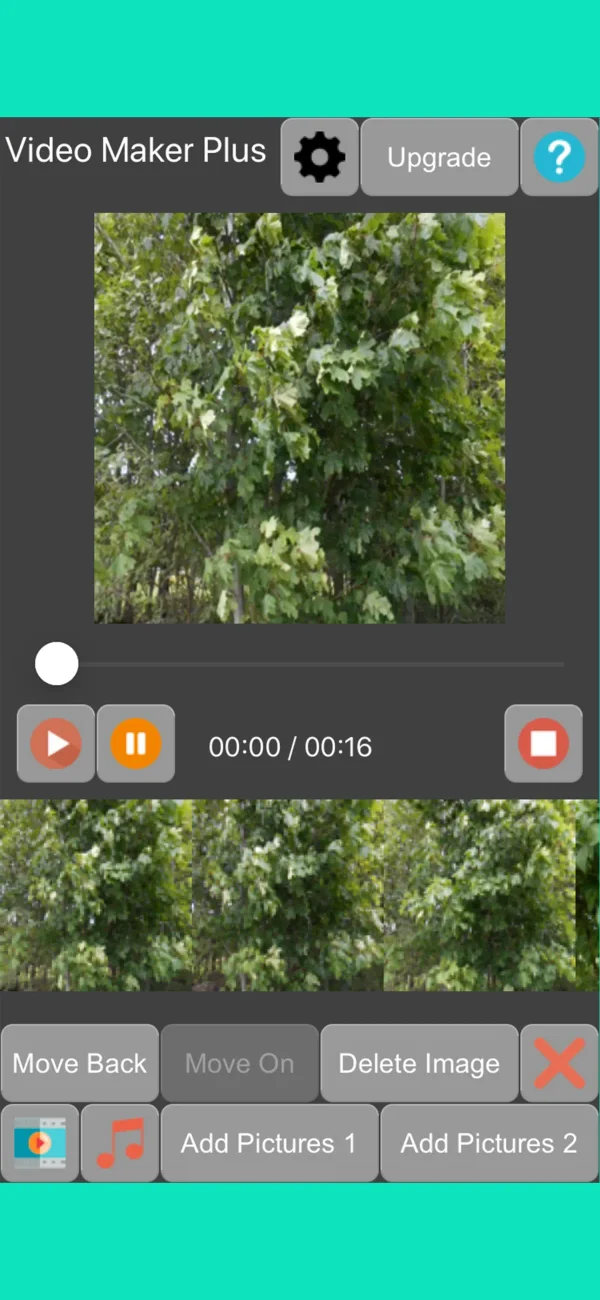
Video Maker Plus is a video-making program. The video is made of images added to the program. Music can also be added to the finished video. You can add up to 40 images to a video without upgrading.
Add pictures
Press the “Add Pictures1” or “Add Pictures 2” button to add pictures. You will then be presented with a file picker. Whether the images are in the cloud or on the phone media, you can add them to the images in the application.
In the “Add Pictures 1” window, you can select all pictures by double-clicking on the window. And by clicking the window three times with your finger, you will delete all the selected images.
Edit Added Pictures
You can delete inserted images one at a time or all at a time. To delete a single image, press the image in the Image bar. When a blue box appears around the image, then the image is selected. To delete, press the “Delete Image” button in the bottom row of buttons. To delete all images, press the 4th button in the bottom row of buttons.
You can move the image left or right in the list. Press the "Move Back" button to move left and press the "Move On" button to move right.
Press the image twice with your finger to move to the beginning of the image list. Pressing the image 3 times in a row moves to the end of the image list.
Make a video
When the bottom strip of images contains images, a video can be made. To make a video, press the first button in the bottom row of buttons.
Edit video size and multiple frames per second
To do this, press the first button in the top row of buttons the “Video Settings” box is displayed. In this box, you can change the width and height of the video. Also, the video setting about several frames per second can be adjusted. In addition, there is a box where you can choose to save the video to the library of images (“Save video to library”) or not.
Add audio to a video
You can add audio to a ready-made video. To do this, press the 2rd button in the bottom row of buttons. Then the music library opens. From there, you can select music for the video.
Edit Video
You can watch the ready-made video from the location you want. To do this, move the video slide to the desired location.
To play the video, press the first button in the average row of buttons. The second button in this row is a pause, putting the video in pause status. And if you no longer want to watch the video, press the third button in the average row of buttons - that's a stop.
The numbers are visible, in the average row of buttons which show the position of playing the video, and the length of the entire video.
Watch a video
You can import video from Apple Finder->Phone->Files Video Maker Plus folder. The phone must be connected to a computer.
Novedades
Versión 1.5 · 2/1/2026
Update age ratings question.
Privacidad de la aplicación
Lo que Janek Soomets declara en App Store sobre cómo esta aplicación gestiona los datos.
-
No se recopilan datos
El desarrollador no recopila ningún dato de esta aplicación.
Las prácticas de privacidad pueden variar, por ejemplo, según las funciones que uses o tu edad.
Información
- Vendedor
- Janek Soomets
- Categoría
- Productividad
- Versión
- 1.5
- Actualizado
- 2/1/2026
- Publicado
- 12/7/2019
- Tamaño
- 534,0 KB
- Requiere
- iOS 13.6 o posterior
- Clasificación por edad
- 4+
- Precio
- Gratis
- Compras en la aplicación
- Sí
- Idiomas
- Inglés
- Copyright
- © 2025 Janek Soomets
Quizá también te guste
-
 FW MediaProductividad
-
 Font Wizard Pro: Font ManagerProductividad
-
 AI Limits: seguimiento de IAMonitor de tokens y límites
-
 AI Note Taker + Voice NotesProductividad
-
 Remi - Everyday ReminderProductividad
-
 jersey.aiProductividad
-
 OmniAI - AI Chat AssistantProductividad
-
 Submit Your App IdeaProductividad
-
 Advanced Search Smart OptionsProductividad
-
 Pinku AI OfficialProductividad