- 対象年齢4+
- カテゴリ仕事効率化
- 開発元Janek Soomets
- 言語英語
- サイズ534.0 KB
App Storeの公式ページにリンクしています
Download.orgはVideo Maker+のファイルを一切ホストしていません。ボタンを押すと、Janek Soometsが公開しているApp Storeのアプリページが開きます。ページの最終確認:2026/11/18。
スクリーンショット


概要
開発元はこのテキストをお使いの言語で提供していません。
Video Maker Plus is a video-making program. The video is made of images added to the program. Music can also be added to the finished video. You can add up to 40 images to a video without upgrading.
Add pictures
Press the “Add Pictures1” or “Add Pictures 2” button to add pictures. You will then be presented with a file picker. Whether the images are in the cloud or on the phone media, you can add them to the images in the application.
In the “Add Pictures 1” window, you can select all pictures by double-clicking on the window. And by clicking the window three times with your finger, you will delete all the selected images.
Edit Added Pictures
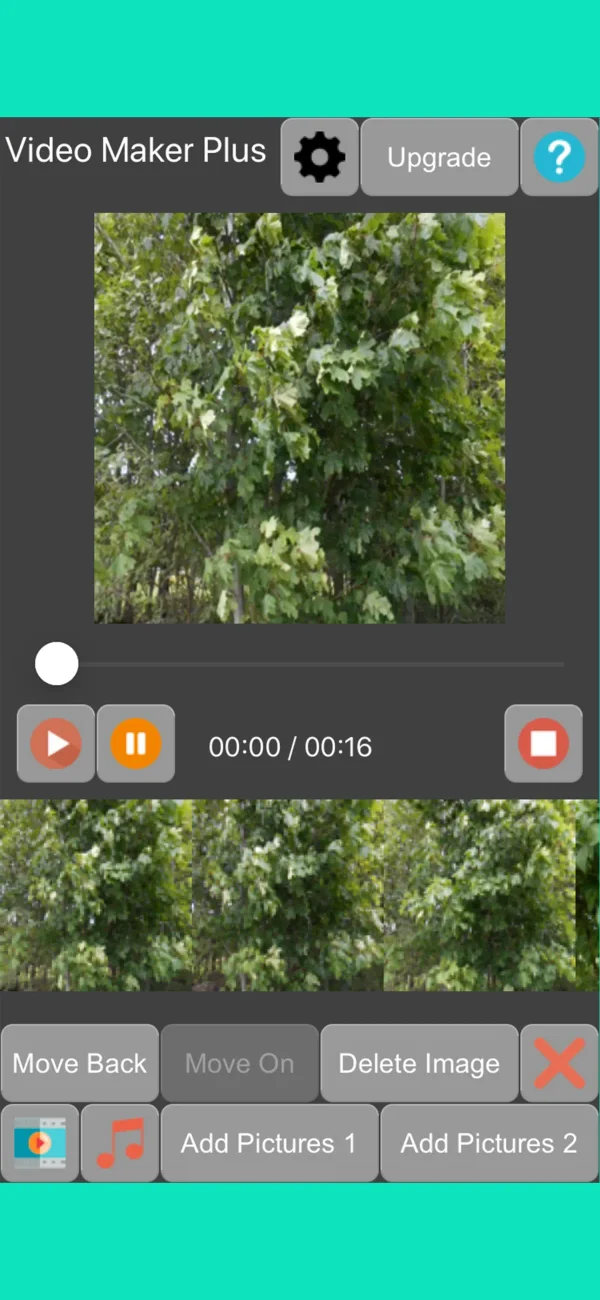
You can delete inserted images one at a time or all at a time. To delete a single image, press the image in the Image bar. When a blue box appears around the image, then the image is selected. To delete, press the “Delete Image” button in the bottom row of buttons. To delete all images, press the 4th button in the bottom row of buttons.
You can move the image left or right in the list. Press the "Move Back" button to move left and press the "Move On" button to move right.
Press the image twice with your finger to move to the beginning of the image list. Pressing the image 3 times in a row moves to the end of the image list.
Make a video
When the bottom strip of images contains images, a video can be made. To make a video, press the first button in the bottom row of buttons.
Edit video size and multiple frames per second
To do this, press the first button in the top row of buttons the “Video Settings” box is displayed. In this box, you can change the width and height of the video. Also, the video setting about several frames per second can be adjusted. In addition, there is a box where you can choose to save the video to the library of images (“Save video to library”) or not.
Add audio to a video
You can add audio to a ready-made video. To do this, press the 2rd button in the bottom row of buttons. Then the music library opens. From there, you can select music for the video.
Edit Video
You can watch the ready-made video from the location you want. To do this, move the video slide to the desired location.
To play the video, press the first button in the average row of buttons. The second button in this row is a pause, putting the video in pause status. And if you no longer want to watch the video, press the third button in the average row of buttons - that's a stop.
The numbers are visible, in the average row of buttons which show the position of playing the video, and the length of the entire video.
Watch a video
You can import video from Apple Finder->Phone->Files Video Maker Plus folder. The phone must be connected to a computer.
新機能
バージョン 1.5 · 2026/1/2
Update age ratings question.
アプリのプライバシー
このアプリのデータの取り扱いについて、Janek SoometsがApp Storeで申告している内容です。
-
データの収集なし
開発元はこのアプリからデータを収集しません。
プライバシーの取り扱いは、ご利用の機能やお客様の年齢などに応じて異なる場合があります。
情報
- 販売元
- Janek Soomets
- カテゴリ
- 仕事効率化
- バージョン
- 1.5
- 更新日
- 2026/1/2
- リリース
- 2019/7/12
- サイズ
- 534.0 KB
- 必要条件
- iOS 13.6以降
- 対象年齢
- 4+
- 価格
- 無料
- アプリ内課金
- あり
- 言語
- 英語
- 著作権
- © 2025 Janek Soomets