
YMGuide
Organize & Play YouTube Videos
Diseñada para iPhone, iPad, iPod touch
Gratis · Compras en la aplicación
- Clasificación por edad17+
- CategoríaMúsica
- DesarrolladorSothear Ly
- IdiomasInglés+ 1 más
- Tamaño59,1 MB
Enlaza a la página oficial de App Store
Download.org no aloja ningún archivo de YMGuide. El botón abre la página de la aplicación en App Store, donde la publica Sothear Ly. Ficha comprobada por última vez el 16/11/2026.
Capturas de pantalla
Acerca de
El desarrollador no ha proporcionado este texto en tu idioma.
YMGuide app for iOS, play, organize, and enjoy YouTube videos. You can trim the YouTube video stream to your liking as it streams to your device..
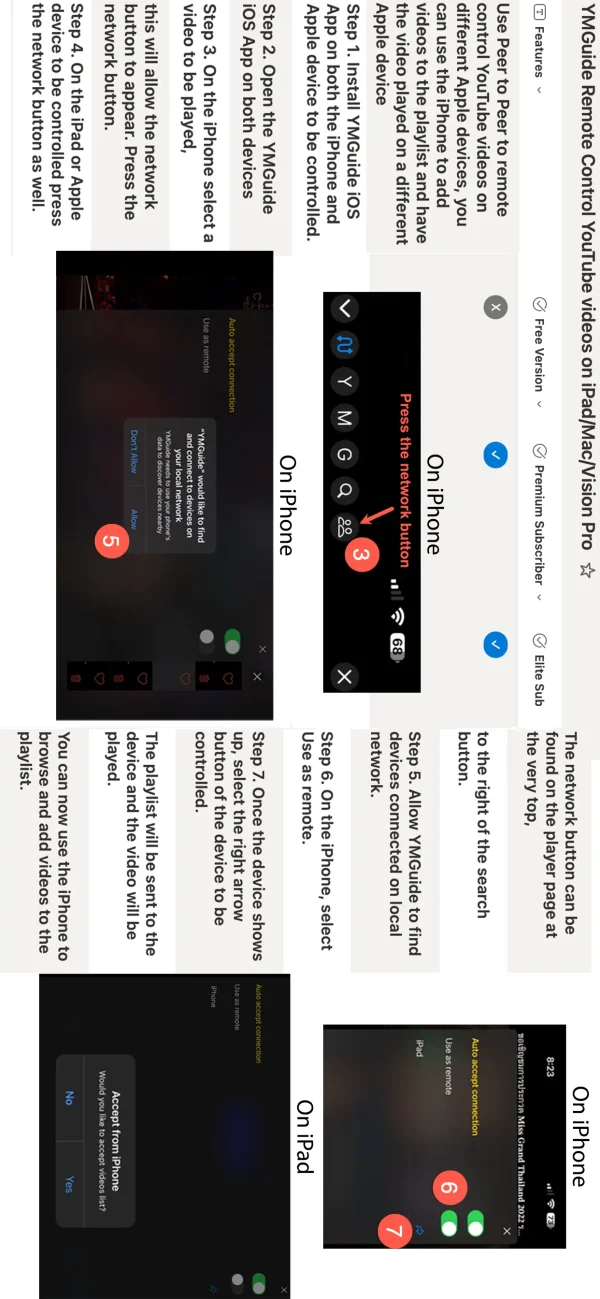
Remote control video playback(Remote Play) on iPad/Mac/Vision Pro with your iPhone, the YMGuide app controls the other YMGuide app on another Apple device.
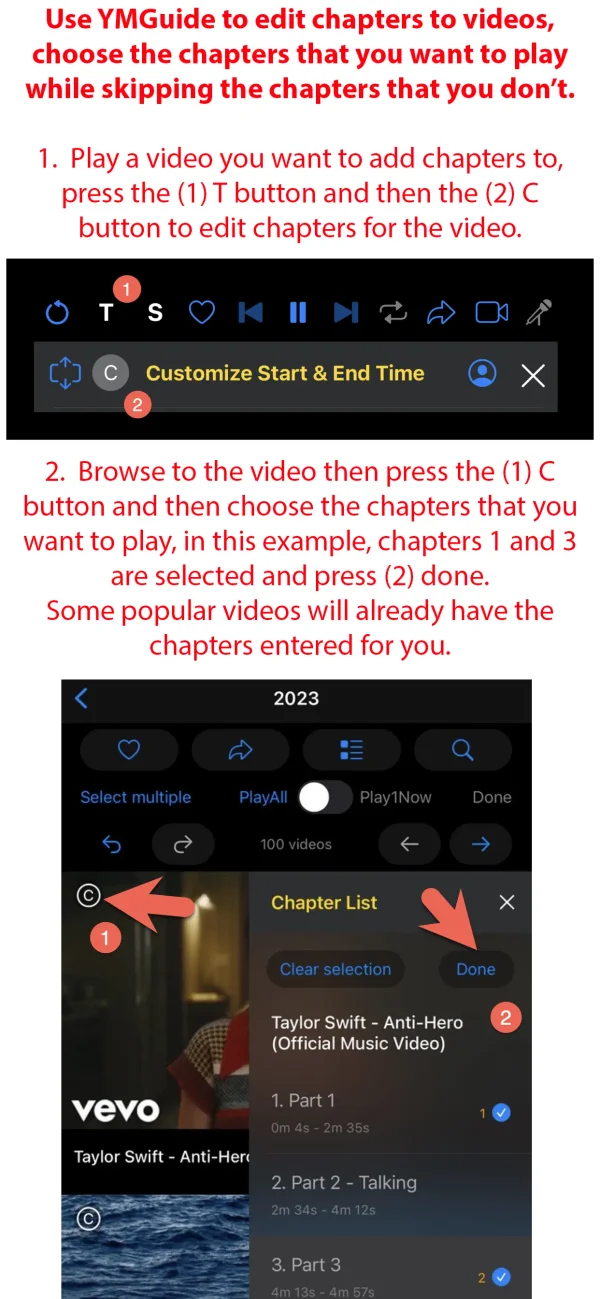
Edit chapters* and allows you to play directly to the chapters in the order you want and skip the chapters you don't want to watch.
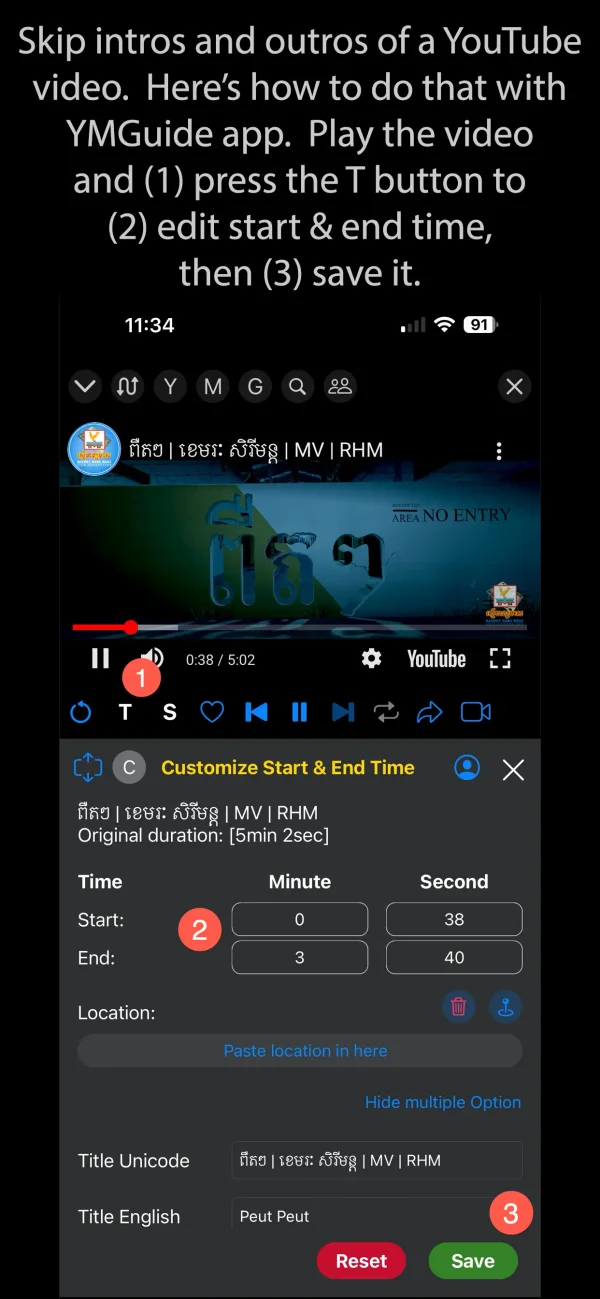
Have you ever wanted to automatically skip intros and outros of YouTube videos?
Edit the start and end times of each video* you watch and save it so that you only watch the parts that you want, using our T button.
Record your karaoke singing sessions.*
Listen to the original song, so you can learn how to sing it, then switch to the karaoke version of the video instantaneously at the press of a microphone button. Switch from one video to a similarly linked video that you customize.
Located at the top of our Player Page:
● Y button opens video in YouTube page
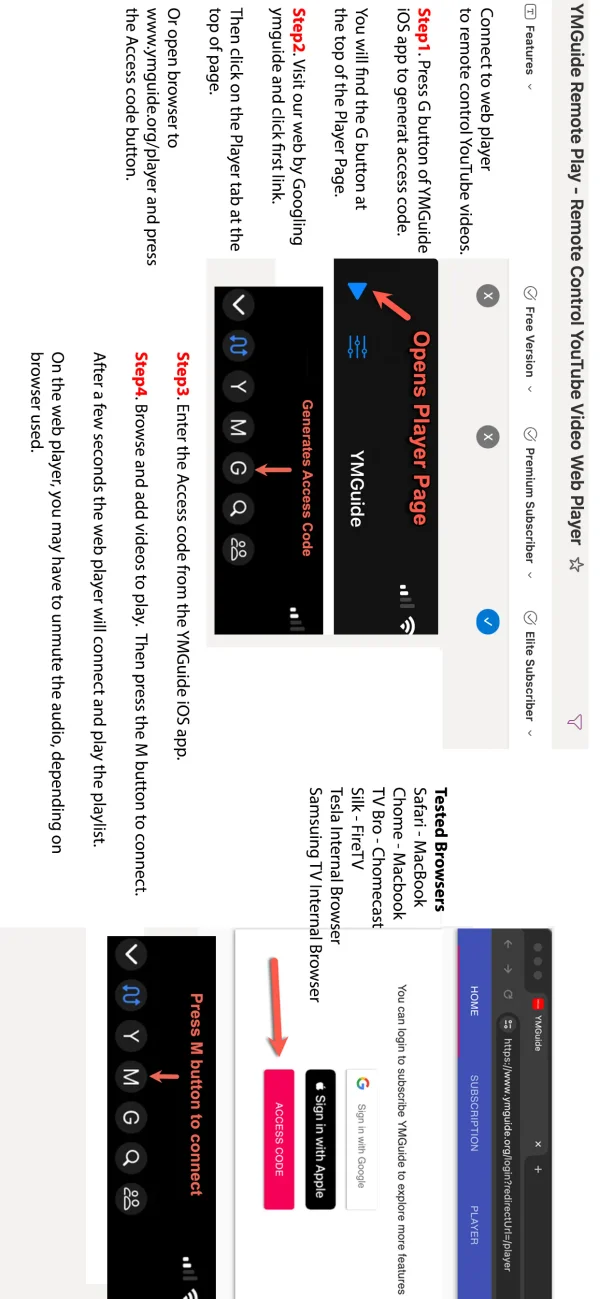
● M button for connecting to Remote Player(iPhone YMGuide app connects to web player)**
● G button to generate access code for our web player(password less)
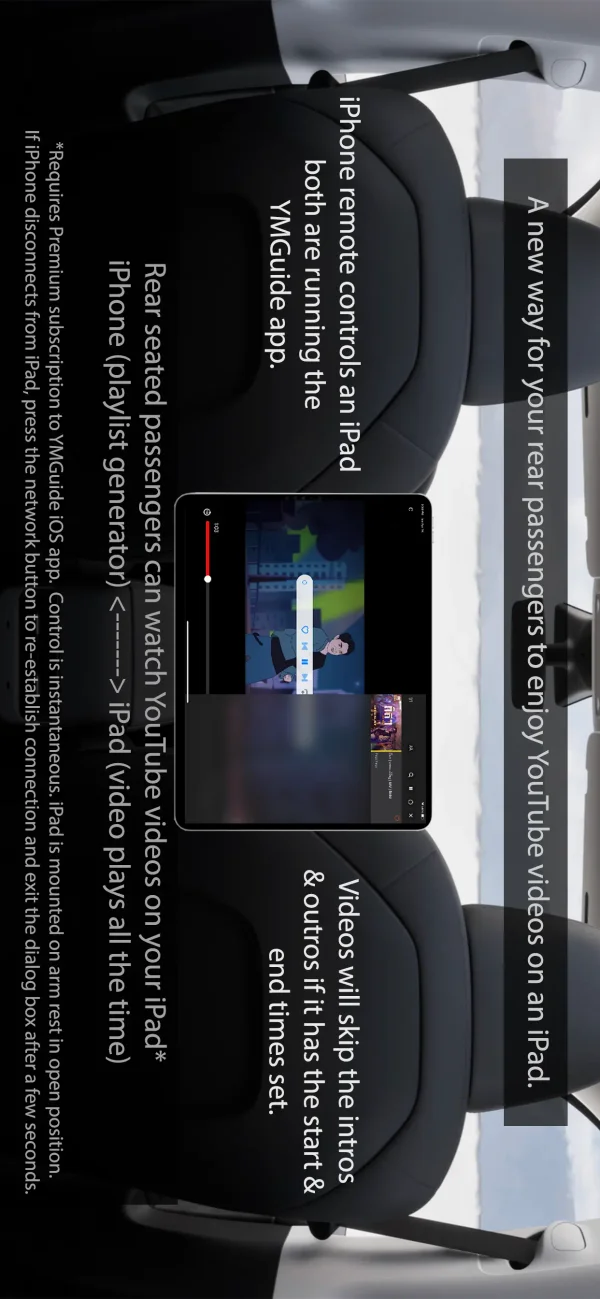
● Network button(Peer 2 Peer) - allows using iPhone(YMGuide app) as remote control of an iPad(running YMGuide app)*
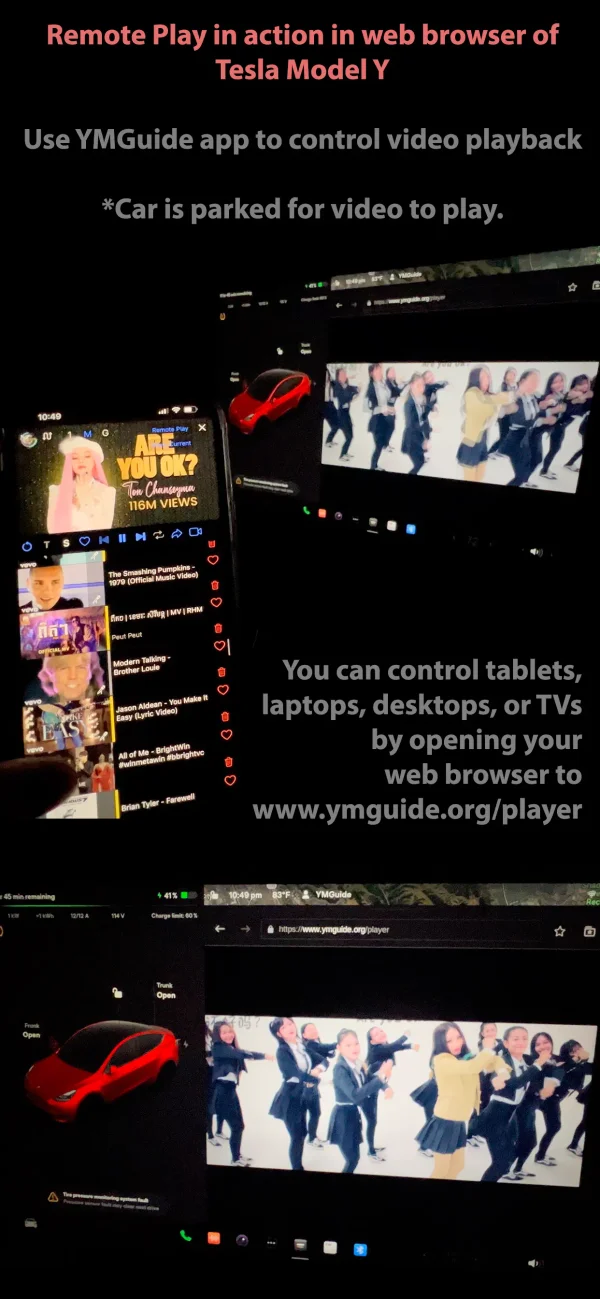
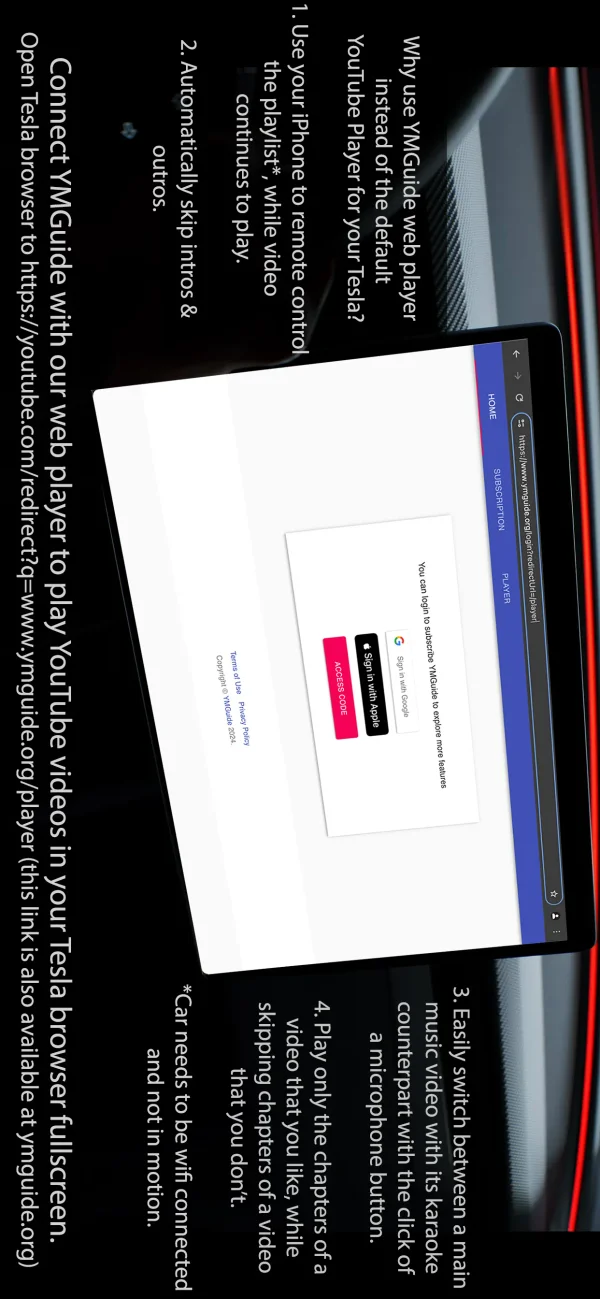
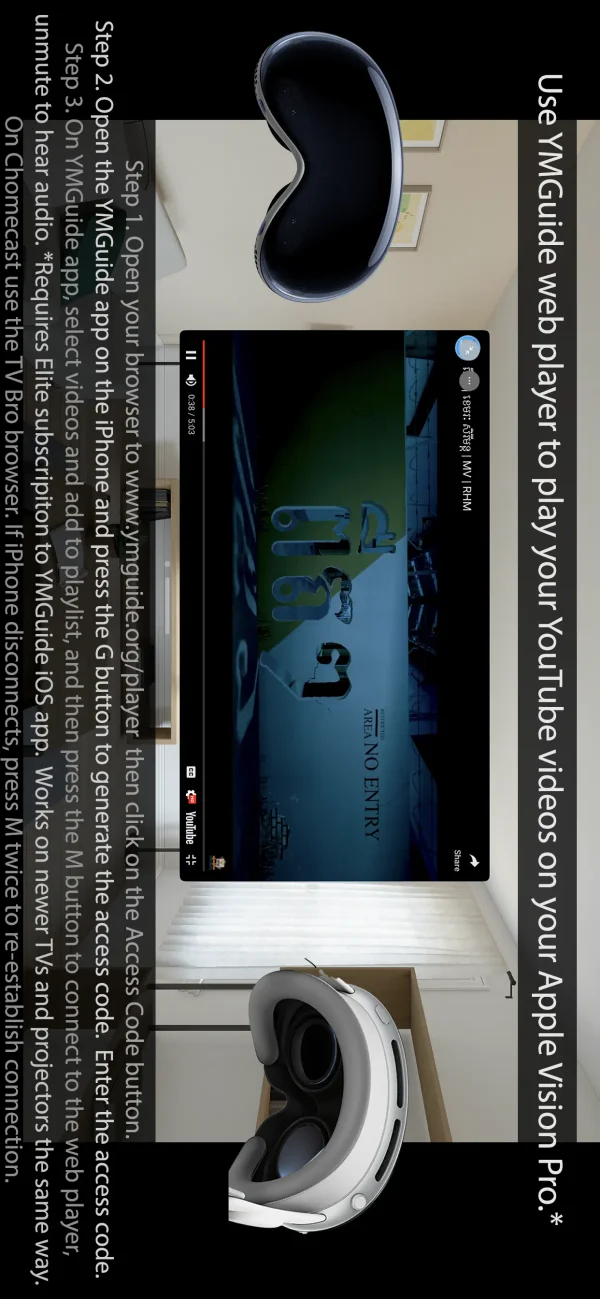
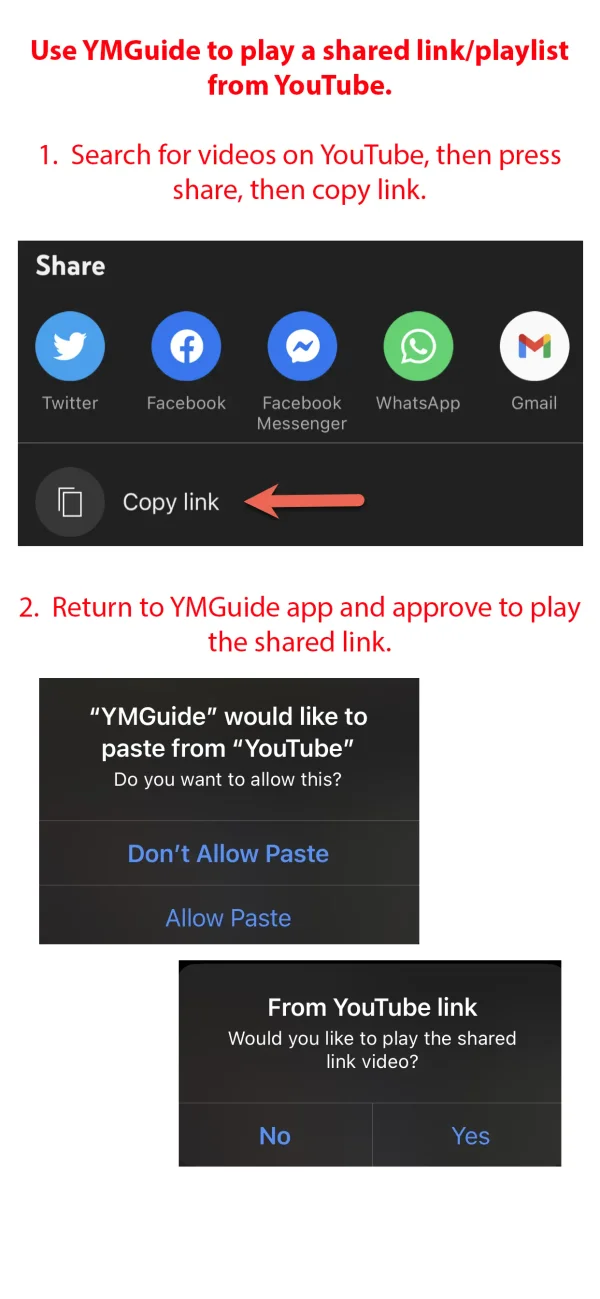
Remote Play** feature allows you to use your phone as a remote control for YouTube videos playing on your TV, Tesla screen, or Apple Vision Pro.
Steps to connect YMGuide app to external device(web enabled TV/Laptop, on Chromecast use TV Bro browser app, on FireTV use Silk browser)
Step 1. Visit our page at https://www.ymguide.org/player (if using iPad/Mac/Vision Pro/Tesla)
Step 2. Login using your login or by access code. Get access code by pressing G button at the top of Player page in our mobile app.
Step 3. On mobile device, press M button(located next to G button), after adding some videos, to connect app to web player.
Visit our X page (formerly Twitter) for "how to" use our app: https://www.twitter.com/YMGuideApp
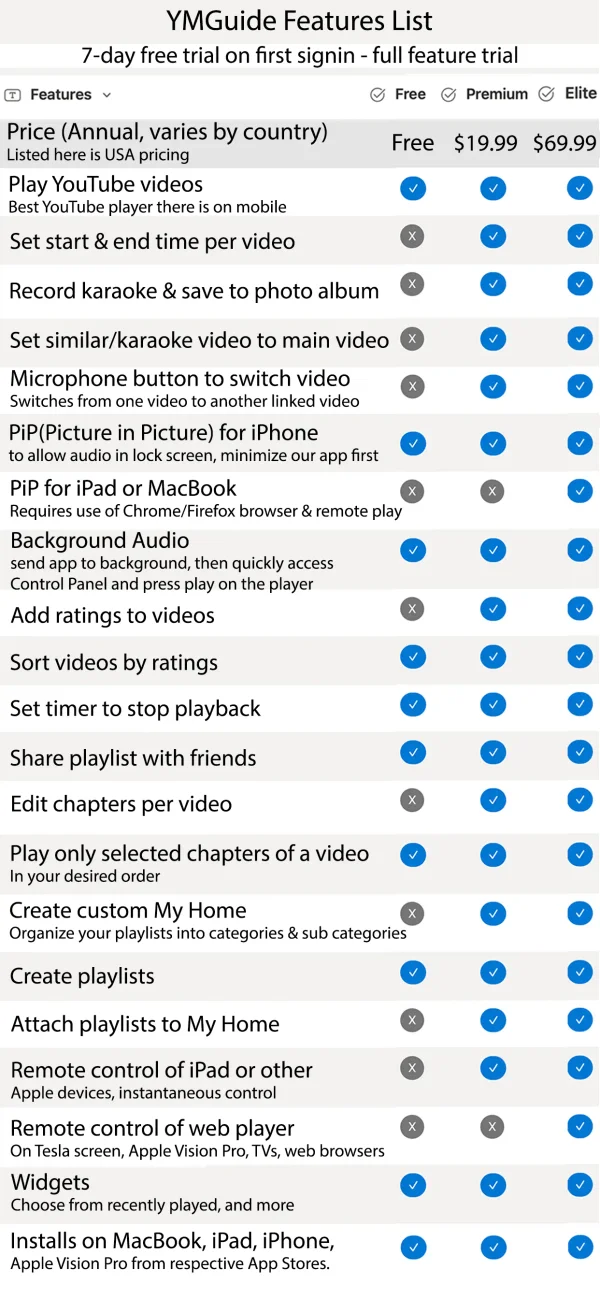
Picture-in-Picture is available on iPhone, minimize our mobile app to allow background audio to play in the lock screen. Elite subscribers can use remote control mode on iPad/MacBook to have PiP capability, users have to open browser to https://www.ymguide.org/player where our mobile app sends the playlist to the iPad browser which can go into PiP.
New with My Home, organize your favorite videos into playlists and place them in custom categories and subcategories so that you can quickly go back to them. We provide YMGuide Home, our own example playlists that update daily that we curated for users and place them in our created categories and sub categories.
New widgets, allows you to select recently played, country, playlist, playlist grouping, and category to open to.
*Requires Premium subscription
**Requires Elite subscription -- 7 day free trial from first login.
Additional Subscription information
● Subscription automatically renews unless auto-renew is turned off at least 24-hours before the end of the current period.
● Account will be charged for renewal in accordance with your plan, within 24-hours prior to the end of the current period.
● Subscriptions may be managed by the user and auto-renewal may be turned off by going to the user's Account Settings after purchase.
● Any unused portion of a free trial period, if offered, will be forfeited when the user purchases a subscription to that publication, where applicable.
Legal:
Terms of Use: https://www.ymguide.org/term_of_use
Privacy Policy: https://www.ymguide.org/privacy_policy
All the content is provided by YouTube services, please follow these:
https://www.youtube.com/t/terms
https://www.youtube.com/yt/copyright/
https://www.youtube.com/yt/policyandsafety/
Support:
Twitter/X: @YMGuideApp
Novedades
Versión 4.2.2 · 18/11/2025
Bug fixes and performance improvements
Privacidad de la aplicación
Lo que Sothear Ly declara en App Store sobre cómo esta aplicación gestiona los datos.
-
Datos usados para rastrearte
Pueden usarse para rastrearte en aplicaciones y sitios web propiedad de otras empresas.
- Compras
- Ubicación
- Información de contacto
- Contenido del usuario
- Historial de búsqueda
- Historial de navegación
- Identificadores
- Datos de uso
- Diagnóstico
- Otros datos
-
Datos vinculados a ti
Pueden recopilarse y vincularse a tu identidad.
- Compras
- Ubicación
- Información de contacto
- Contenido del usuario
- Historial de búsqueda
- Historial de navegación
- Identificadores
- Datos de uso
- Diagnóstico
- Otros datos
-
Datos no vinculados a ti
Pueden recopilarse, pero no se vinculan a tu identidad.
- Contenido del usuario
Las prácticas de privacidad pueden variar, por ejemplo, según las funciones que uses o tu edad.
Información
- Vendedor
- Sothear Ly
- Categoría
- Música
- Versión
- 4.2.2
- Actualizado
- 18/11/2025
- Publicado
- 30/7/2020
- Tamaño
- 59,1 MB
- Requiere
- iOS 13.0 o posterior
- Clasificación por edad
- 17+
- Precio
- Gratis
- Compras en la aplicación
- Sí
- Idiomas
- Inglés, Camboyano
- Copyright
- Copyright © 2025 YMGuide
Quizá también te guste
-
 YouTune MusicMúsica
-
 9Tube Música y VideoMúsica & Vídeo Sin Anuncios
-
 Music TV -Jugador para YouTubeVe tus Canciones
-
 Karaoke Offline: Music PlayerMúsica
-
 myBeat: Video y MúsicaSin anuncios, en segundo plano
-
 PlengMúsica
-
 VideoCopy: Video Editor, PlayMúsica
-
 Any MP3 Converter -Extract MP3Convert Any Video to MP3
-
 Online Música y Video PlayerTransmisión música ilimitada
-
 KaraFun: Karaoke, Battle, QuizCanta, juega y disfruta