
YMGuide
Organize & Play YouTube Videos
Được thiết kế cho iPhone, iPad, iPod touch
Miễn phí · Mua hàng trong ứng dụng
- Độ tuổi17+
- Danh mụcNhạc
- Nhà phát triểnSothear Ly
- Ngôn ngữTiếng Anh+ 1 ngôn ngữ khác
- Kích thước59,1 MB
Liên kết đến trang App Store chính thức
Download.org không lưu trữ tệp nào của YMGuide. Nút này mở trang ứng dụng trên App Store, nơi Sothear Ly phát hành ứng dụng. Trang được kiểm tra lần cuối: 16/11/2026.
Ảnh chụp màn hình
Giới thiệu
Nhà phát triển chưa cung cấp nội dung này bằng ngôn ngữ của bạn.
YMGuide app for iOS, play, organize, and enjoy YouTube videos. You can trim the YouTube video stream to your liking as it streams to your device..
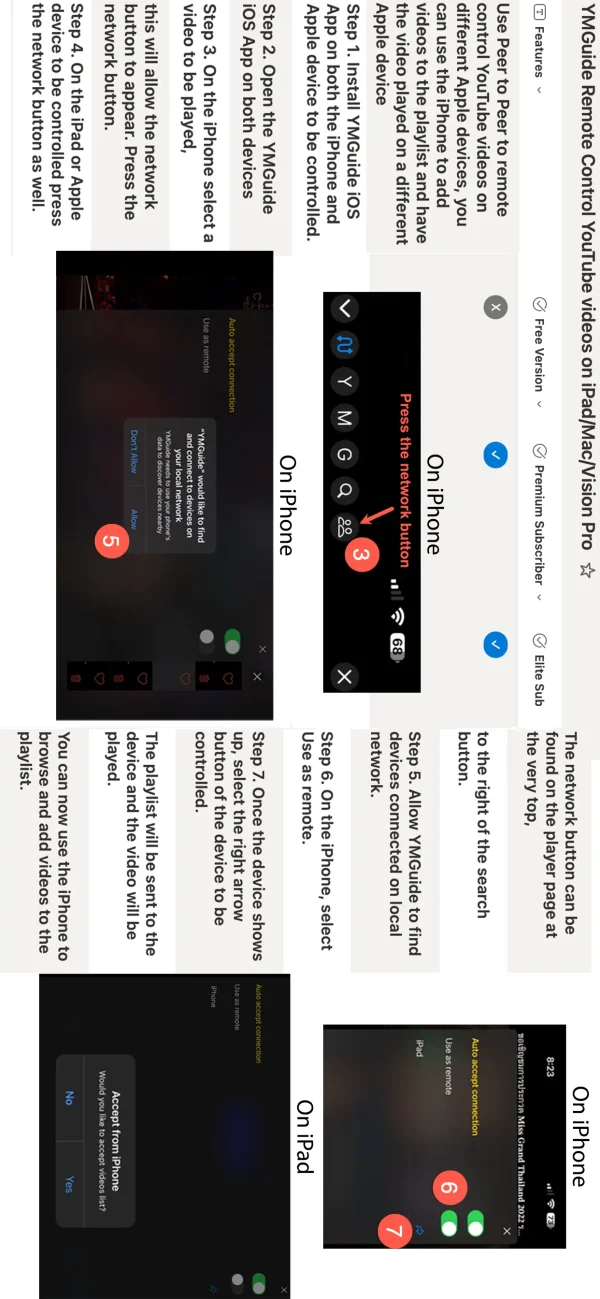
Remote control video playback(Remote Play) on iPad/Mac/Vision Pro with your iPhone, the YMGuide app controls the other YMGuide app on another Apple device.
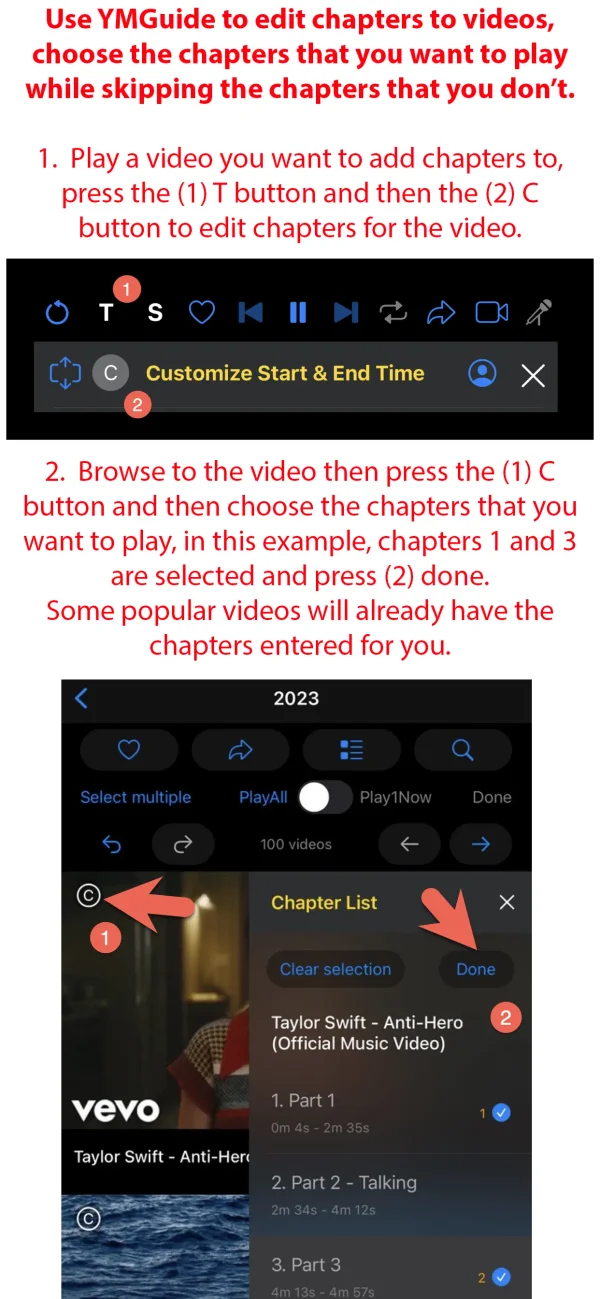
Edit chapters* and allows you to play directly to the chapters in the order you want and skip the chapters you don't want to watch.
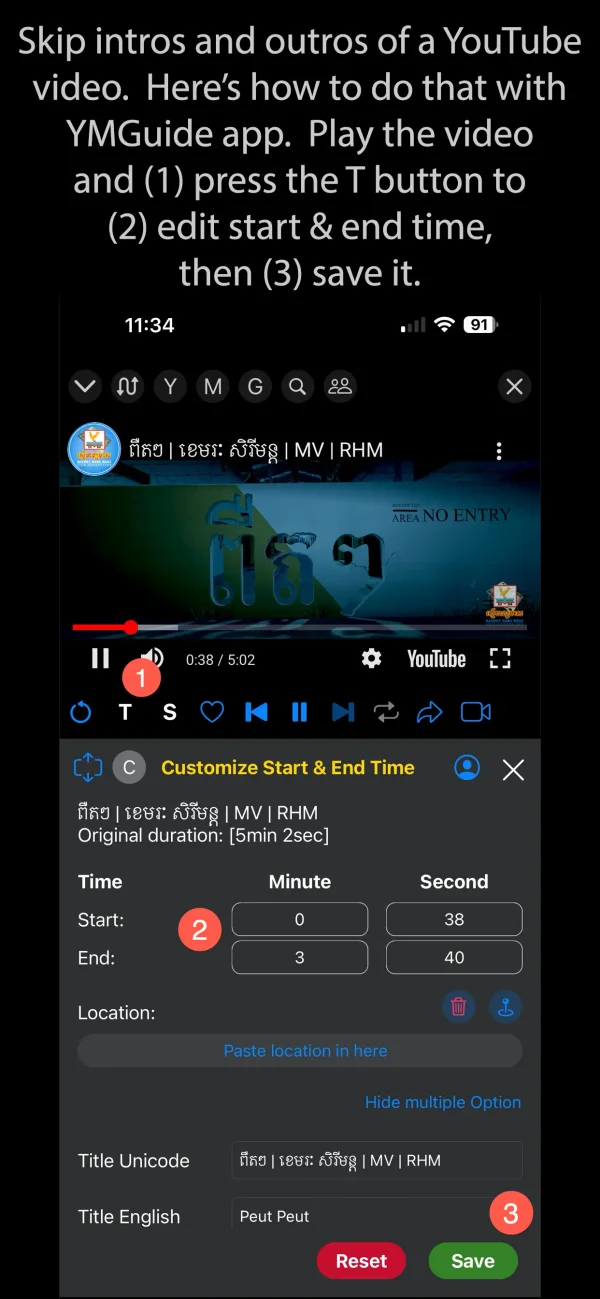
Have you ever wanted to automatically skip intros and outros of YouTube videos?
Edit the start and end times of each video* you watch and save it so that you only watch the parts that you want, using our T button.
Record your karaoke singing sessions.*
Listen to the original song, so you can learn how to sing it, then switch to the karaoke version of the video instantaneously at the press of a microphone button. Switch from one video to a similarly linked video that you customize.
Located at the top of our Player Page:
● Y button opens video in YouTube page
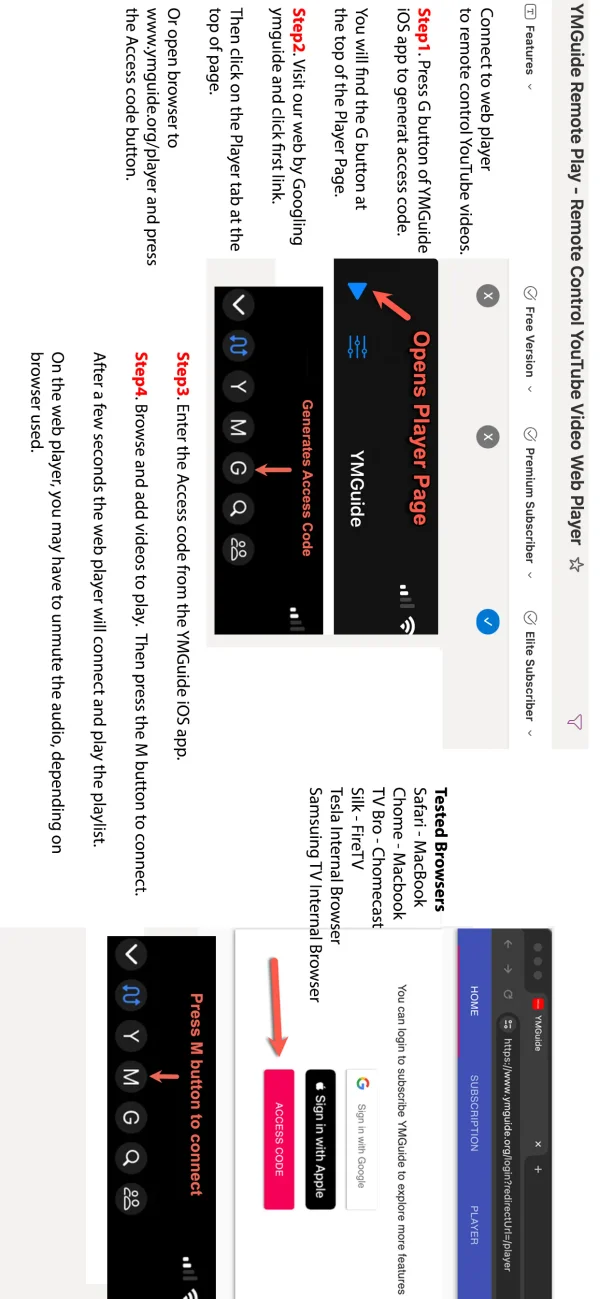
● M button for connecting to Remote Player(iPhone YMGuide app connects to web player)**
● G button to generate access code for our web player(password less)
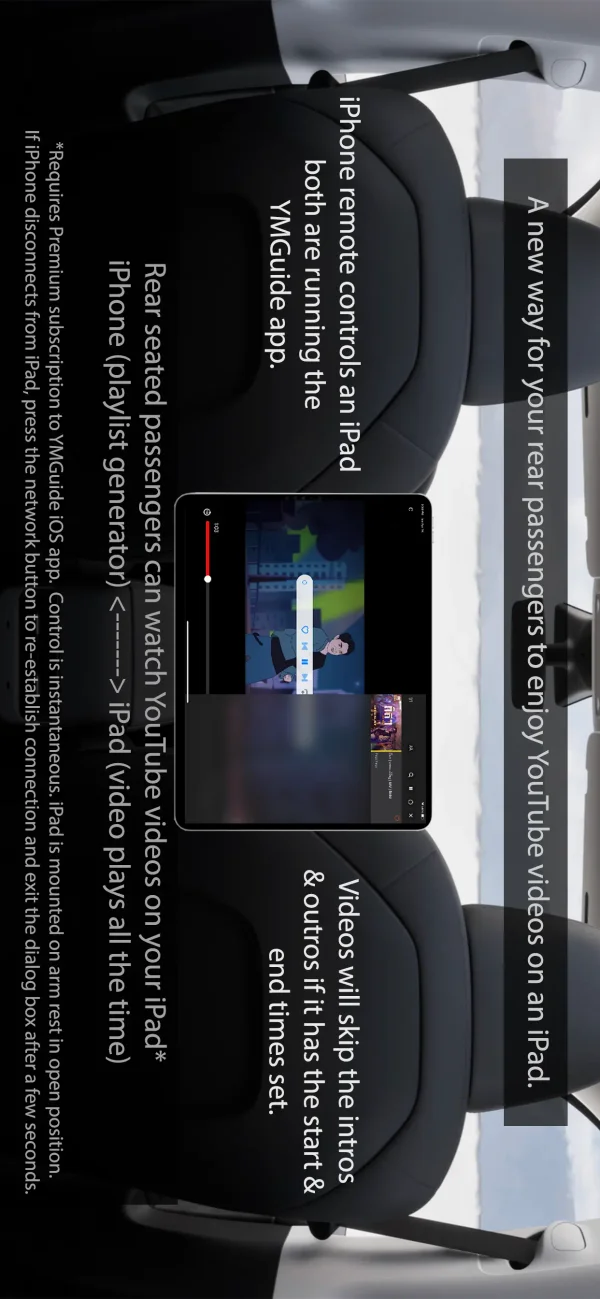
● Network button(Peer 2 Peer) - allows using iPhone(YMGuide app) as remote control of an iPad(running YMGuide app)*
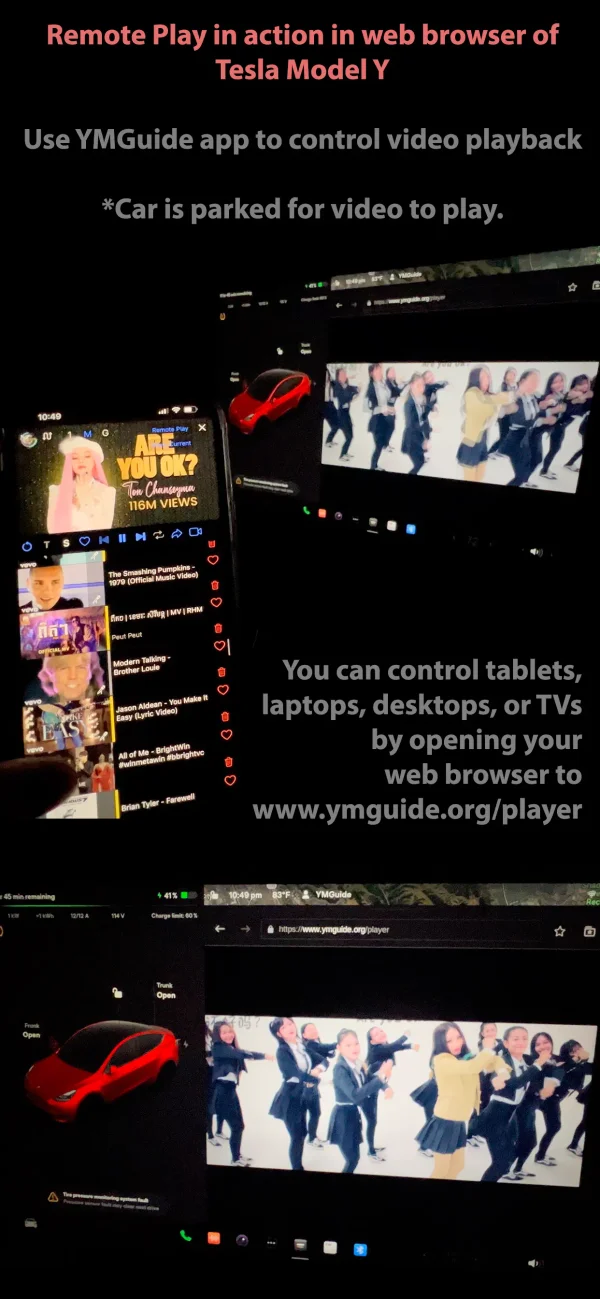
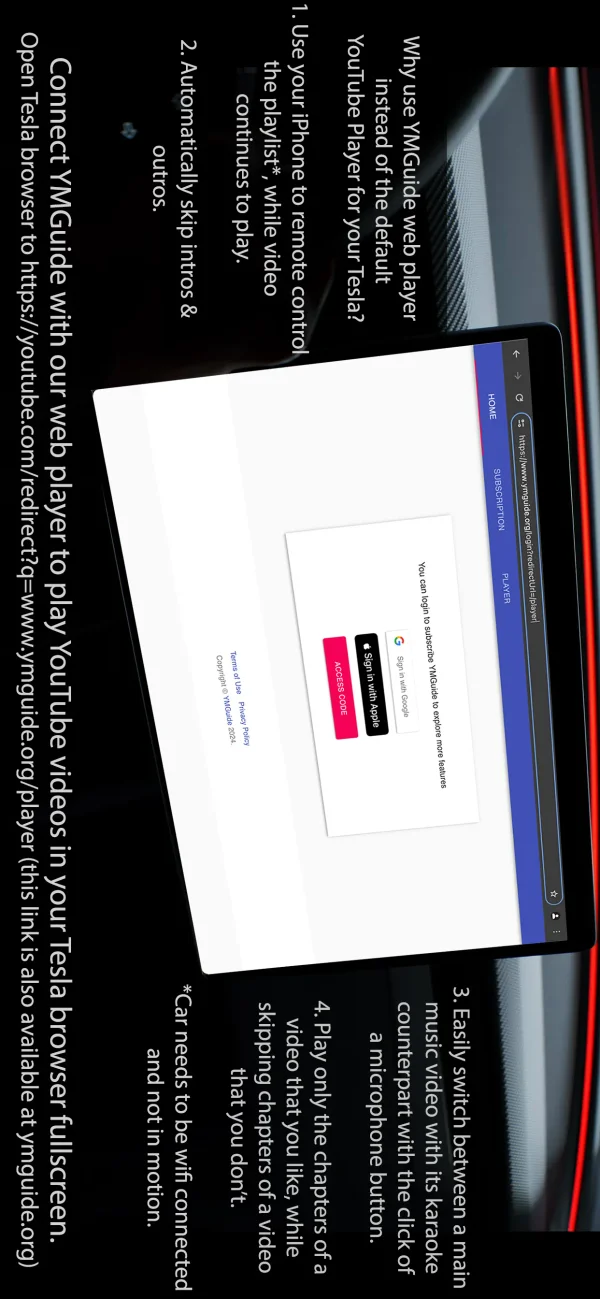
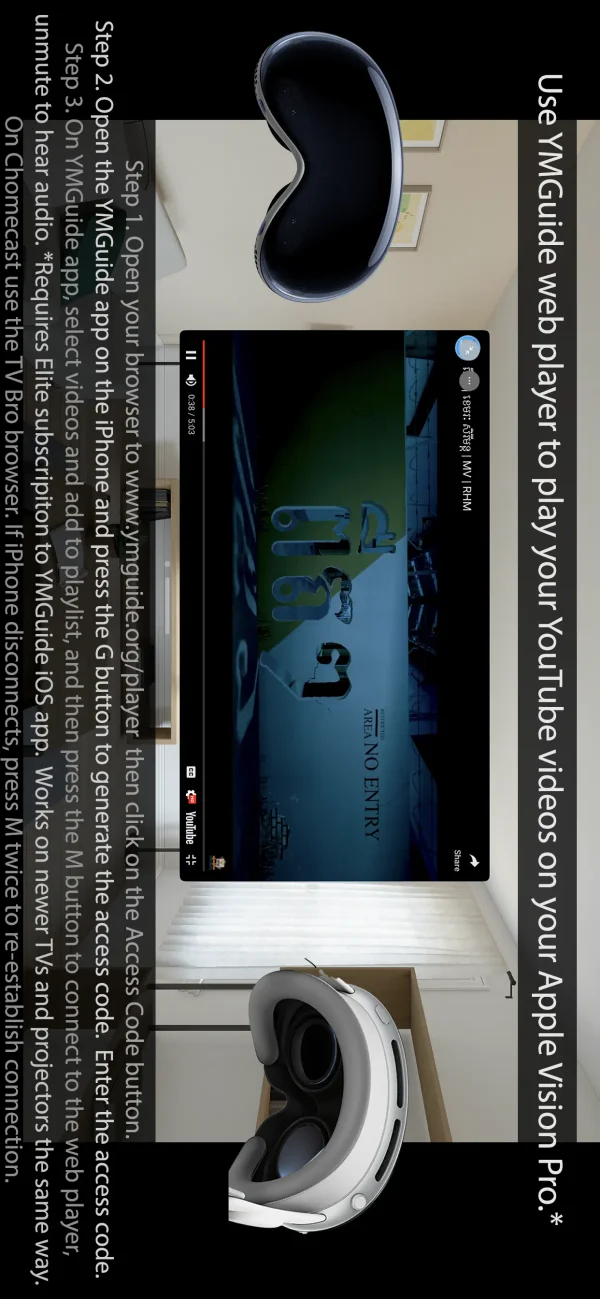
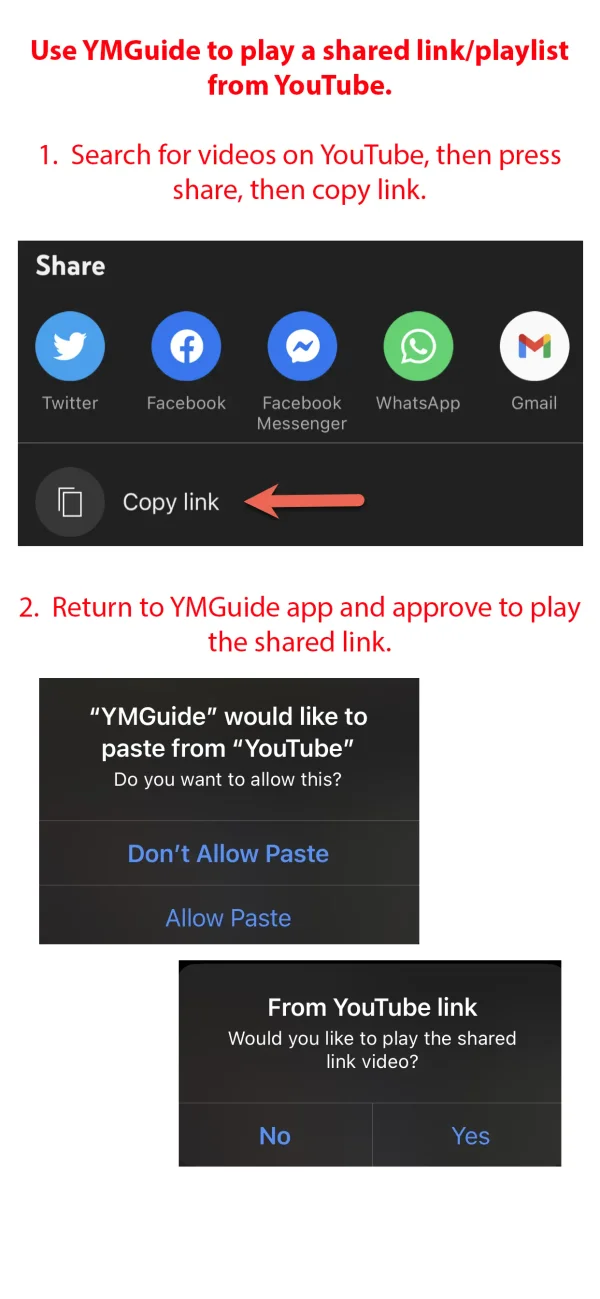
Remote Play** feature allows you to use your phone as a remote control for YouTube videos playing on your TV, Tesla screen, or Apple Vision Pro.
Steps to connect YMGuide app to external device(web enabled TV/Laptop, on Chromecast use TV Bro browser app, on FireTV use Silk browser)
Step 1. Visit our page at https://www.ymguide.org/player (if using iPad/Mac/Vision Pro/Tesla)
Step 2. Login using your login or by access code. Get access code by pressing G button at the top of Player page in our mobile app.
Step 3. On mobile device, press M button(located next to G button), after adding some videos, to connect app to web player.
Visit our X page (formerly Twitter) for "how to" use our app: https://www.twitter.com/YMGuideApp
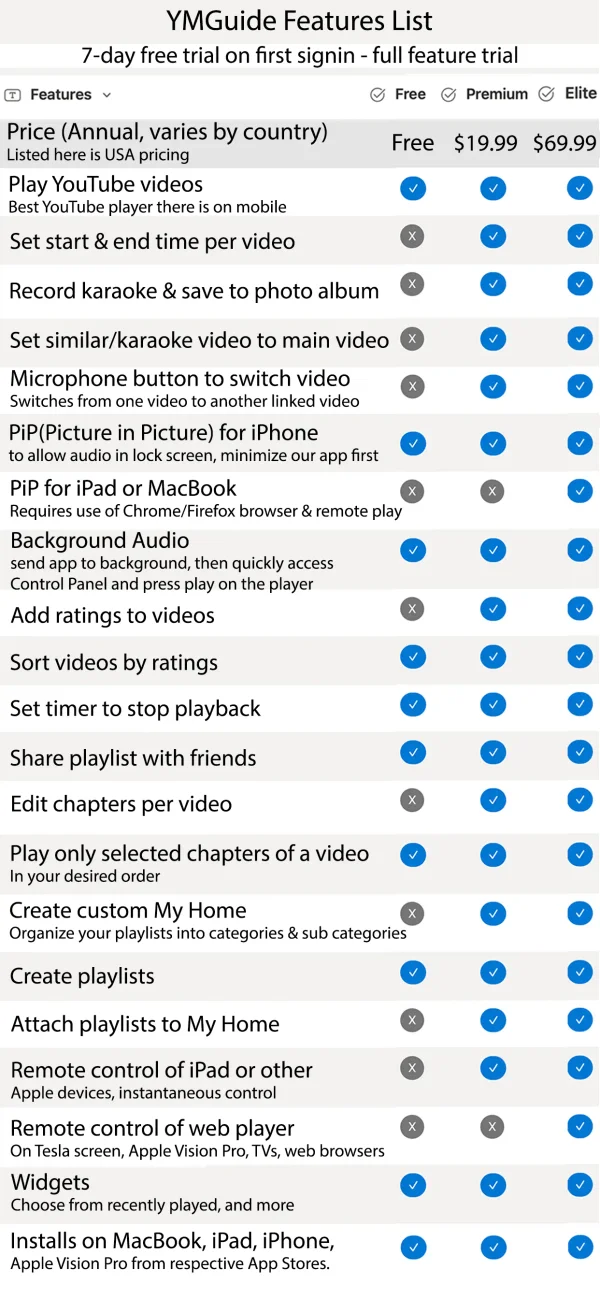
Picture-in-Picture is available on iPhone, minimize our mobile app to allow background audio to play in the lock screen. Elite subscribers can use remote control mode on iPad/MacBook to have PiP capability, users have to open browser to https://www.ymguide.org/player where our mobile app sends the playlist to the iPad browser which can go into PiP.
New with My Home, organize your favorite videos into playlists and place them in custom categories and subcategories so that you can quickly go back to them. We provide YMGuide Home, our own example playlists that update daily that we curated for users and place them in our created categories and sub categories.
New widgets, allows you to select recently played, country, playlist, playlist grouping, and category to open to.
*Requires Premium subscription
**Requires Elite subscription -- 7 day free trial from first login.
Additional Subscription information
● Subscription automatically renews unless auto-renew is turned off at least 24-hours before the end of the current period.
● Account will be charged for renewal in accordance with your plan, within 24-hours prior to the end of the current period.
● Subscriptions may be managed by the user and auto-renewal may be turned off by going to the user's Account Settings after purchase.
● Any unused portion of a free trial period, if offered, will be forfeited when the user purchases a subscription to that publication, where applicable.
Legal:
Terms of Use: https://www.ymguide.org/term_of_use
Privacy Policy: https://www.ymguide.org/privacy_policy
All the content is provided by YouTube services, please follow these:
https://www.youtube.com/t/terms
https://www.youtube.com/yt/copyright/
https://www.youtube.com/yt/policyandsafety/
Support:
Twitter/X: @YMGuideApp
Có gì mới
Phiên bản 4.2.2 · 18/11/2025
Bug fixes and performance improvements
Quyền riêng tư của ứng dụng
Những gì Sothear Ly khai báo trên App Store về cách ứng dụng này xử lý dữ liệu.
-
Dữ liệu được sử dụng để theo dõi bạn
Có thể được sử dụng để theo dõi bạn trên các ứng dụng và trang web do công ty khác sở hữu.
- Mục mua
- Vị trí
- Thông tin liên hệ
- Nội dung của người dùng
- Lịch sử tìm kiếm
- Lịch sử duyệt web
- Mã định danh
- Dữ liệu sử dụng
- Chẩn đoán
- Dữ liệu khác
-
Dữ liệu liên kết với bạn
Có thể được thu thập và liên kết với danh tính của bạn.
- Mục mua
- Vị trí
- Thông tin liên hệ
- Nội dung của người dùng
- Lịch sử tìm kiếm
- Lịch sử duyệt web
- Mã định danh
- Dữ liệu sử dụng
- Chẩn đoán
- Dữ liệu khác
-
Dữ liệu không liên kết với bạn
Có thể được thu thập nhưng không liên kết với danh tính của bạn.
- Nội dung của người dùng
Phương thức đảm bảo quyền riêng tư có thể khác nhau, chẳng hạn như tuỳ theo các tính năng bạn sử dụng hoặc độ tuổi của bạn.
Thông tin
- Người bán
- Sothear Ly
- Danh mục
- Nhạc
- Phiên bản
- 4.2.2
- Cập nhật
- 18/11/2025
- Phát hành
- 30/07/2020
- Kích thước
- 59,1 MB
- Yêu cầu
- iOS 13.0 trở lên
- Độ tuổi
- 17+
- Giá
- Miễn phí
- Mua hàng trong ứng dụng
- Có
- Ngôn ngữ
- Tiếng Anh, Cambodian
- Bản quyền
- Copyright © 2025 YMGuide
Có thể bạn cũng thích
-
 YouTune MusicNhạc
-
 9Tube: Âm nhạc và VideoXem video không QC và nghe nền
-
 Music TV: Song & Video PlayerNhạc
-
 Karaoke Offline: Music PlayerNhạc
-
 myBeat: video & music playerKhông quảng cáo, nhạc phát nền
-
 PlengNhạc
-
 VideoCopy: Video Editor, PlayNhạc
-
 Any MP3 Converter -Extract MP3Nhạc
-
 Online Music & Video PlayerPhát nhạc không giới hạn
-
 KaraFun: Karaoke, Battle, QuizNhạc