Flap Segment Clock Watch Face
Tempus Arcanum- PEGI 3Classification d’âge
- PersonnalisationCatégorie
- 20/10/2026Mis à jour
- 1,09 €Prix
Renvoie vers la fiche Google Play officielle de com.tempusarcanum.flapseg. Dernière vérification le 26/11/2026.
À propos de cette application
Traduction automatique par Google. Langue d’origine : Anglais (États-Unis).
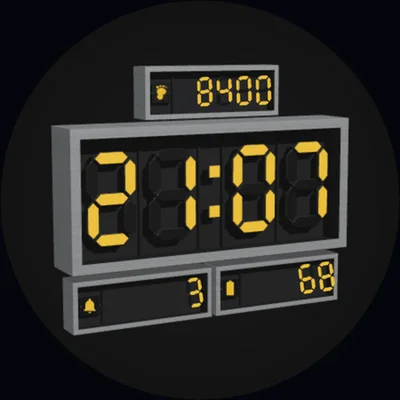
Horloge à segments à rabats 3D animée : chaque segment est une plaque qui se retourne.
Un cadran de montre numérique animé en 3D pour Wear OS : un affichage mécanique à segments, où chaque segment de chaque chiffre est une plaque distincte sur son propre axe, peinte en clair d'un côté et en noir de l'autre. Avant l'avènement des LED, les stations-service et les tableaux d'affichage utilisaient ce système. Ici, le boîtier en métal brossé est orienté vers l'utilisateur, révélant l'épaisseur des plaques, leurs axes et leurs ombres sur le fond noir.
CARACTÉRISTIQUES PRINCIPALES
• À chaque nouvelle minute, seules les plaques concernées se retournent : on les aperçoit de profil à mi-rotation, un reflet parcourant le bord métallique, avant que le nouveau chiffre ne s'affiche.
• Touchez le cadran et chaque plaque de l'heure effectue une rotation en vague, de gauche à droite, jusqu'à un cycle complet de 88:88 et retour. À l'heure pile, la rotation est continue.
• Le nombre de pas, les notifications non lues et le niveau de batterie s'affichent sur trois petits écrans composés des mêmes plaques, alignés à droite comme un compteur, chacun avec son icône sur sa propre plaque.
• Une autre complication d'application affiche également son icône et son affichage en segments. • Rien ne bouge à l'arrêt : les cadrans tournent uniquement lors du changement de minute, d'une simple pression et à chaque heure.
PERSONNALISEZ-LE
• Couleurs : jaune sur noir (le cadran classique), blanc nacré (comme un tableau d'affichage d'aéroport) ou orange fluo sur fond anthracite dans un boîtier bronze.
• Affichage de l'heure : 12 ou 24 heures, selon le réglage de votre montre.
• Trois complications : nombre de pas, notifications non lues et niveau de batterie ; choisissez d'autres données pour chacune d'elles dans l'éditeur de cadrans.
AFFICHAGE PERMANENT
L'affichage permanent ne montre que les contours des cadrans lumineux, en sourdine sur fond noir.
COMPATIBILITÉ
Fonctionne avec Wear OS 6 et versions ultérieures, comme les modèles Galaxy Watch mis à jour vers One UI 8 Watch et Pixel Watch. Conçu au format cadran : aucune autorisation requise, aucune donnée collectée.
INSTALLATION
1. Installez-le depuis Google Play sur votre montre ou appuyez sur « Installer sur ma montre » dans l'application mobile. 2. Appuyez longuement sur le cadran de votre montre, faites glisser votre doigt jusqu'à l'écran rabattable et appuyez dessus. Pour le personnaliser, appuyez longuement dessus, puis appuyez sur Personnaliser.
Plus de cadrans : ce cadran fait partie de Tempus Arcanum, une application proposant plus de 200 cadrans animés pour Wear OS, téléchargeable gratuitement. Recherchez « Tempus Arcanum » sur Google Play, parcourez la collection complète sur votre téléphone et transférez le cadran de votre choix sur votre montre en un seul clic.
Afficher le texte d’origine
A 3D animated digital watch face for Wear OS: a mechanical flap segment sign, where every stroke of every digit is a separate plate on its own axle, painted bright on one side and black on the other. Before LEDs, gas stations and scoreboards showed their numbers this way. Here the brushed-metal housing is turned toward you, so you see the plates' thickness, their axles and their shadows on the black backplate.
KEY FEATURES
• On each new minute only the plates that change turn over: you see them edge-on mid-turn, a glint running along the metal edge, before the new digit lands.
• Tap the dial and every plate of the time turns in a wave, left to right to a full 88:88 and back. On the hour the wave runs by itself.
• Steps, unread notifications and battery show on three small displays made of the same plates, right-aligned like a counter, each with its icon on a plate of its own.
• Another app's complication shows its icon and its reading in flap segments too.
• Nothing moves at rest: the plates turn only when the minute changes, on a tap and on the hour.
MAKE IT YOURS
• Colors: yellow on black (the classic sign), pearl white (like an airport board) or fluorescent orange on charcoal in a bronze housing.
• Time: 12- or 24-hour, as your watch is set.
• Three complications: steps, unread notifications and battery; choose other data for any of them in the watch face editor.
ALWAYS-ON DISPLAY
Always-on shows only thin outlines of the lit plates, dim on black.
COMPATIBILITY
Works on Wear OS 6 or later, such as Galaxy Watch models updated to One UI 8 Watch and Pixel Watch. Made in Watch Face Format: no permissions, no data collected.
HOW TO INSTALL
1. Install it from Google Play on your watch, or tap Install on my watch in the phone app.
2. Touch and hold your watch face, swipe to The Flap Display and tap it. To customize, touch and hold it, then tap Customize.
More watch faces: this face is part of Tempus Arcanum, an app with 200+ animated watch faces for Wear OS, free to download. Search for "Tempus Arcanum" on Google Play, browse the whole collection on your phone and send any face to your watch with one tap.
Sécurité des données
Ce que Tempus Arcanum déclare sur Google Play au sujet des données que cette application collecte et partage.
- Aucune donnée partagée avec des tiersEn savoir plus sur la manière dont les développeurs déclarent le partage
- Aucune donnée collectéeEn savoir plus sur la manière dont les développeurs déclarent la collecte
Nouveautés
20/10/2026
Refreshed with the new Tempus Arcanum icon. Small fixes and improvements.
Coordonnées du développeur
- Site webtempusarcanum.com
- E-mailsupport@tempusarcanum.com
- Politique de confidentialitételegra.ph
- Adresseвулиця Будівельників, будинок 7 30 Помічна Кіровоградська область Ukraine 27030
Informations
- Proposée par
- Tempus Arcanum
- Catégorie
- Personnalisation
- Mis à jour
- 20/10/2026
- Publié
- 15/10/2026
- Classification d’âge
- PEGI 3
- Prix
- 1,09 €
- Nom du package
- com.tempusarcanum.flapseg