Flap Segment Clock Watch Face
Tempus Arcanum- 3 歳以上対象年齢
- カスタマイズカテゴリ
- 2026/10/20更新日
- ¥170価格
com.tempusarcanum.flapsegのGoogle Play公式ページにリンクしています。最終確認:2026/11/26。
このアプリについて
Googleによる英語 (アメリカ合衆国)からの自動翻訳です。
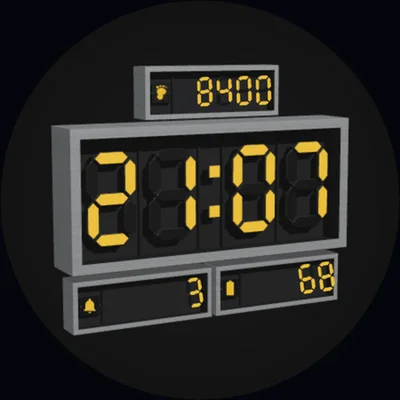
アニメーション付き3Dフラップ式時計:各セグメントは回転するプレートです
Wear OS向け3Dアニメーションデジタルウォッチフェイス:機械式フラップセグメントサインを採用。各数字のストロークは、それぞれ独立した軸に取り付けられたプレートで構成され、片面は明るく、もう片面は黒く塗装されています。LEDが登場する以前は、ガソリンスタンドやスコアボードなどで数字がこのように表示されていました。つや消し金属製の筐体が手前に向けられているため、プレートの厚み、軸、そして黒い裏板に映る影を見ることができます。
主な機能
• 毎分、数字が変わるプレートだけが回転します。回転途中のプレートが横から見え、金属の縁に沿って光が走る様子が確認できます。そして、新しい数字が着地します。
• 文字盤をタップすると、時刻を示すすべてのプレートが波のように左から右へ88:88まで回転し、再び左に戻ります。正時には波は単独で回転します。
• 歩数、未読通知、バッテリー残量は、同じプレートで構成された3つの小さなディスプレイに表示されます。カウンターのように右端に並び、それぞれにアイコンが配置されています。
• 他のアプリのコンプリケーションも、アイコンと表示内容をフラップセグメントで表示します。
• 静止状態では何も動きません。プレートは分が変わる時、タップした時、そして毎正時にのみ回転します。
カスタマイズ
• カラー:イエロー(ブラックにクラシックな配色)、パールホワイト(空港の案内板のような配色)、ブロンズケースに蛍光オレンジ(チャコールグレーに配色)。
• 時刻表示:時計の設定に応じて12時間表示または24時間表示。
• 3つのコンプリケーション:歩数、未読通知、バッテリー残量。ウォッチフェイスエディターで、それぞれのコンプリケーションに別のデータを表示することも可能です。
常時表示
常時表示では、点灯したプレートの細い輪郭線が黒地に薄暗く表示されます。
互換性
Wear OS 6以降(One UI 8にアップデートされたGalaxy WatchやPixel Watchなど)に対応。ウォッチフェイス形式:権限の取得やデータ収集は一切行いません。
インストール方法
1. スマートウォッチのGoogle Playからインストールするか、スマートフォンアプリで「スマートウォッチにインストール」をタップしてください。
2. ウォッチフェイスを長押しし、「フラップディスプレイ」までスワイプしてタップします。カスタマイズするには、長押ししてから「カスタマイズ」をタップしてください。
その他のウォッチフェイス:このウォッチフェイスは、Wear OS向けの200種類以上のアニメーションウォッチフェイスを収録したアプリ「Tempus Arcanum」に含まれています。アプリは無料でダウンロードできます。Google Playで「Tempus Arcanum」を検索し、スマートフォンでコレクション全体を閲覧して、ワンタップでウォッチフェイスを送信してください。
原文を表示
A 3D animated digital watch face for Wear OS: a mechanical flap segment sign, where every stroke of every digit is a separate plate on its own axle, painted bright on one side and black on the other. Before LEDs, gas stations and scoreboards showed their numbers this way. Here the brushed-metal housing is turned toward you, so you see the plates' thickness, their axles and their shadows on the black backplate.
KEY FEATURES
• On each new minute only the plates that change turn over: you see them edge-on mid-turn, a glint running along the metal edge, before the new digit lands.
• Tap the dial and every plate of the time turns in a wave, left to right to a full 88:88 and back. On the hour the wave runs by itself.
• Steps, unread notifications and battery show on three small displays made of the same plates, right-aligned like a counter, each with its icon on a plate of its own.
• Another app's complication shows its icon and its reading in flap segments too.
• Nothing moves at rest: the plates turn only when the minute changes, on a tap and on the hour.
MAKE IT YOURS
• Colors: yellow on black (the classic sign), pearl white (like an airport board) or fluorescent orange on charcoal in a bronze housing.
• Time: 12- or 24-hour, as your watch is set.
• Three complications: steps, unread notifications and battery; choose other data for any of them in the watch face editor.
ALWAYS-ON DISPLAY
Always-on shows only thin outlines of the lit plates, dim on black.
COMPATIBILITY
Works on Wear OS 6 or later, such as Galaxy Watch models updated to One UI 8 Watch and Pixel Watch. Made in Watch Face Format: no permissions, no data collected.
HOW TO INSTALL
1. Install it from Google Play on your watch, or tap Install on my watch in the phone app.
2. Touch and hold your watch face, swipe to The Flap Display and tap it. To customize, touch and hold it, then tap Customize.
More watch faces: this face is part of Tempus Arcanum, an app with 200+ animated watch faces for Wear OS, free to download. Search for "Tempus Arcanum" on Google Play, browse the whole collection on your phone and send any face to your watch with one tap.
データ セーフティ
このアプリが収集・共有するデータについて、Tempus ArcanumがGoogle Playで申告している内容です。
- 第三者と共有されるデータはありません詳しくは、デベロッパーが共有を申告する方法についての説明をご覧ください
- データは収集されません詳しくは、デベロッパーが収集を申告する方法についての説明をご覧ください
新機能
2026/10/20
Refreshed with the new Tempus Arcanum icon. Small fixes and improvements.
開発元の連絡先
- ウェブサイトtempusarcanum.com
- メールsupport@tempusarcanum.com
- プライバシーポリシーtelegra.ph
- 住所вулиця Будівельників, будинок 7 30 Помічна Кіровоградська область Ukraine 27030
情報
- 提供元
- Tempus Arcanum
- カテゴリ
- カスタマイズ
- 更新日
- 2026/10/20
- リリース
- 2026/10/15
- 対象年齢
- 3 歳以上
- 価格
- ¥170
- パッケージ名
- com.tempusarcanum.flapseg