GRBL Nothing Nova
Grubel- PEGI 3Classification d’âge
- PersonnalisationCatégorie
- 07/10/2026Mis à jour
- 1,59 €Prix
Renvoie vers la fiche Google Play officielle de com.grubel.nnova. Dernière vérification le 13/11/2026.
À propos de cette application
Traduction automatique par Google. Langue d’origine : Anglais (États-Unis).
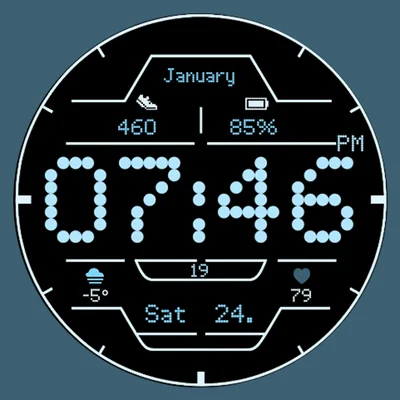
Cadran de montre numérique élégant et audacieux au design moderne
Sublimez votre expérience Wear OS avec un cadran conçu pour allier clarté, style et fonctionnalité. Que vous souhaitiez suivre votre journée ou l'assortir à votre tenue, ce cadran vous offre tout ce dont vous avez besoin directement à votre poignet.
Fonctionnalités clés
- Formats de l'heure : Compatible avec les formats AM/PM et 12 h/24 h.
- Suivi essentiel : Podomètre fixe et informations sur la batterie en temps réel.
- Précision : Affichage des heures et des secondes pour ceux qui comptent chaque instant.
- Date rapide : Restez organisé grâce à un affichage clair de la date.
- Affichage permanent : Optimisé pour une consommation d'énergie réduite tout en gardant vos informations visibles.
- Personnalisation : 2 complications personnalisées pour afficher les données les plus importantes.
- 15 thèmes de couleurs : Changez de style instantanément selon votre humeur ou votre look.
---
⚠️ REMARQUE IMPORTANTE : L'application compagnon sur votre téléphone est un outil d'assistance ; elle n'installe PAS le cadran directement. Veuillez suivre les instructions d'installation ci-dessous pour une configuration optimale.
---
Guide d'installation (Wear OS)
Installer votre nouveau cadran est simple : suivez ces étapes :
Méthode 1 : Depuis l'application Play Store
1. Sélectionnez votre appareil : Dans l'application Play Store, appuyez sur le menu déroulant et sélectionnez votre montre.
2. Patientez quelques minutes le temps que le cadran soit transféré sur votre montre.
3. Activez-le : Appuyez longuement sur votre cadran actuel, faites glisser votre doigt vers la gauche et appuyez sur « AJOUTER UN CADRAN » pour le trouver et le sélectionner.
Méthode 2 : Depuis le site web du Play Store (PC/Mac)
1. Recherchez le cadran : Ouvrez votre navigateur web (Chrome, Safari, etc.) et recherchez le cadran sur le Play Store.
2. Installez-le : Cliquez sur « Installer sur d'autres appareils » et sélectionnez votre montre.
3. Activez-le : Une fois le téléchargement terminé, appuyez longuement sur l'écran de votre montre, faites glisser votre doigt vers la gauche et appuyez sur « AJOUTER UN CADRAN » pour l'activer.
---
Notes techniques et assistance
* Compatibilité : Conçue pour l’API 34 et versions ultérieures.
* Astuce : Pour afficher le niveau de batterie de votre téléphone sur la montre, nous vous recommandons d’installer l’application « Phone Battery Complication ».
* Besoin d’aide ? En cas de problème, n’hésitez pas à nous contacter avant de laisser un avis négatif. Nous serons ravis de vous aider à résoudre tout problème !
Courriel : grubel.watchfaces@gmail.com
Afficher le texte d’origine
Elevate your Wear OS experience with a watch face designed for clarity, style, and utility. Whether you're tracking your day or matching your outfit, this face brings everything you need right to your wrist.
Key Features
- Time Formats: Supports both AM/PM and 12H/24H formats.
- Essential Tracking: Fixed steps counter and real-time battery info.
- Precision: Displays Hour with Seconds for those who count every moment.
- Quick Date: Stay organized with a clear date display.
- Always On Display: Optimized for battery efficiency while keeping your info visible.
- Customization: 2 custom complications to show the data you care about most.
- 15 Color Themes: Swap styles instantly to suit your mood or look.
---
⚠️ IMPORTANT NOTE: The companion app on your phone is a helper tool - it does NOT install the watch face directly. Please follow the installation instructions below for a smooth setup.
---
Installation Guide (Wear OS)
Getting your new watch face up and running is easy if you follow these steps:
Method 1: From the Play Store App
1. Select Your Device: Tap the drop-down menu in the Play Store app and select your WATCH as the target device.
2. Wait & Sync: Give it a few minutes to transfer to your watch.
3. Activate: Long-press your current watch face, swipe all the way to the left, and tap "ADD WATCH FACE" to find and select this one.
Method 2: From the Play Store Website (PC/Mac)
1. Browse: Open your web browser (Chrome, Safari, etc.) and search for the watch face on the Play Store.
2. Install: Click "Install on more devices" and select your watch.
3. Activate: Once the download finishes, long-press your watch screen, swipe left, and tap "ADD WATCH FACE" to activate it.
---
Technical Notes & Support
* Compatibility: Designed for API 34+.
* Pro Tip: If you want to display your phone's battery status on the watch, we recommend installing the "Phone Battery Complication" app.
* We're Here to Help: If you run into any issues, please reach out before leaving a negative review. I’m happy to help you get everything working perfectly!
Email: grubel.watchfaces@gmail.com
Sécurité des données
Ce que Grubel déclare sur Google Play au sujet des données que cette application collecte et partage.
- Aucune donnée partagée avec des tiersEn savoir plus sur la manière dont les développeurs déclarent le partage
- Aucune donnée collectéeEn savoir plus sur la manière dont les développeurs déclarent la collecte
Coordonnées du développeur
- Site webgrubelwatchfaces.com
- E-mailgrubel.watchfaces@gmail.com
- Politique de confidentialitésites.google.com
- AdresseJuliana Tuwima 20/8a 90-002 Łódź Poland
Informations
- Proposée par
- Grubel
- Catégorie
- Personnalisation
- Mis à jour
- 07/10/2026
- Publié
- 24/01/2026
- Classification d’âge
- PEGI 3
- Prix
- 1,59 €
- Nom du package
- com.grubel.nnova