GRBL Nothing Nova
Grubel- 3 歳以上対象年齢
- カスタマイズカテゴリ
- 2026/10/7更新日
- ¥260価格
com.grubel.nnovaのGoogle Play公式ページにリンクしています。最終確認:2026/11/13。
このアプリについて
Googleによる英語 (アメリカ合衆国)からの自動翻訳です。
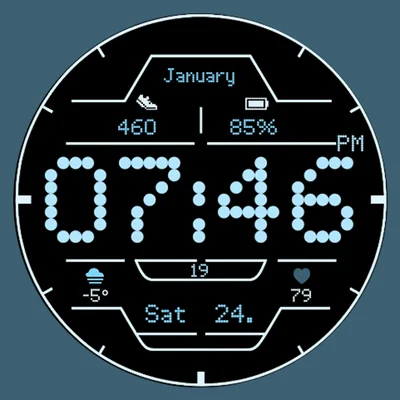
洗練された大胆なモダンなデザインのデジタルウォッチフェイス
明瞭性、スタイル、そして実用性を追求してデザインされたウォッチフェイスで、Wear OS エクスペリエンスをさらに向上させましょう。日々のスケジュール管理にも、ファッションとのコーディネートにも、このウォッチフェイスは必要なものすべてを手首にお届けします。
主な機能
- 時刻表示:AM/PM と 12H/24H の両方の形式に対応しています。
- 基本的なトラッキング:固定歩数計とリアルタイムのバッテリー情報。
- 精度:時間と秒を表示し、常に最新の情報を把握したい方に最適です。
- クイック日付表示:見やすい日付表示で、いつでも整理整頓。
- 常時表示:バッテリー効率を最適化しながら、必要な情報は常に視認性を確保。
- カスタマイズ:2つのカスタムコンプリケーションで、最も必要なデータを表示。
- 15 種類のカラーテーマ:気分やスタイルに合わせて、瞬時にスタイルを切り替えられます。
- ---
⚠️ 重要事項:スマートフォンに付属のコンパニオンアプリは補助ツールであり、ウォッチフェイスを直接インストールするものではありません。スムーズにセットアップするには、以下のインストール手順に従ってください。
---
インストールガイド (Wear OS)
新しいウォッチフェイスは、以下の手順で簡単にインストールできます。
方法 1: Play ストアアプリから
1. デバイスを選択: Play ストアアプリのドロップダウンメニューをタップし、対象のデバイスとしてウォッチを選択します。
2. 待機と同期: ウォッチに転送されるまで数分待ちます。
3. 有効化: 現在のウォッチフェイスを長押しし、左端までスワイプして「ウォッチフェイスを追加」をタップし、このウォッチフェイスを見つけて選択します。
方法 2: Play ストアウェブサイトから (PC/Mac)
1. 参照: ウェブブラウザ (Chrome、Safari など) を開き、Play ストアでウォッチフェイスを検索します。
2. インストール: 「他のデバイスにインストール」をクリックし、ウォッチを選択します。
3. 有効化: ダウンロードが完了したら、ウォッチ画面を長押しし、左にスワイプして「ウォッチフェイスを追加」をタップして有効化します。
---
テクニカルノートとサポート
* 互換性:API 34以上に対応しています。
* プロのヒント:時計にスマートフォンのバッテリー状態を表示したい場合は、「スマートフォンバッテリーコンプリケーション」アプリのインストールをお勧めします。
* サポート体制:何か問題が発生した場合は、否定的なレビューを残す前にご連絡ください。すべてが完璧に動作するようになるよう、喜んでお手伝いいたします。
メールアドレス:grubel.watchfaces@gmail.com
原文を表示
Elevate your Wear OS experience with a watch face designed for clarity, style, and utility. Whether you're tracking your day or matching your outfit, this face brings everything you need right to your wrist.
Key Features
- Time Formats: Supports both AM/PM and 12H/24H formats.
- Essential Tracking: Fixed steps counter and real-time battery info.
- Precision: Displays Hour with Seconds for those who count every moment.
- Quick Date: Stay organized with a clear date display.
- Always On Display: Optimized for battery efficiency while keeping your info visible.
- Customization: 2 custom complications to show the data you care about most.
- 15 Color Themes: Swap styles instantly to suit your mood or look.
---
⚠️ IMPORTANT NOTE: The companion app on your phone is a helper tool - it does NOT install the watch face directly. Please follow the installation instructions below for a smooth setup.
---
Installation Guide (Wear OS)
Getting your new watch face up and running is easy if you follow these steps:
Method 1: From the Play Store App
1. Select Your Device: Tap the drop-down menu in the Play Store app and select your WATCH as the target device.
2. Wait & Sync: Give it a few minutes to transfer to your watch.
3. Activate: Long-press your current watch face, swipe all the way to the left, and tap "ADD WATCH FACE" to find and select this one.
Method 2: From the Play Store Website (PC/Mac)
1. Browse: Open your web browser (Chrome, Safari, etc.) and search for the watch face on the Play Store.
2. Install: Click "Install on more devices" and select your watch.
3. Activate: Once the download finishes, long-press your watch screen, swipe left, and tap "ADD WATCH FACE" to activate it.
---
Technical Notes & Support
* Compatibility: Designed for API 34+.
* Pro Tip: If you want to display your phone's battery status on the watch, we recommend installing the "Phone Battery Complication" app.
* We're Here to Help: If you run into any issues, please reach out before leaving a negative review. I’m happy to help you get everything working perfectly!
Email: grubel.watchfaces@gmail.com
データ セーフティ
このアプリが収集・共有するデータについて、GrubelがGoogle Playで申告している内容です。
- 第三者と共有されるデータはありません詳しくは、デベロッパーが共有を申告する方法についての説明をご覧ください
- データは収集されません詳しくは、デベロッパーが収集を申告する方法についての説明をご覧ください
開発元の連絡先
- ウェブサイトgrubelwatchfaces.com
- メールgrubel.watchfaces@gmail.com
- プライバシーポリシーsites.google.com
- 住所Juliana Tuwima 20/8a 90-002 Łódź Poland
情報
- 提供元
- Grubel
- カテゴリ
- カスタマイズ
- 更新日
- 2026/10/7
- リリース
- 2026/1/24
- 対象年齢
- 3 歳以上
- 価格
- ¥260
- パッケージ名
- com.grubel.nnova