
AQ Installer
XCSpec AQ Device Installer App
Conçue pour iPhone, iPad, iPod touch
Gratuit
- Classification d’âge4+
- CatégorieUtilitaires
- DéveloppeurXCSpec
- LanguesAnglais
- Taille55,3 Mo
Renvoie vers la page App Store officielle
Download.org n’héberge aucun fichier de AQ Installer. Le bouton ouvre la page de l’application sur App Store, où XCSpec la publie. Fiche vérifiée pour la dernière fois le 12/11/2026.
Captures d’écran



À propos
Le développeur n’a pas fourni ce texte dans votre langue.
AQ Installer is the professional installer’s tool for setting up and managing Xcspec Air Quality thermostats in large-scale environments such as schools, factories, and office buildings.
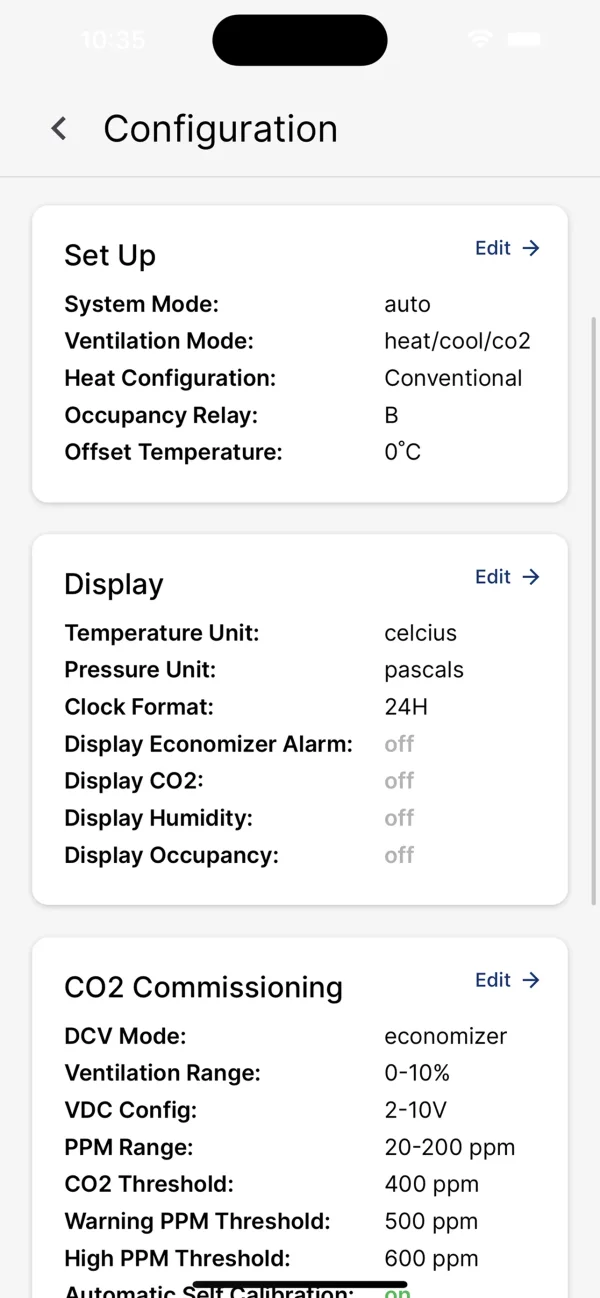
Built specifically for industrial and commercial use, the app simplifies attaching to the device and configuring all the climate and ventilation controls through your mobile app
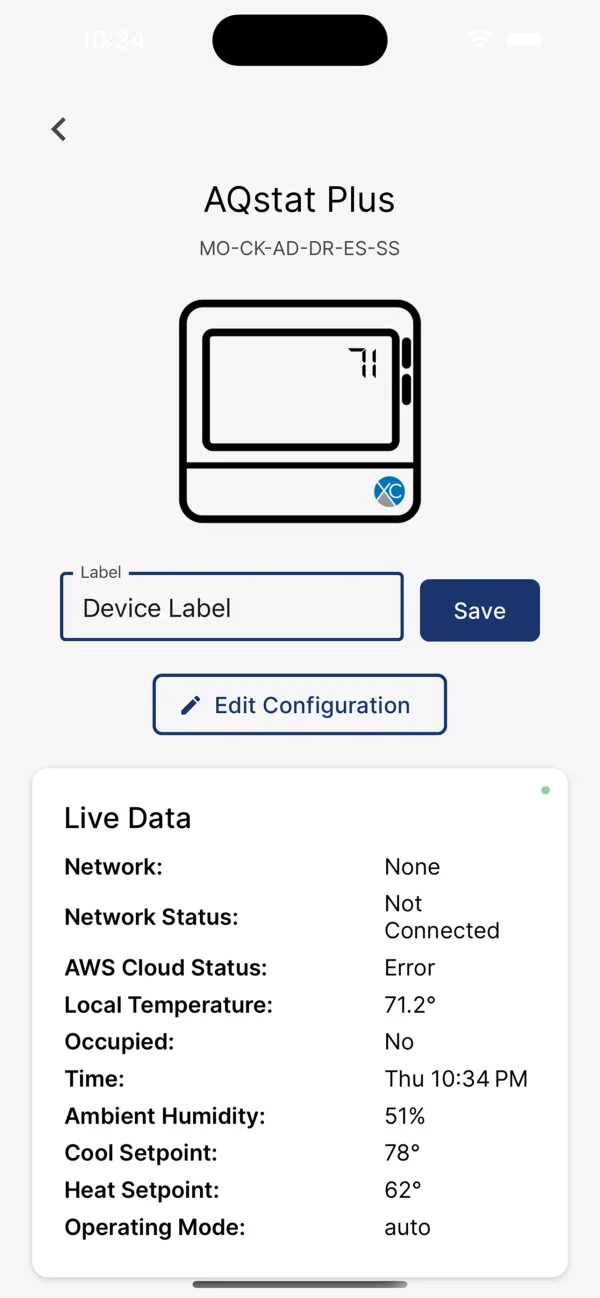
Allows installers to quickly assign a device specific label and synchronize time with their mobile device.
Quickly configure the thermostat ventilation and heating/cooling parameters.
Set up Schedules with our easy to use Picker.
Easily configure the unit onto any IEEE802.b/g/n Wi-Fi network to enable communications with our cloud.
Confirm settings and operation on the Live Data Page.
Nouveautés
Version 1.2.0 · 05/11/2026
New devices
• AQ Indoor air-quality sensor: live readings, label, Wi-Fi set-up, and every setting from the device's own configuration pages.
• RTU Controller: set up like a thermostat, with Set Up Economizer in place of CO2 commissioning and Sensor Input Selection for the outside, return and supply air sensors.
• Thermostats show their bound remote sensors on the device summary.
Finding your device
• Scan QR Code comes first on Searching for Devices; Connect Manually sits below it.
• A clear reason when a Wi-Fi join fails, and a warning when a VPN is active.
• Each device's Wi-Fi signal strength is shown on its main screen.
• The app version and build appear on the welcome screen.
Set-up and schedules
• Equipment settings: heat/cool stages, staging delay, swings, minimum compressor on-time, display light.
• Schedules with four periods per day where the thermostat supports it.
• Loading an older preset no longer changes settings it never captured.
Fixes
• Devices on older firmware connect again.
• Switching between Conventional and Heat Pump now takes effect.
• Sync Device Time lists the US time zones and saves the thermostat's zone.
• Schedule edits are saved to the thermostat.
• Scan QR Code no longer stops at "Scanner Unavailable".
• Remote sensor temperatures show in the thermostat's display unit.
• The calibration slider shows its value while you drag it.
Confidentialité de l’application
Ce que XCSpec déclare sur l’App Store au sujet du traitement des données par cette application.
-
Données non collectées
Le développeur ne collecte aucune donnée à partir de cette application.
Les pratiques en matière de confidentialité peuvent varier, notamment en fonction des fonctionnalités que vous utilisez ou de votre âge.
Informations
- Vendeur
- XCSpec
- Catégorie
- Utilitaires
- Version
- 1.2.0
- Mis à jour
- 05/11/2026
- Publié
- 02/10/2025
- Taille
- 55,3 Mo
- Nécessite
- iOS 15.1 ou version ultérieure
- Classification d’âge
- 4+
- Prix
- Gratuit
- Langues
- Anglais
- Copyright
- © XCSpec
Vous aimerez peut-être aussi
-
 Visionect ConfiguratorUtilitaires
-
 AddressITUtilitaires
-
 Request CerritosUtilitaires
-
 BTU Calculator: AC & HVACUtilitaires
-
 Intelli-Guide™ ServiceUtilitaires
-
 Cleanlys: Nettoyage & BoostOptimiser Performance
-
 CoolAutomation ProfessionalUtilitaires
-
 BudderflyUtilitaires
-
 Xylem XUtilitaires
-
 Toshiba Fault CodesUtilitaires