- Classification d’âge17+
- CatégorieProductivité
- DéveloppeurBen Hybert
- LanguesAnglais
- Taille22,4 Mo
Renvoie vers la page App Store officielle
Download.org n’héberge aucun fichier de CNNCT. Le bouton ouvre la page de l’application sur App Store, où Ben Hybert la publie. Fiche vérifiée pour la dernière fois le 06/11/2026.
Captures d’écran


À propos
Le développeur n’a pas fourni ce texte dans votre langue.
Keep your calendar and appointments together with CNNCT. Sign in using the email address you use for bookings, then see what is coming up and manage your plans.
YOUR CALENDAR
• Organisers can plan in day, three-day, week and month views.
• Add and edit events, move or resize them, and block time.
• See connected calendar colours, event details, guests and meeting links when available.
• Check opening hours and manage bookings alongside calendar events.
YOUR APPOINTMENTS
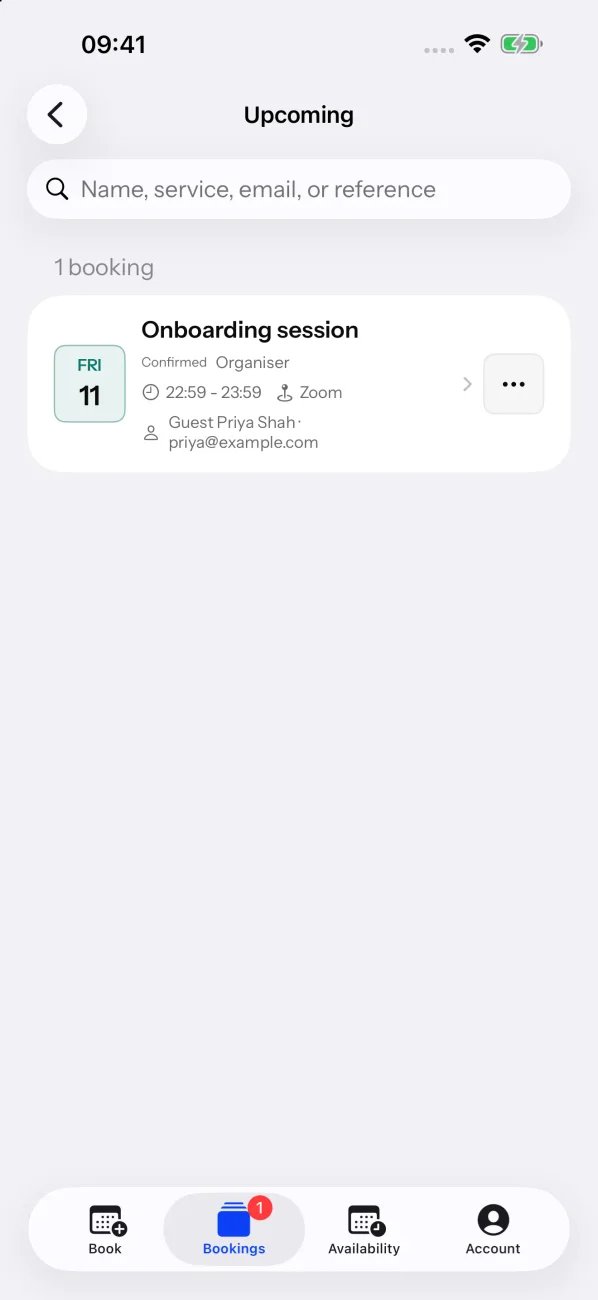
• View upcoming appointments and booking history.
• Book again with previous organisers, or open a CNNCT booking link to choose a service and time.
• Reschedule or cancel where the organiser allows it.
• Receive booking reminders and updates when notifications are enabled.
• Organisers can accept or reject requests and open or close days for new bookings.
SIRI, WIDGETS AND APPLE WATCH
• Use Siri and Shortcuts to open a day, prepare an event or blocked time, and hear what is next.
• Add Home Screen and Lock Screen widgets for quick access to your calendar and bookings.
• View your synced agenda and event details on Apple Watch, with watch-face complications and Smart Stack support.
Widgets and Apple Watch show the calendar last synced by your iPhone. Open the iPhone app to refresh it. Event editing is available on iPhone; Siri prepares an event for you to review and save.
CNNCT uses one-time email codes to sign you in. Organisers set up their services, booking pages and calendar connections at cnnct.uk. Some appointments may require payment to the organiser. CNNCT is free to use. Organiser calendar tools require an organiser account. Repeating connected events can be edited one occurrence at a time; creating repeating series and sending guest invitations are not supported in the native editor.
Nouveautés
Version 1.5.0 · 02/11/2026
Manage your calendar alongside your bookings, with day, three-day, week and month views.
• Add and edit events, or move and resize them directly in the calendar.
• Swipe smoothly between months, see your calendar colours and opening hours, and open event details, guests and meeting links.
• Use Siri and Shortcuts to open a day, prepare an event or blocked time, and hear what's next.
• Add Home Screen and Lock Screen widgets that open the right event or booking.
• See your synced agenda on Apple Watch, with watch-face complications and Smart Stack support.
Widgets and Apple Watch show the calendar last synced by your iPhone. Open the iPhone app to refresh it.
Confidentialité de l’application
Ce que Ben Hybert déclare sur l’App Store au sujet du traitement des données par cette application.
-
Données établissant un lien avec vous
Peuvent être collectées et liées à votre identité.
- Achats
- Informations financières
- Coordonnées
- Contenu utilisateur
- Identifiants
- Données d’utilisation
Les pratiques en matière de confidentialité peuvent varier, notamment en fonction des fonctionnalités que vous utilisez ou de votre âge.
Informations
- Vendeur
- Ben Hybert
- Catégorie
- Productivité
- Version
- 1.5.0
- Mis à jour
- 02/11/2026
- Publié
- 20/09/2026
- Taille
- 22,4 Mo
- Nécessite
- iOS 17.0 ou version ultérieure
- Classification d’âge
- 17+
- Prix
- Gratuit
- Langues
- Anglais
- Copyright
- © 2026 Connect Dorset