- Batasan usia17+
- KategoriProduktivitas
- PengembangBen Hybert
- BahasaInggris
- Ukuran22,4 MB
Tertaut ke halaman resmi App Store
Download.org tidak menyimpan file CNNCT apa pun. Tombol ini membuka halaman aplikasi di App Store, tempat Ben Hybert menerbitkannya. Halaman terakhir diperiksa pada 6/11/2026.
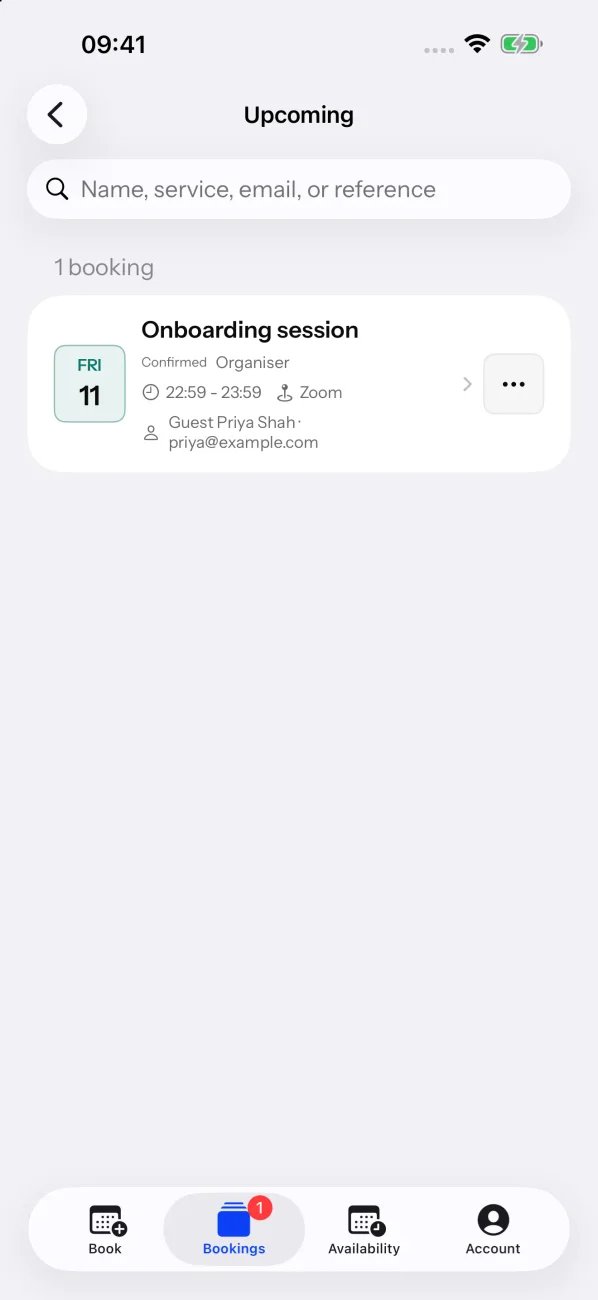
Tangkapan layar


Tentang
Pengembang belum menyediakan teks ini dalam bahasa Anda.
Keep your calendar and appointments together with CNNCT. Sign in using the email address you use for bookings, then see what is coming up and manage your plans.
YOUR CALENDAR
• Organisers can plan in day, three-day, week and month views.
• Add and edit events, move or resize them, and block time.
• See connected calendar colours, event details, guests and meeting links when available.
• Check opening hours and manage bookings alongside calendar events.
YOUR APPOINTMENTS
• View upcoming appointments and booking history.
• Book again with previous organisers, or open a CNNCT booking link to choose a service and time.
• Reschedule or cancel where the organiser allows it.
• Receive booking reminders and updates when notifications are enabled.
• Organisers can accept or reject requests and open or close days for new bookings.
SIRI, WIDGETS AND APPLE WATCH
• Use Siri and Shortcuts to open a day, prepare an event or blocked time, and hear what is next.
• Add Home Screen and Lock Screen widgets for quick access to your calendar and bookings.
• View your synced agenda and event details on Apple Watch, with watch-face complications and Smart Stack support.
Widgets and Apple Watch show the calendar last synced by your iPhone. Open the iPhone app to refresh it. Event editing is available on iPhone; Siri prepares an event for you to review and save.
CNNCT uses one-time email codes to sign you in. Organisers set up their services, booking pages and calendar connections at cnnct.uk. Some appointments may require payment to the organiser. CNNCT is free to use. Organiser calendar tools require an organiser account. Repeating connected events can be edited one occurrence at a time; creating repeating series and sending guest invitations are not supported in the native editor.
Yang baru
Versi 1.5.0 · 2/11/2026
Manage your calendar alongside your bookings, with day, three-day, week and month views.
• Add and edit events, or move and resize them directly in the calendar.
• Swipe smoothly between months, see your calendar colours and opening hours, and open event details, guests and meeting links.
• Use Siri and Shortcuts to open a day, prepare an event or blocked time, and hear what's next.
• Add Home Screen and Lock Screen widgets that open the right event or booking.
• See your synced agenda on Apple Watch, with watch-face complications and Smart Stack support.
Widgets and Apple Watch show the calendar last synced by your iPhone. Open the iPhone app to refresh it.
Privasi aplikasi
Yang dinyatakan Ben Hybert di App Store tentang cara aplikasi ini menangani data.
-
Data yang ditautkan dengan Anda
Dapat dikumpulkan dan ditautkan dengan identitas Anda.
- Pembelian
- Info keuangan
- Info kontak
- Konten pengguna
- Pengenal
- Data penggunaan
Praktik privasi dapat bervariasi, misalnya berdasarkan fitur yang Anda gunakan atau usia Anda.
Informasi
- Penjual
- Ben Hybert
- Kategori
- Produktivitas
- Versi
- 1.5.0
- Diperbarui
- 2/11/2026
- Dirilis
- 20/9/2026
- Ukuran
- 22,4 MB
- Memerlukan
- iOS 17.0 atau yang lebih baru
- Batasan usia
- 17+
- Harga
- Gratis
- Bahasa
- Inggris
- Hak cipta
- © 2026 Connect Dorset