- Classification d’âge4+
- CatégorieÉconomie et entreprise
- DéveloppeurPanasonic Holdings Corporation
- Taille40,5 Mo
Renvoie vers la page App Store officielle
Download.org n’héberge aucun fichier de HC ROP. Le bouton ouvre la page de l’application sur App Store, où Panasonic Holdings Corporation la publie. Fiche vérifiée pour la dernière fois le 15/11/2026.
Captures d’écran
À propos
Le développeur n’a pas fourni ce texte dans votre langue.
=== Name of App ===
HC ROP (HC series memory camera recorder Remote Operation Panel)
=== Description ===
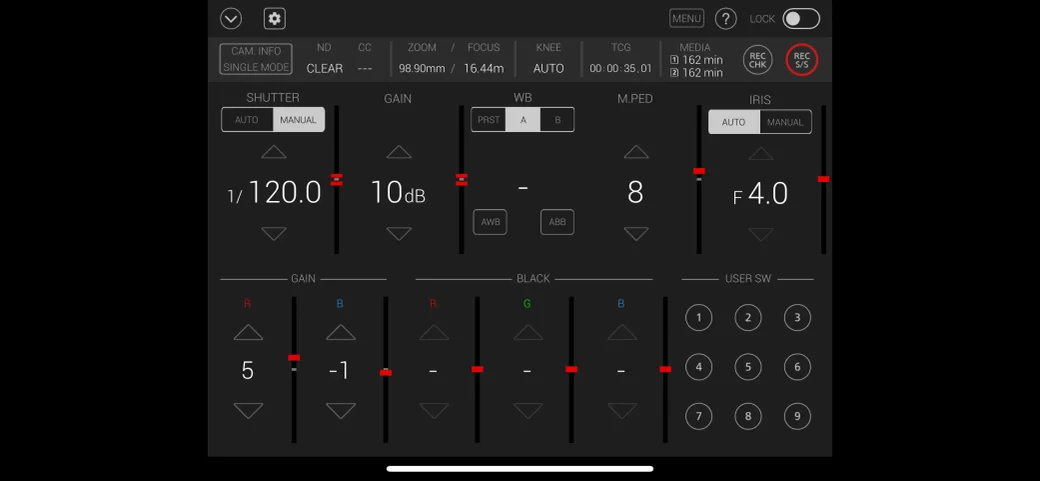
HC ROP is a control program that enables the wireless remote control of the memory camera recorder "Panasonic HC-X series" and "Panasonic AG-CX series"(excluding some models).
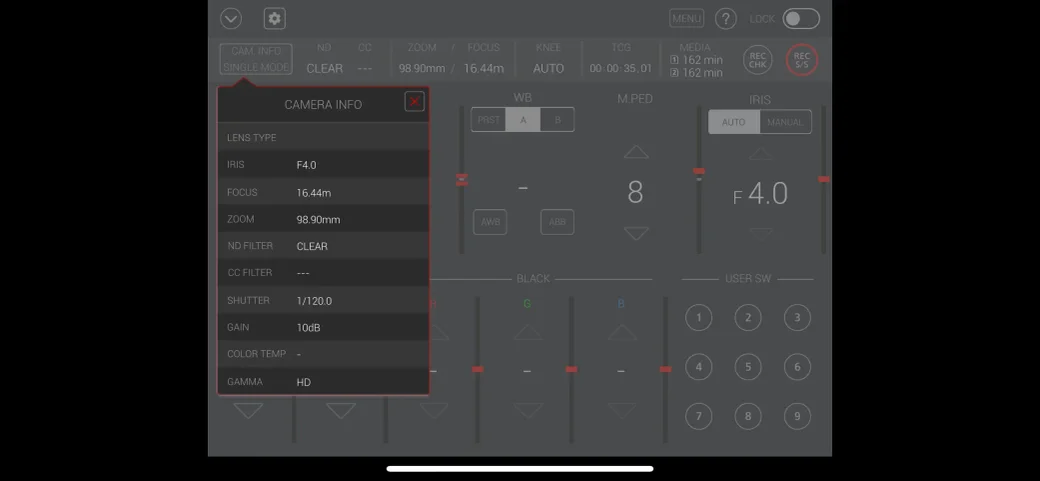
It provides a GUI that displays status information, settings and user switch status in a single screen and the ability to change camera settings intuitively using a screen touch.
Buttons such as user buttons and REC S/S button in screen can manipulate camera recorder.
HC ROP cam manipulate one memory camera reorder by switching up to eight memory camera reorders. Please tap a "?" button to see a hint for usage of this app.
=== Applicable Model ===
HC-X1500, HC-X2000、HC-X1200、HC-X1600、HC-X1800、HC-X2100、HC-X2、HC-X20
AG-CX7, AG-CX8, AG-CX10, AG-CX98、AG-CX20、AG-CX100、AG-CX18
=== Supported OS ===
iOS 15 or later
iPadOS 15 or later
=== Features ===
1. Camera status display
- List of camera information
- ND/CC FILTER
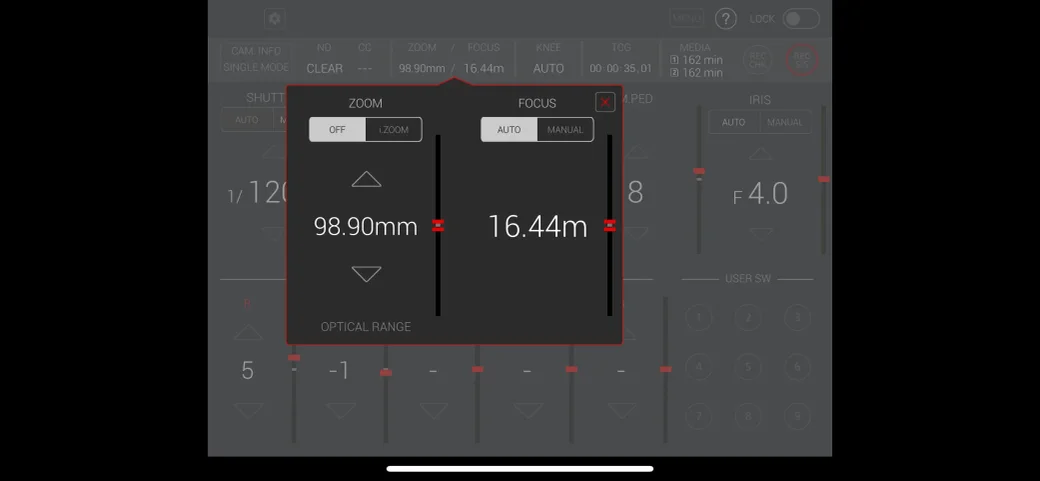
- ZOOM/FOCUS
- KNEE
- TCG
- Remaining time of recording media
2. CONTROLLABLE FUNCTIONS
- SHUTTER (AUTO/MANUAL)
- GAIN
- WHITE BALANCE(PRE/A/B, AWB, ABB)
- MASTER PEDESTAL
- IRIS(AUTO/MANUAL)
- Painting GAIN(R/B)
- USER SW (1-9)
- MENU display and setting
- HELP
- LOCK(disable operation on HC ROP)
- ZOOM(i.ZOOM/i.ZOOM_OFF)
- FOCUS(AUTO/MANUAL)
- KNEE(AUTO/MANUAL(MID))
- TCG(TC/UB display and setting)
- REC CHECK
- REC Start/Stop
3. Settings and switching of a connected camera
You can set or switch connected cameras in a connect setting panel by tapping a connect manipulation button in the screen. Please refer to "CONNECTION" item by tapping "?" for details.
=== NOTE ===
(1)Permission for the local network is required since iOS14. If you cannot connect the app to the camera, make the following settings.
1. Open "Settings" on iPhone/iPad
2. Select "Privacy">"Local Network"
3. Set "HC ROP" to "ON"
(2)In iOS, camera information may not be displayed correctly on the app screen.This can be fixed by turning on airplane mode and then turning off again.
1. Close "CX ROP".
2. Select "Settings" on the device home screen
3. Turn on "Airplane mode"
4. Turn off "Airplane mode"
5. Launch "CX ROP"
*These settings need to be repeated after turning off or restarting the device.
Nouveautés
Version 1.4 · 28/05/2025
Fixed some minor bugs.
Confidentialité de l’application
Ce que Panasonic Holdings Corporation déclare sur l’App Store au sujet du traitement des données par cette application.
-
Données non collectées
Le développeur ne collecte aucune donnée à partir de cette application.
Les pratiques en matière de confidentialité peuvent varier, notamment en fonction des fonctionnalités que vous utilisez ou de votre âge.
Informations
- Vendeur
- Panasonic Holdings Corporation
- Catégorie
- Économie et entreprise
- Version
- 1.4
- Mis à jour
- 28/05/2025
- Publié
- 22/02/2020
- Taille
- 40,5 Mo
- Nécessite
- iOS 15.0 ou version ultérieure
- Classification d’âge
- 4+
- Prix
- Gratuit
- Copyright
- © Panasonic Corporation
Vous aimerez peut-être aussi
-
 CX ROPÉconomie et entreprise
-
 AG ROPÉconomie et entreprise
-
 EVA ROPÉconomie et entreprise
-
 VARICAM ROPÉconomie et entreprise
-
 Haivision Play ProÉconomie et entreprise
-
 MagicQ Remote ControlProductivité
-
 LuminairProductivité
-
 NEEWER TeleprompterProductivité
-
 Q-SYS UCI ViewerProductivité
-
 Sidus Link ProProductivité