- Classification d’âge4+
- CatégorieSports
- LanguesAnglais
- Taille335,0 Ko
Renvoie vers la page App Store officielle
Download.org n’héberge aucun fichier de HowzApp. Le bouton ouvre la page de l’application sur App Store, où la publie. Fiche vérifiée pour la dernière fois le 12/11/2026.
Captures d’écran
À propos
Le développeur n’a pas fourni ce texte dans votre langue.
Each video must consist of one delivery only, filmed in 4k video and at 60 fps. THE APP WILL NOT WORK WITHOUT THESE SETTINGS. Of course, the pitching and impact must be recorded in the video
At present, it requires a WHITE CRICKET BALL and will not work with other colors.
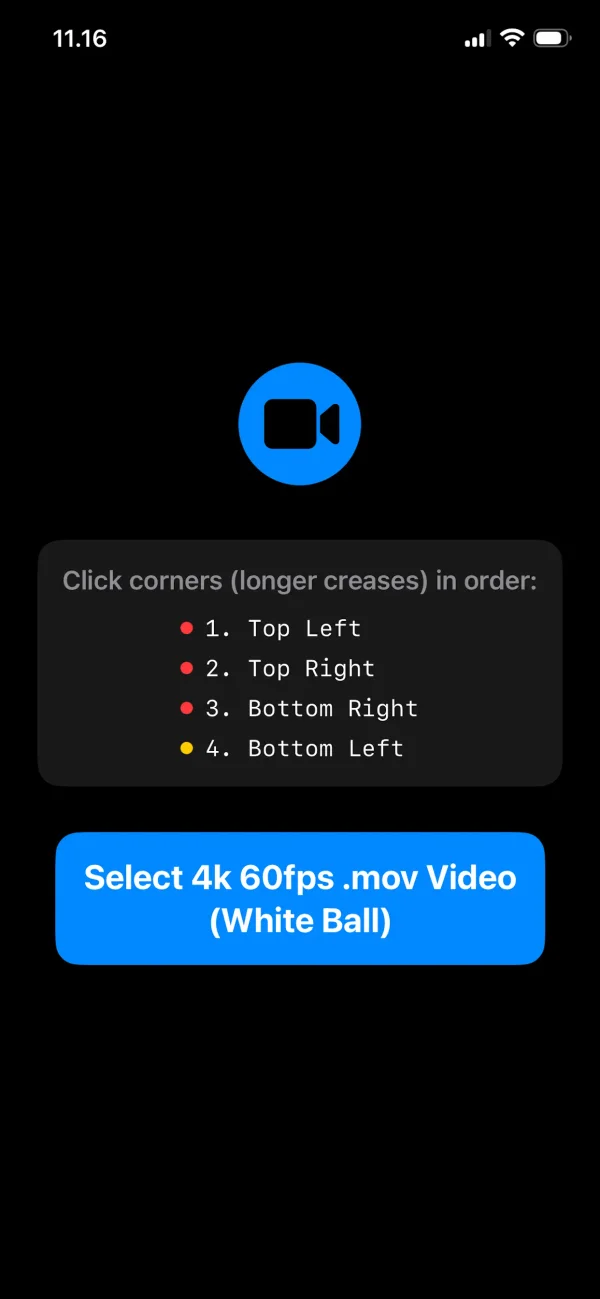
The 4 corners to click (see above) must be FULLY VISIBLE in the video. Additionally, THE TOP OF OFF STUMP SHOULD BE VISIBLE AT THE START OF THE VIDEO to calibrate the tracker.
Once the app icon is clicked, instructions on which corners to click along with which order to be selected appears. Then, the user has to pick the video for review. It may take a moment for the video to be rendered
Once a video has been selected, the users can click the "RHB" (Right Hand Bat) button to change it to "LHB" (Left Hand Bat). The button toggles between these two modes.
The video will play automatically once rendered so the users can identify that delivery.
Then user selects the corners in the right sequence. 2 fingers can be used to zoom the video in (to the center) and 1 finger to click. If the user needs to modify selection, then the "Reset" button is available to clear the corner clicks. Once the 4 required corners have been selected, a "Send" button will appear. After this. an "Uploading video" popup will be visible.
After the pop-up disappears, the user should be able to see the OUT / NOT OUT / UMPIRE'S CALL decision. Also, users will see a small yellow and red line drawn close to the batsman (zooming may be needed to see it). The yellow part represents the visible ball path and the red represents the predicted path. The transition from yellow to red path is meant to be approximate and not exact.
If N/A is still present after the Uploading Video popup has vanished, then trying again will usually solve the problem.
If user wants to upload a new video, the "New" button can be used. When uploading a new video, make sure to click the Reset button.
Confidentialité de l’application
Ce que déclare sur l’App Store au sujet du traitement des données par cette application.
-
Données n’établissant aucun lien avec vous
Peuvent être collectées, mais ne sont pas liées à votre identité.
- Contenu utilisateur
- Diagnostic
Les pratiques en matière de confidentialité peuvent varier, notamment en fonction des fonctionnalités que vous utilisez ou de votre âge.
Informations
- Vendeur
- Apoorva Varadarajan
- Catégorie
- Sports
- Version
- 1.0
- Mis à jour
- 02/04/2026
- Publié
- 02/04/2026
- Taille
- 335,0 Ko
- Nécessite
- iOS 14.0 ou version ultérieure
- Classification d’âge
- 4+
- Prix
- Gratuit
- Langues
- Anglais
- Copyright
- © 2026 Siddharth Krishnan
Vous aimerez peut-être aussi
-
 Howzat - CounterSports
-
 Cricktomate - Cricket ScorerSports
-
 ForthUmpire-Live CricketScorerSports
-
 CRICKO - CRICKET SCORING APPSports
-
 Wicket - Cricket with FriendsSports
-
 OverMate: Cricket Scoring AppSports
-
 Advanced Impactor: Cricket AISports
-
 Cricketers PitchSports
-
 Club DuelzSports
-
Howzat - CricketSports