HowzApp
4k Ball Tracking and DRS
Được thiết kế cho iPhone, iPad, iPod touch
Miễn phí
- Độ tuổi4+
- Danh mụcThể Thao
- Ngôn ngữTiếng Anh
- Kích thước335,0 KB
Liên kết đến trang App Store chính thức
Download.org không lưu trữ tệp nào của HowzApp. Nút này mở trang ứng dụng trên App Store, nơi phát hành ứng dụng. Trang được kiểm tra lần cuối: 12/11/2026.
Ảnh chụp màn hình
Giới thiệu
Nhà phát triển chưa cung cấp nội dung này bằng ngôn ngữ của bạn.
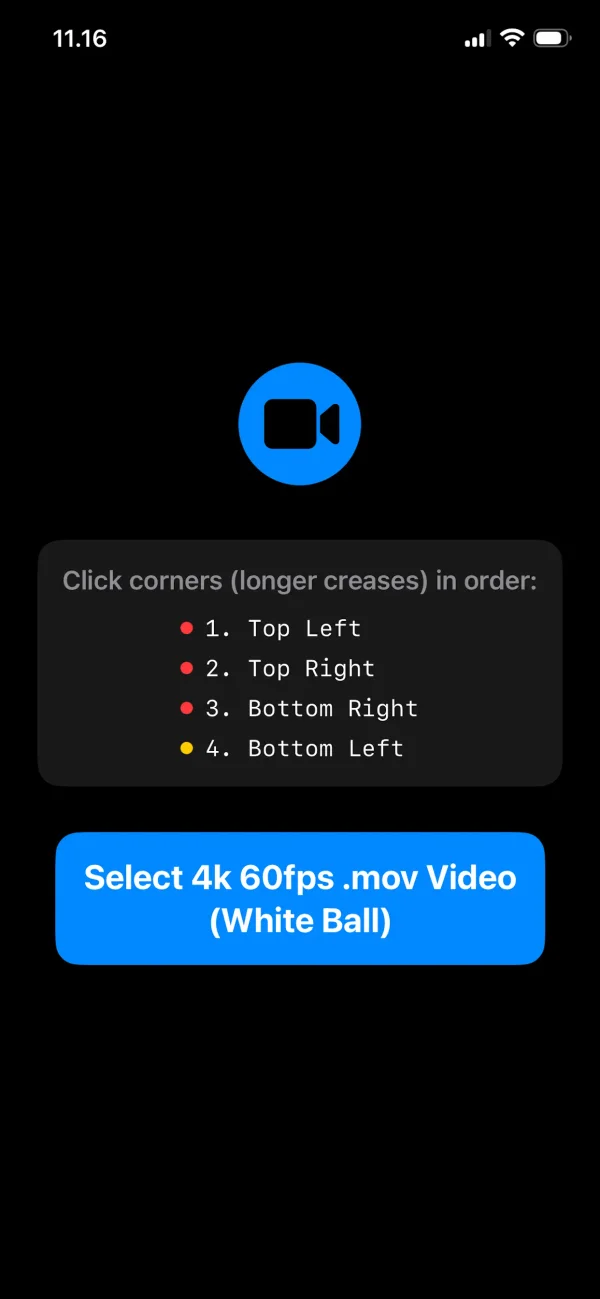
Each video must consist of one delivery only, filmed in 4k video and at 60 fps. THE APP WILL NOT WORK WITHOUT THESE SETTINGS. Of course, the pitching and impact must be recorded in the video
At present, it requires a WHITE CRICKET BALL and will not work with other colors.
The 4 corners to click (see above) must be FULLY VISIBLE in the video. Additionally, THE TOP OF OFF STUMP SHOULD BE VISIBLE AT THE START OF THE VIDEO to calibrate the tracker.
Once the app icon is clicked, instructions on which corners to click along with which order to be selected appears. Then, the user has to pick the video for review. It may take a moment for the video to be rendered
Once a video has been selected, the users can click the "RHB" (Right Hand Bat) button to change it to "LHB" (Left Hand Bat). The button toggles between these two modes.
The video will play automatically once rendered so the users can identify that delivery.
Then user selects the corners in the right sequence. 2 fingers can be used to zoom the video in (to the center) and 1 finger to click. If the user needs to modify selection, then the "Reset" button is available to clear the corner clicks. Once the 4 required corners have been selected, a "Send" button will appear. After this. an "Uploading video" popup will be visible.
After the pop-up disappears, the user should be able to see the OUT / NOT OUT / UMPIRE'S CALL decision. Also, users will see a small yellow and red line drawn close to the batsman (zooming may be needed to see it). The yellow part represents the visible ball path and the red represents the predicted path. The transition from yellow to red path is meant to be approximate and not exact.
If N/A is still present after the Uploading Video popup has vanished, then trying again will usually solve the problem.
If user wants to upload a new video, the "New" button can be used. When uploading a new video, make sure to click the Reset button.
Quyền riêng tư của ứng dụng
Những gì khai báo trên App Store về cách ứng dụng này xử lý dữ liệu.
-
Dữ liệu không liên kết với bạn
Có thể được thu thập nhưng không liên kết với danh tính của bạn.
- Nội dung của người dùng
- Chẩn đoán
Phương thức đảm bảo quyền riêng tư có thể khác nhau, chẳng hạn như tuỳ theo các tính năng bạn sử dụng hoặc độ tuổi của bạn.
Thông tin
- Người bán
- Apoorva Varadarajan
- Danh mục
- Thể Thao
- Phiên bản
- 1.0
- Cập nhật
- 02/04/2026
- Phát hành
- 02/04/2026
- Kích thước
- 335,0 KB
- Yêu cầu
- iOS 14.0 trở lên
- Độ tuổi
- 4+
- Giá
- Miễn phí
- Ngôn ngữ
- Tiếng Anh
- Bản quyền
- © 2026 Siddharth Krishnan
Có thể bạn cũng thích
-
 Howzat - CounterThể Thao
-
 Cricktomate - Cricket ScorerThể Thao
-
 ForthUmpire-Live CricketScorerThể Thao
-
 CRICKO - CRICKET SCORING APPThể Thao
-
 Wicket - Cricket with FriendsThể Thao
-
 OverMate: Cricket Scoring AppThể Thao
-
 Advanced Impactor: Cricket AIThể Thao
-
 Cricketers PitchThể Thao
-
 Club DuelzThể Thao
-
Howzat - CricketThể Thao