- Classification d’âge4+
- CatégoriePhoto et vidéo
- DéveloppeurHaoyuan Xia
- LanguesAnglais+ 1 de plus
- Taille8,0 Mo
Renvoie vers la page App Store officielle
Download.org n’héberge aucun fichier de iSoftBox. Le bouton ouvre la page de l’application sur App Store, où Haoyuan Xia la publie. Fiche vérifiée pour la dernière fois le 16/11/2026.
Captures d’écran




À propos
Le développeur n’a pas fourni ce texte dans votre langue.
iSoftBox turns your iPhone or iPad into a clean, controllable light source for photography. Use the display you already have to illuminate small subjects, digitize film, create calibration frames, or paint with light.
A Clean, Full-Screen Light
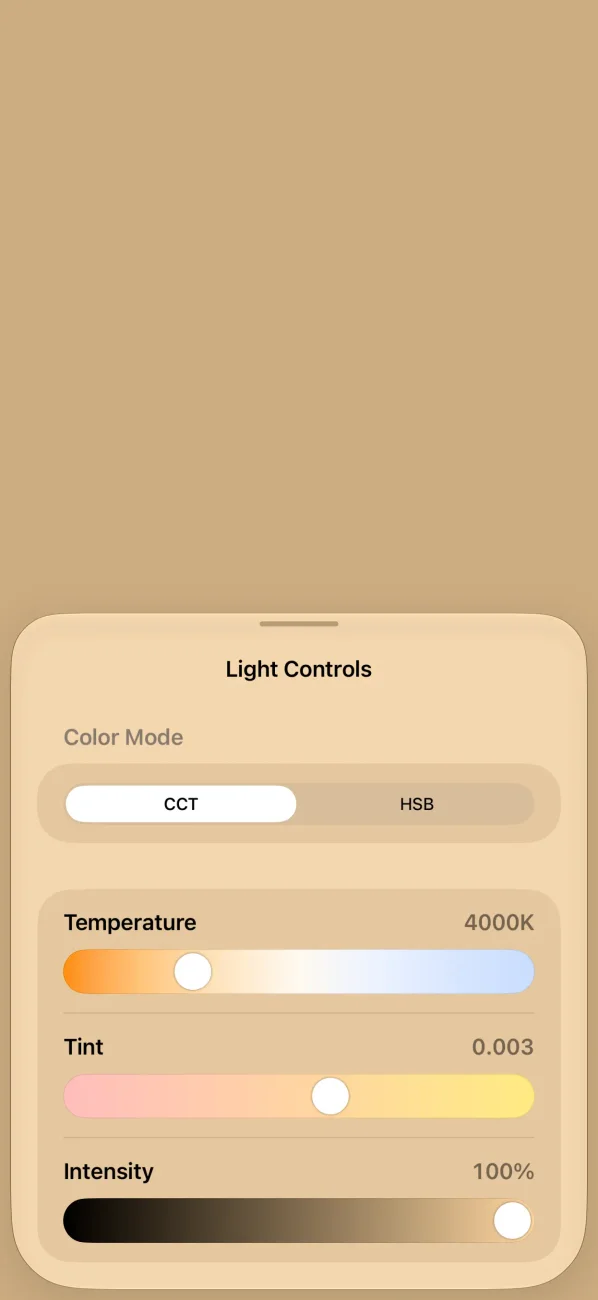
The selected color fills the entire display without permanent controls, toolbars, or status indicators contaminating the light. Choose HSB to shape hue, saturation, and brightness, or switch to CCT to fine-tune white light through temperature, tint, and intensity. A temporary visual readout appears only while you make an adjustment.
Made for Real Photography
• Product and Macro Lighting — Use one device as a key, fill, rim, or accent light for small subjects. Combine multiple devices when your setup needs more coverage or separation.
• Film Digitizing — Place a negative carrier over a neutral white screen to create a practical backlight for camera scanning.
• Astrophotography Flat Frames — Rest the device over an upward-facing telescope aperture and use its uniform screen to capture flat-field calibration frames.
• Light Painting — Move a colored screen through a long exposure to create broad, expressive trails that are difficult to achieve with a point light.
Controls That Stay Out of the Shot
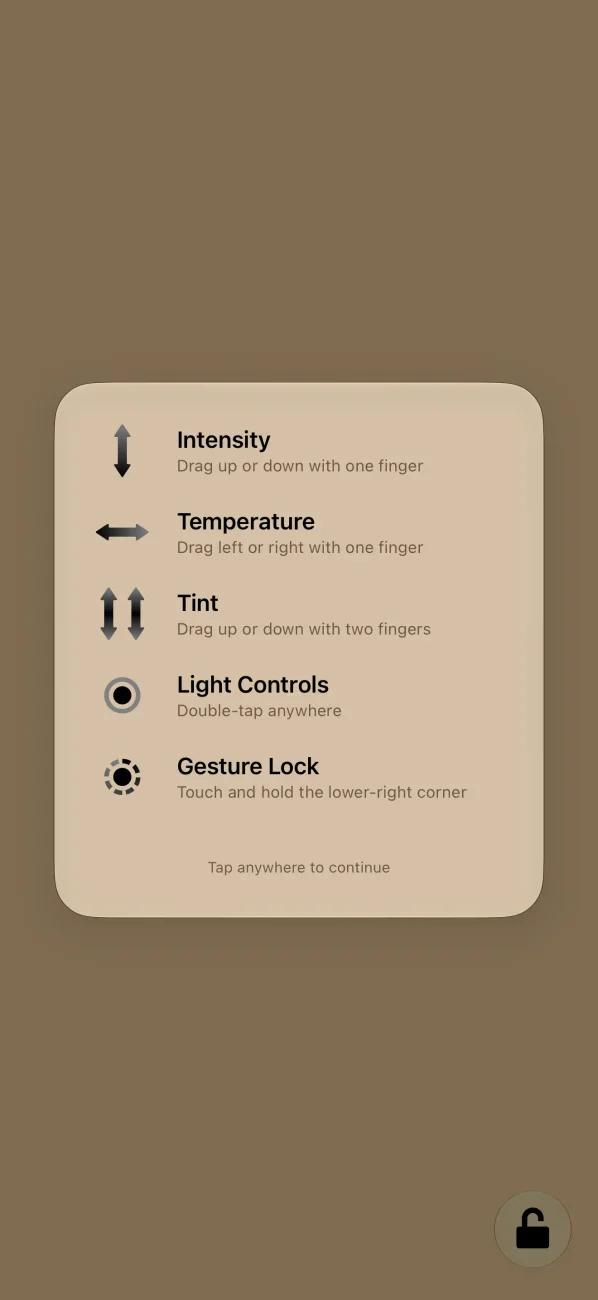
Each color mode has its own gesture assignments. Customize which one- and two-finger swipes adjust each property and choose the drag direction that increases its value. Double-tap to open precise controls for the active mode. When your setup is ready, lock gestures to prevent accidental changes while positioning a subject, film carrier, or other equipment.
Choose a Brightness Curve that suits how you want adjustments to respond. Enable Preserve Settings when you want iSoftBox to restore your Color Mode or Color Adjustments the next time it opens. Built-in Color Accuracy guidance identifies display settings that can affect color consistency.
iSoftBox keeps the display awake while the light is active. When the app leaves the foreground, it restores your original system brightness.
Accessible and Private
All gesture-driven adjustments are also available through standard controls for VoiceOver and Switch Control users. iSoftBox requires no account and includes no analytics or tracking identifiers. Your preferences remain on your device.
Whether you are building a careful tabletop setup or experimenting outdoors after dark, iSoftBox gives you a simple photographic light that is always close at hand.
Nouveautés
Version 5.3.0 · 26/10/2026
• Add support for iPhone Duo
• Use the app in landscape on iPhone
• Improve Gesture Lock positioning and touch responsiveness
Confidentialité de l’application
Ce que Haoyuan Xia déclare sur l’App Store au sujet du traitement des données par cette application.
-
Données non collectées
Le développeur ne collecte aucune donnée à partir de cette application.
Les pratiques en matière de confidentialité peuvent varier, notamment en fonction des fonctionnalités que vous utilisez ou de votre âge.
Informations
- Vendeur
- Haoyuan Xia
- Catégorie
- Photo et vidéo
- Version
- 5.3.0
- Mis à jour
- 26/10/2026
- Publié
- 05/05/2019
- Taille
- 8,0 Mo
- Nécessite
- iOS 17.0 ou version ultérieure
- Classification d’âge
- 4+
- Prix
- Gratuit
- Langues
- Anglais, Chinois simplifié
- Copyright
- © 2026 Haoyuan Xia
Vous aimerez peut-être aussi
-
 XINGING-named CAMHOMME beforePhoto et vidéo
-
 小猫补光灯 - 花叔官方出品Photo et vidéo
-
 AiryCam - Posing CameraPhoto et vidéo
-
 Remo Cam - Vintage CameraPhoto et vidéo
-
 LumièreChat Pro: Studio SelfieÉclairage pour Selfies
-
 Onlymo胶片相机-复古艺术感创意滤镜特效Photo et vidéo
-
 Bebo Cam:Retro Instant CameraPhoto et vidéo
-
 JULabCamera
-
 Colorby: AI Color Editor & CamPhoto et vidéo
-
 Swan Cam - Caméra rétro IADes photos cinéma sans effort