- Classification d’âge4+
- CatégorieGraphisme et design
- DéveloppeurHirofumi Tanjo
- LanguesAnglais+ 8 de plus
- Taille13,8 Mo
Renvoie vers la page App Store officielle
Download.org n’héberge aucun fichier de Kuu3D. Le bouton ouvre la page de l’application sur App Store, où Hirofumi Tanjo la publie. Fiche vérifiée pour la dernière fois le 23/11/2026.
Captures d’écran

À propos
Le développeur n’a pas fourni ce texte dans votre langue.
3D data, beautifully and clearly. Kuu3D is a 3D viewer for iPhone and iPad.
It supports USDZ, OBJ, STL, glTF / GLB and PLY (point cloud). Open files from the Files app, AirDrop, or the Share sheet of other apps.
EASY TO LOOK AT
Operate with your fingertips. Rotate with one finger, pan and zoom with two, twist two fingers to tilt, double-tap to show the whole model.
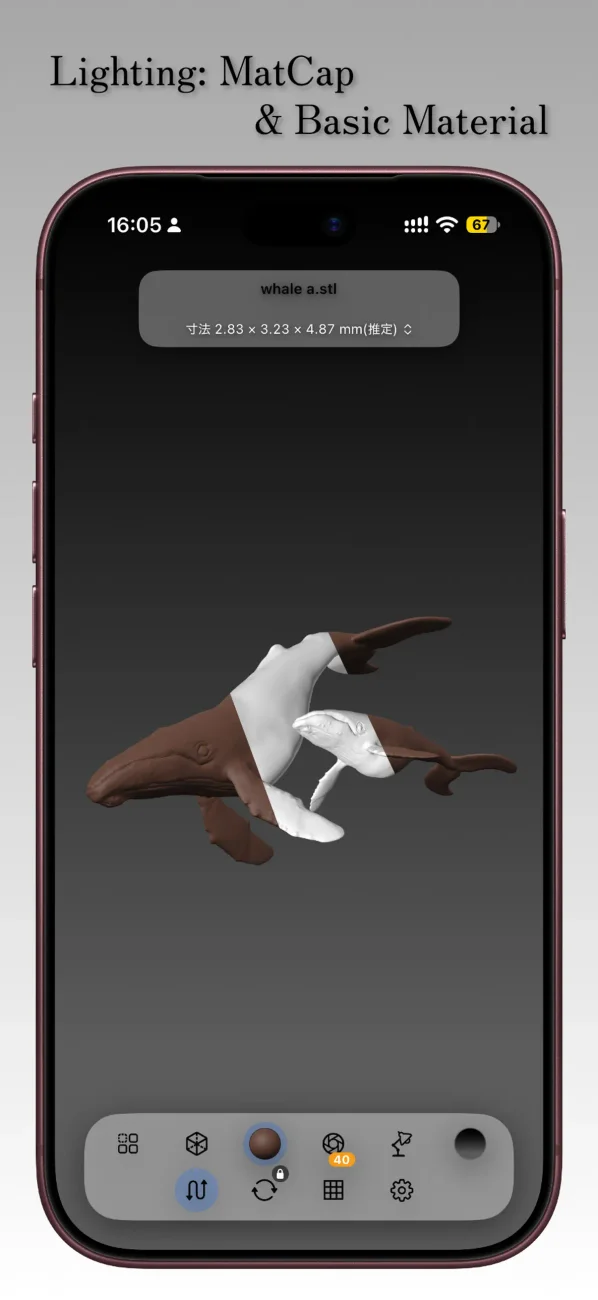
Switch between softly shaded MatCap materials to study the form itself.
Sky, dusk, night, or sakura: choose a background to suit your mood and your data.
Wireframe view to check the flow of the mesh.
Drag the circle on screen to change the light direction freely.
Change the field of view to adjust perspective.
Turntable mode slowly rotates the model so you can take it all in.
Grab the toolbar and move it to the top of the screen if you like.
HANDY FOR CHECKING
See dimensions. The unit is guessed from the file format and can be changed.
Get notified when a model's face directions (normals) look reversed.
Large files are displayed as smoothly as possible.
SIMPLE AND PRIVATE
Save your favorite files in the library.
No network access. Your files never leave the device, and no personal data is collected.
Almost every feature is free. The one-time purchase "Unlock All Features" removes the limits on the turntable (free users get a half turn) and the library size (free users can save 3 files). It is not a subscription.
SUPPORTED FORMATS USDZ / USD, OBJ, STL, glTF / GLB, PLY (point cloud) Note: animation playback is not supported.
Nouveautés
Version 1.5 · 21/11/2026
• Almost every feature is now free: MatCap, backgrounds, wireframe, light, field of view, and large files.
• A fresh, soft and tactile (neumorphic) design that supports both Light and Dark appearance. The toolbar and the screen frame now blend smoothly together.
• The grid is now shown as a checkerboard.
• Twist two fingers to tilt the model along the screen.
• Grab the toolbar and move it to the top of the screen.
• The light circle is now always shown at the center of the model.
• Added a soft fill light so the side facing away from the light doesn't go too dark.
• The outline of the "Cel-look" MatCap is now bolder and easier to see.
• The "Dark Gray" MatCap is slightly darker.
• The ground shadow now hides automatically when you look from below.
• Touches with three or more fingers are now ignored, to prevent accidental input.
• Removed the bounding-box button. The dimension numbers are still shown.
• Small display adjustments and bug fixes.
Confidentialité de l’application
Ce que Hirofumi Tanjo déclare sur l’App Store au sujet du traitement des données par cette application.
-
Données non collectées
Le développeur ne collecte aucune donnée à partir de cette application.
Les pratiques en matière de confidentialité peuvent varier, notamment en fonction des fonctionnalités que vous utilisez ou de votre âge.
Informations
- Vendeur
- Hirofumi Tanjo
- Catégorie
- Graphisme et design
- Version
- 1.5
- Mis à jour
- 21/11/2026
- Publié
- 19/10/2026
- Taille
- 13,8 Mo
- Nécessite
- iOS 17.0 ou version ultérieure
- Classification d’âge
- 4+
- Prix
- Gratuit
- Achats intégrés
- Oui
- Langues
- Anglais, Français, Allemand, Italien, Japonais, Coréen, Chinois simplifié, Espagnol, Chinois traditionnel
- Copyright
- © 2026 Studio_Yoru
Vous aimerez peut-être aussi
-
 MIRU 3DGraphisme et design
-
 ShapePeek: STL & STEP ViewerGraphisme et design
-
 LasViewer ProGraphisme et design
-
 ÜnflatGraphisme et design
-
 Model Viewer | CAD ViewerGraphisme et design
-
 GLB: 3D Model GeneratorGraphisme et design
-
 3dMasterGraphisme et design
-
 Photo en dessin animéCaricature, avatar et manga
-
 Realtime Drawing : Turbo PaintSketch,Doodle to Create AI Art
-
 Open3D: STL & 3D Model ViewerGraphisme et design