Kuu3D
3D data, beautifully
Dirancang untuk iPhone, iPad
Gratis · Pembelian dalam aplikasi
- Batasan usia4+
- KategoriGrafik & Desain
- PengembangHirofumi Tanjo
- BahasaInggris+ 8 lainnya
- Ukuran13,8 MB
Tertaut ke halaman resmi App Store
Download.org tidak menyimpan file Kuu3D apa pun. Tombol ini membuka halaman aplikasi di App Store, tempat Hirofumi Tanjo menerbitkannya. Halaman terakhir diperiksa pada 23/11/2026.
Tangkapan layar

Tentang
Pengembang belum menyediakan teks ini dalam bahasa Anda.
3D data, beautifully and clearly. Kuu3D is a 3D viewer for iPhone and iPad.
It supports USDZ, OBJ, STL, glTF / GLB and PLY (point cloud). Open files from the Files app, AirDrop, or the Share sheet of other apps.
EASY TO LOOK AT
Operate with your fingertips. Rotate with one finger, pan and zoom with two, twist two fingers to tilt, double-tap to show the whole model.
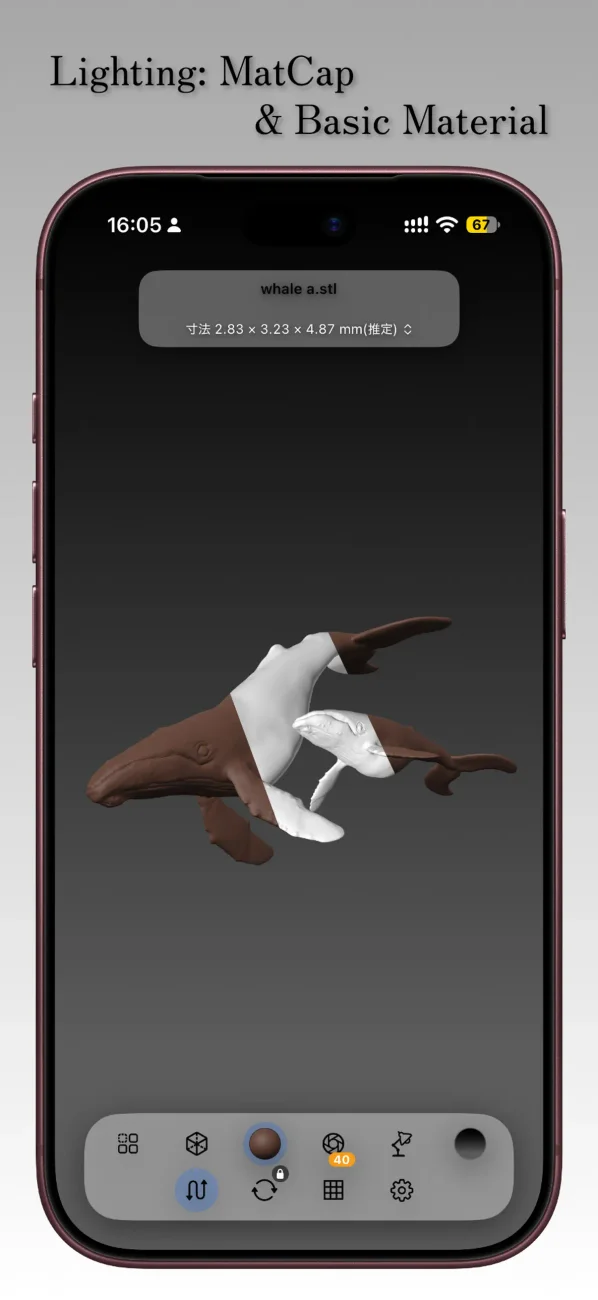
Switch between softly shaded MatCap materials to study the form itself.
Sky, dusk, night, or sakura: choose a background to suit your mood and your data.
Wireframe view to check the flow of the mesh.
Drag the circle on screen to change the light direction freely.
Change the field of view to adjust perspective.
Turntable mode slowly rotates the model so you can take it all in.
Grab the toolbar and move it to the top of the screen if you like.
HANDY FOR CHECKING
See dimensions. The unit is guessed from the file format and can be changed.
Get notified when a model's face directions (normals) look reversed.
Large files are displayed as smoothly as possible.
SIMPLE AND PRIVATE
Save your favorite files in the library.
No network access. Your files never leave the device, and no personal data is collected.
Almost every feature is free. The one-time purchase "Unlock All Features" removes the limits on the turntable (free users get a half turn) and the library size (free users can save 3 files). It is not a subscription.
SUPPORTED FORMATS USDZ / USD, OBJ, STL, glTF / GLB, PLY (point cloud) Note: animation playback is not supported.
Yang baru
Versi 1.5 · 21/11/2026
• Almost every feature is now free: MatCap, backgrounds, wireframe, light, field of view, and large files.
• A fresh, soft and tactile (neumorphic) design that supports both Light and Dark appearance. The toolbar and the screen frame now blend smoothly together.
• The grid is now shown as a checkerboard.
• Twist two fingers to tilt the model along the screen.
• Grab the toolbar and move it to the top of the screen.
• The light circle is now always shown at the center of the model.
• Added a soft fill light so the side facing away from the light doesn't go too dark.
• The outline of the "Cel-look" MatCap is now bolder and easier to see.
• The "Dark Gray" MatCap is slightly darker.
• The ground shadow now hides automatically when you look from below.
• Touches with three or more fingers are now ignored, to prevent accidental input.
• Removed the bounding-box button. The dimension numbers are still shown.
• Small display adjustments and bug fixes.
Privasi aplikasi
Yang dinyatakan Hirofumi Tanjo di App Store tentang cara aplikasi ini menangani data.
-
Data tidak dikumpulkan
Pengembang tidak mengumpulkan data apa pun dari aplikasi ini.
Praktik privasi dapat bervariasi, misalnya berdasarkan fitur yang Anda gunakan atau usia Anda.
Informasi
- Penjual
- Hirofumi Tanjo
- Kategori
- Grafik & Desain
- Versi
- 1.5
- Diperbarui
- 21/11/2026
- Dirilis
- 19/10/2026
- Ukuran
- 13,8 MB
- Memerlukan
- iOS 17.0 atau yang lebih baru
- Batasan usia
- 4+
- Harga
- Gratis
- Pembelian dalam aplikasi
- Ya
- Bahasa
- Inggris, Prancis, Jerman, Italia, Jepang, Korea, Tionghoa Sederhana, Spanyol, Tionghoa Tradisional
- Hak cipta
- © 2026 Studio_Yoru
Mungkin Anda juga suka
-
 MIRU 3DGrafik & Desain
-
 ShapePeek: STL & STEP ViewerGrafik & Desain
-
 LasViewer ProGrafik & Desain
-
 ÜnflatGrafik & Desain
-
 Model Viewer | CAD ViewerGrafik & Desain
-
 GLB: 3D Model GeneratorGrafik & Desain
-
 3dMasterGrafik & Desain
-
 Ubah Foto Jadi KartunAvatar, Anime dan Karikatur
-
 Realtime Drawing : Turbo PaintGrafik & Desain
-
 Open3D: STL & 3D Model ViewerGrafik & Desain