
metalign
Logbook for film photography
Conçue pour iPhone, iPad
Gratuit · Achats intégrés
- Classification d’âge4+
- CatégoriePhoto et vidéo
- DéveloppeurChristoph Auer
- LanguesAnglais+ 1 de plus
- Taille24,1 Mo
Renvoie vers la page App Store officielle
Download.org n’héberge aucun fichier de metalign. Le bouton ouvre la page de l’application sur App Store, où Christoph Auer la publie. Fiche vérifiée pour la dernière fois le 23/11/2026.
Captures d’écran



À propos
Le développeur n’a pas fourni ce texte dans votre langue.
Everything a frame should have carried.
A film scan comes back from the lab knowing nothing about itself: which camera, when, what settings, where. Film doesn’t record any of that, so somebody has to write it down. With metalign that happens as you go: log each frame as you shoot, and when the roll comes back, the log is written into your scans as real metadata, the kind a digital camera would have put there itself.
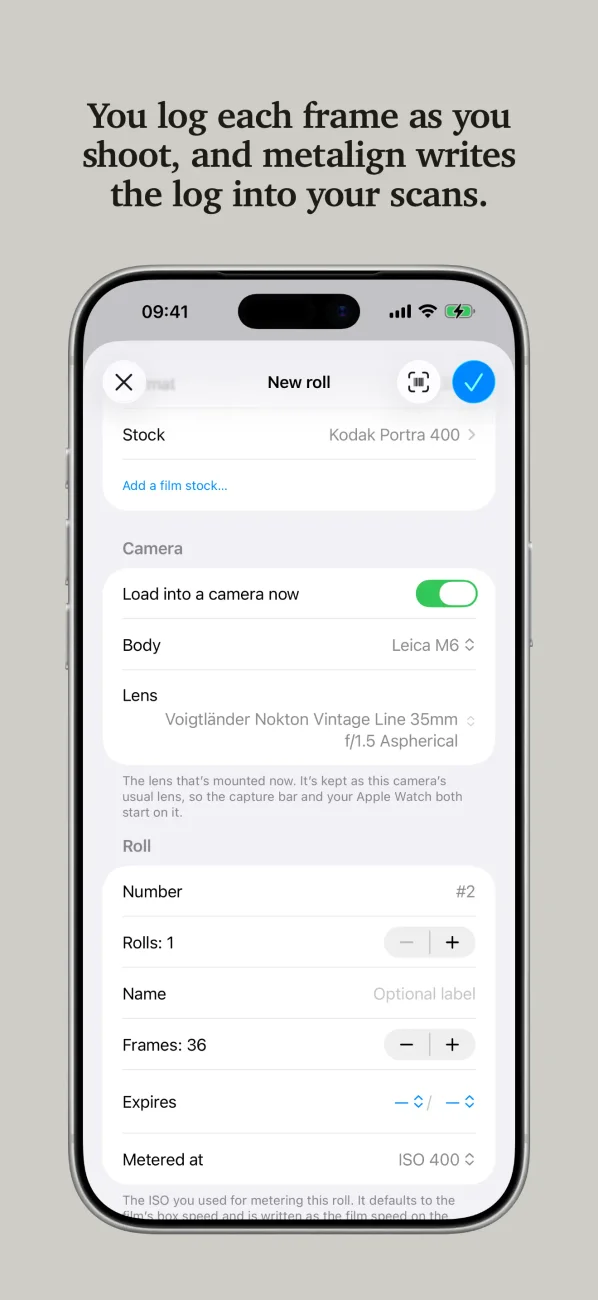
Load a roll
Which film, which format, and the ISO you’re rating it at. Or scan the barcode on the box: say which film it is the first time, and after that the scan fills it in. Between rolls your film lives here too: fridge, freezer, expiry date, and where each roll stands, from Unused to Scanned.
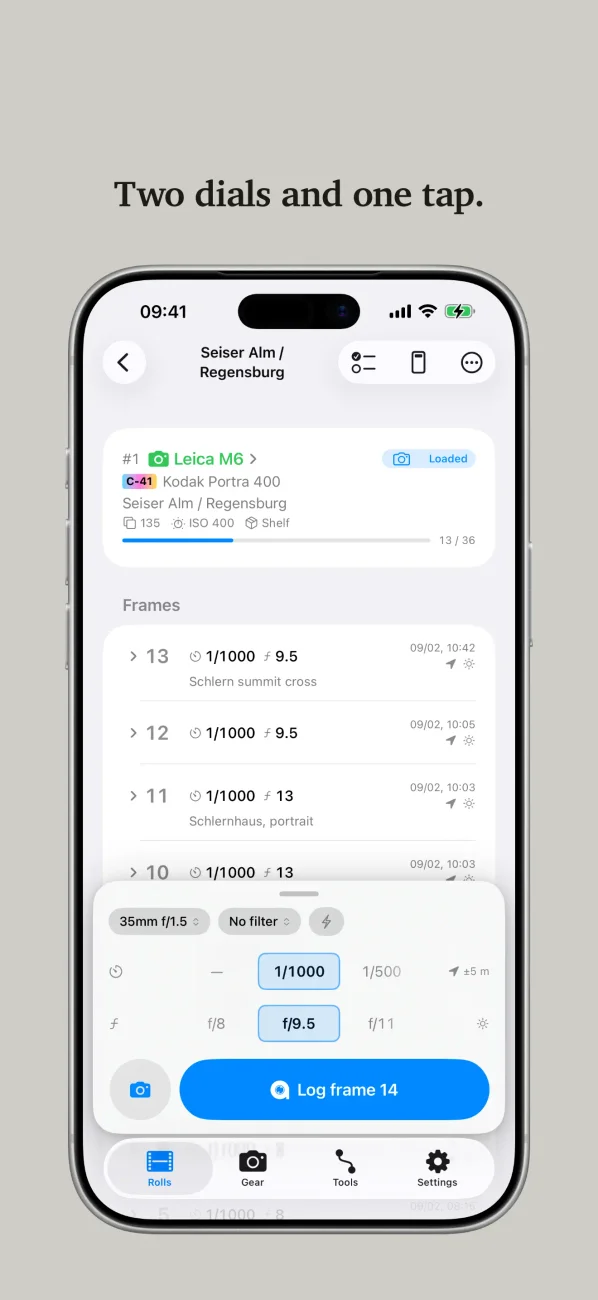
Log each frame
Two dials and one tap. The time comes along by itself, and the place too once you allow location, the dials stay where you left them, and a run at the same settings costs a tap a frame. A frame logged with no dials in front of you records no exposure unless you give it one. That is on purpose: better no data than a guess.
With your iPhone in a pocket
Most of a roll gets shot with your iPhone in a pocket, and it can stay there. Put the loaded roll on the Lock Screen, with a button that logs the next frame. From iOS 18, the same Log Frame control goes on the Action button or in Control Center without building a shortcut first, and Siri logs a frame by voice, with a note if you have something to say.
Apple Watch shows each camera with film in it, a turn of the Digital Crown apart, and it works with your iPhone out of range: the press is saved on the watch and lands on the roll at the time you pressed. It takes its own location as you press.
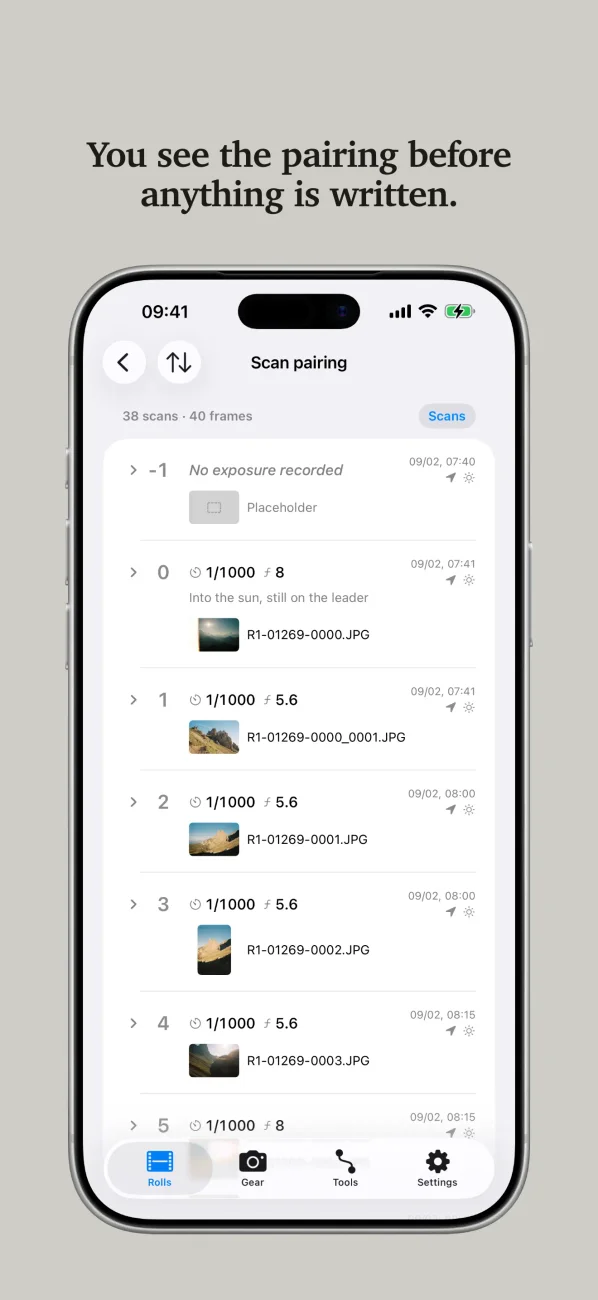
Check the pairing
Weeks later the lab sends back scans named after a job number. metalign lines them up against the log by position — frame 1 to the first scan, a blank frame holding its place — and lays the pairing out to check before anything is written. A roll that slipped by one frame shows up here, not in your scan folder.
Write onto the scans
One tap writes the roll’s metadata onto the lab’s JPEG scans: shutter, aperture, lens, film, the time each frame was taken in the time zone it was taken in, and where. All of it goes into the files themselves, as real EXIF and XMP, the metadata photo apps read. The picture is left alone: the pixels are copied as they are, never recompressed, and every file is read back before you get it. Scans from Files are copied into a new album in Photos or a new folder in Files, and the lab’s delivery stays as it came unless you choose to overwrite it. The written roll stays in the app as a contact sheet.
More in each frame
A frame can also carry the filter with its cost stated in stops, the flash, a title and a caption, and the light it was made in: golden hour, blue hour, the sun’s height and direction. Lenses and films come from a built-in catalogue, a lens with its real ring clicks, and a body you describe once, with its shutter dial’s real speeds.
No account and no tracking. Your library stays on your iPhone, and syncs through your own iCloud only if you turn that on.
No subscription. The first two rolls need nothing, and after that one purchase covers as many rolls as you like. Every roll you have can always be logged to its end.
Nouveautés
Version 1.1.0 · 20/11/2026
New
• Scan pairing shows its gestures step by step
• Save share cards to the roll’s album in Photos
• Rate metalign and metalign on Instagram in Settings > About
Changed
• The Rolls list now opens on the tab your film is in. If you had chosen All rolls, choose it again in Settings
• All rolls is the last tab
• Select is a checklist button
• Headings stay in place on share cards and contact sheets
• On Apple Watch, a crossed-out iPhone marks frames your iPhone hasn’t taken yet
Fixed
• Fixed XMP GPS tag writing
• Fixed Scan pairing losing picked scans when turned or resized
• Fixed share cards’ order in the roll’s album
• Fixed headings briefly lifting on share cards and contact sheets
Confidentialité de l’application
Ce que Christoph Auer déclare sur l’App Store au sujet du traitement des données par cette application.
-
Données non collectées
Le développeur ne collecte aucune donnée à partir de cette application.
Les pratiques en matière de confidentialité peuvent varier, notamment en fonction des fonctionnalités que vous utilisez ou de votre âge.
Informations
- Vendeur
- Christoph Auer
- Catégorie
- Photo et vidéo
- Version
- 1.1.0
- Mis à jour
- 20/11/2026
- Publié
- 11/11/2026
- Taille
- 24,1 Mo
- Nécessite
- iOS 17.0 ou version ultérieure
- Classification d’âge
- 4+
- Prix
- Gratuit
- Achats intégrés
- Oui
- Langues
- Anglais, Allemand
- Copyright
- © 2026 Christoph Auer
Vous aimerez peut-être aussi
-
 Filmlog AnalogPhoto et vidéo
-
 Analog BuddyCaméra & studio photo créatif
-
 Camera Shelf - Gear TrackerPhoto et vidéo
-
 Light Leak Club: Analog FilmPhoto et vidéo
-
 HorikaPhoto et vidéo
-
 Profondeur de Champ SharpStopHyperfocale, ND et étoiles
-
 GrayZone – PosemètrePosemètre spot précis
-
 FLANEUR – Street PhotographyPhoto et vidéo
-
 Mark II Artist's ViewfinderPlanifiez la séance facilement
-
 Very Good CameraPhoto et vidéo