
metalign
Logbook for film photography
Dirancang untuk iPhone, iPad
Gratis · Pembelian dalam aplikasi
- Batasan usia4+
- KategoriFoto & Video
- PengembangChristoph Auer
- BahasaInggris+ 1 lainnya
- Ukuran24,1 MB
Tertaut ke halaman resmi App Store
Download.org tidak menyimpan file metalign apa pun. Tombol ini membuka halaman aplikasi di App Store, tempat Christoph Auer menerbitkannya. Halaman terakhir diperiksa pada 23/11/2026.
Tangkapan layar



Tentang
Pengembang belum menyediakan teks ini dalam bahasa Anda.
Everything a frame should have carried.
A film scan comes back from the lab knowing nothing about itself: which camera, when, what settings, where. Film doesn’t record any of that, so somebody has to write it down. With metalign that happens as you go: log each frame as you shoot, and when the roll comes back, the log is written into your scans as real metadata, the kind a digital camera would have put there itself.
Load a roll
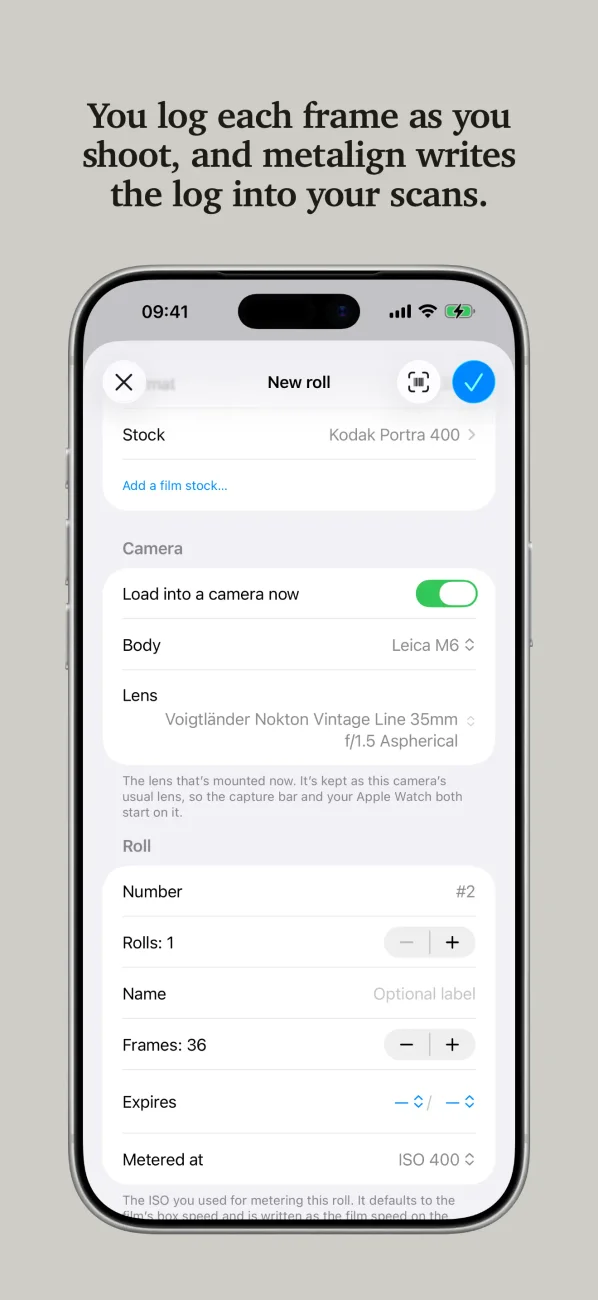
Which film, which format, and the ISO you’re rating it at. Or scan the barcode on the box: say which film it is the first time, and after that the scan fills it in. Between rolls your film lives here too: fridge, freezer, expiry date, and where each roll stands, from Unused to Scanned.
Log each frame
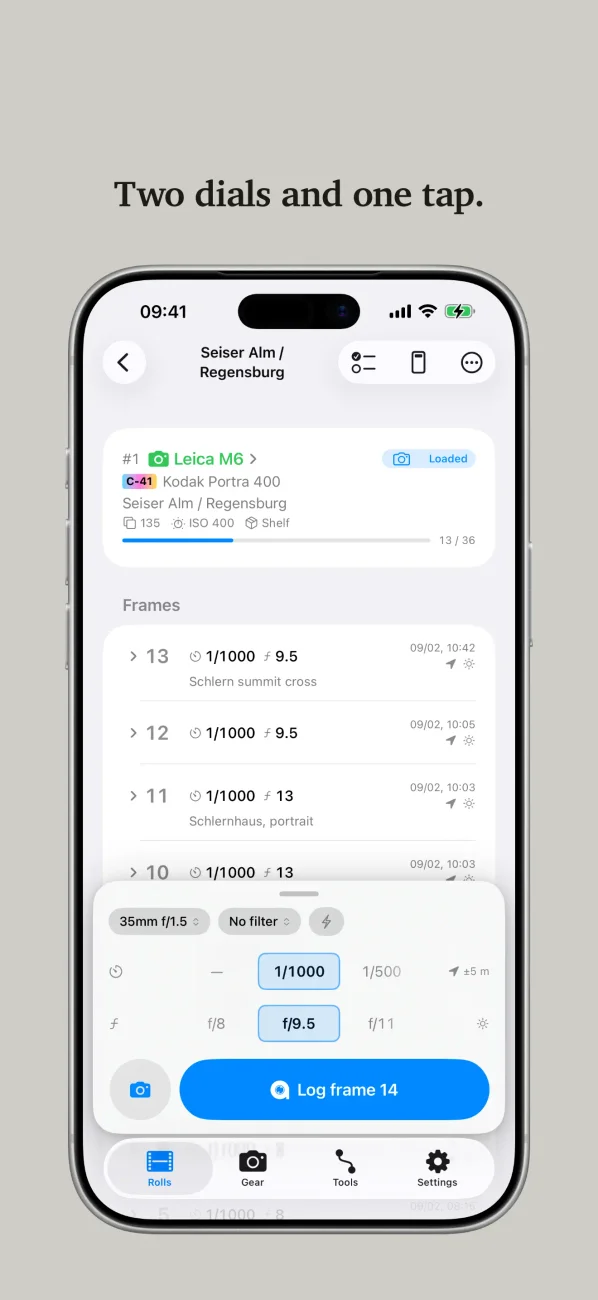
Two dials and one tap. The time comes along by itself, and the place too once you allow location, the dials stay where you left them, and a run at the same settings costs a tap a frame. A frame logged with no dials in front of you records no exposure unless you give it one. That is on purpose: better no data than a guess.
With your iPhone in a pocket
Most of a roll gets shot with your iPhone in a pocket, and it can stay there. Put the loaded roll on the Lock Screen, with a button that logs the next frame. From iOS 18, the same Log Frame control goes on the Action button or in Control Center without building a shortcut first, and Siri logs a frame by voice, with a note if you have something to say.
Apple Watch shows each camera with film in it, a turn of the Digital Crown apart, and it works with your iPhone out of range: the press is saved on the watch and lands on the roll at the time you pressed. It takes its own location as you press.
Check the pairing
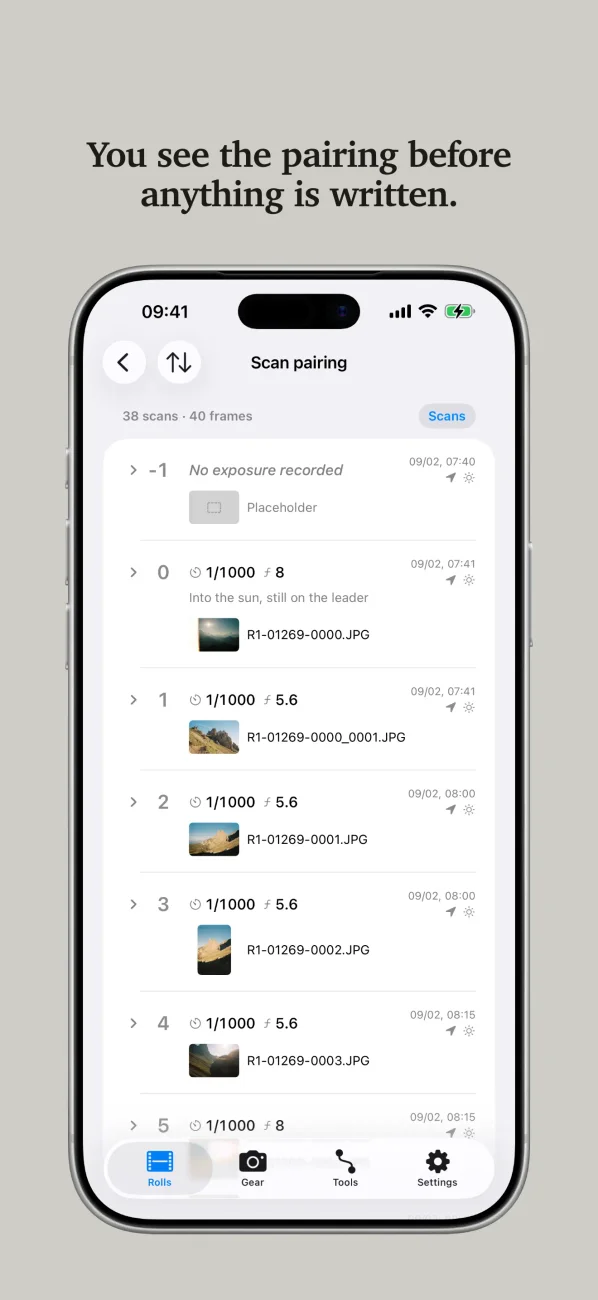
Weeks later the lab sends back scans named after a job number. metalign lines them up against the log by position — frame 1 to the first scan, a blank frame holding its place — and lays the pairing out to check before anything is written. A roll that slipped by one frame shows up here, not in your scan folder.
Write onto the scans
One tap writes the roll’s metadata onto the lab’s JPEG scans: shutter, aperture, lens, film, the time each frame was taken in the time zone it was taken in, and where. All of it goes into the files themselves, as real EXIF and XMP, the metadata photo apps read. The picture is left alone: the pixels are copied as they are, never recompressed, and every file is read back before you get it. Scans from Files are copied into a new album in Photos or a new folder in Files, and the lab’s delivery stays as it came unless you choose to overwrite it. The written roll stays in the app as a contact sheet.
More in each frame
A frame can also carry the filter with its cost stated in stops, the flash, a title and a caption, and the light it was made in: golden hour, blue hour, the sun’s height and direction. Lenses and films come from a built-in catalogue, a lens with its real ring clicks, and a body you describe once, with its shutter dial’s real speeds.
No account and no tracking. Your library stays on your iPhone, and syncs through your own iCloud only if you turn that on.
No subscription. The first two rolls need nothing, and after that one purchase covers as many rolls as you like. Every roll you have can always be logged to its end.
Yang baru
Versi 1.1.0 · 20/11/2026
New
• Scan pairing shows its gestures step by step
• Save share cards to the roll’s album in Photos
• Rate metalign and metalign on Instagram in Settings > About
Changed
• The Rolls list now opens on the tab your film is in. If you had chosen All rolls, choose it again in Settings
• All rolls is the last tab
• Select is a checklist button
• Headings stay in place on share cards and contact sheets
• On Apple Watch, a crossed-out iPhone marks frames your iPhone hasn’t taken yet
Fixed
• Fixed XMP GPS tag writing
• Fixed Scan pairing losing picked scans when turned or resized
• Fixed share cards’ order in the roll’s album
• Fixed headings briefly lifting on share cards and contact sheets
Privasi aplikasi
Yang dinyatakan Christoph Auer di App Store tentang cara aplikasi ini menangani data.
-
Data tidak dikumpulkan
Pengembang tidak mengumpulkan data apa pun dari aplikasi ini.
Praktik privasi dapat bervariasi, misalnya berdasarkan fitur yang Anda gunakan atau usia Anda.
Informasi
- Penjual
- Christoph Auer
- Kategori
- Foto & Video
- Versi
- 1.1.0
- Diperbarui
- 20/11/2026
- Dirilis
- 11/11/2026
- Ukuran
- 24,1 MB
- Memerlukan
- iOS 17.0 atau yang lebih baru
- Batasan usia
- 4+
- Harga
- Gratis
- Pembelian dalam aplikasi
- Ya
- Bahasa
- Inggris, Jerman
- Hak cipta
- © 2026 Christoph Auer
Mungkin Anda juga suka
-
 Filmlog AnalogFoto & Video
-
 Analog Buddy: Film CameraFoto & Video
-
 Camera Shelf - Gear TrackerFoto & Video
-
 Light Leak Club: Analog FilmFoto & Video
-
 HorikaFoto & Video
-
 SharpStop Depth of Field CalcFoto & Video
-
 GrayZone - Light MeterFoto & Video
-
 FLANEUR – Street PhotographyFoto & Video
-
 Mark II Artist's ViewfinderFoto & Video
-
 Very Good CameraFoto & Video