
- Classification d’âge4+
- CatégorieUtilitaires
- DéveloppeurAllwomenstalk
- LanguesAnglais
- Taille2,0 Mo
Renvoie vers la page App Store officielle
Download.org n’héberge aucun fichier de Mirrox. Le bouton ouvre la page de l’application sur App Store, où Allwomenstalk la publie. Fiche vérifiée pour la dernière fois le 12/11/2026.
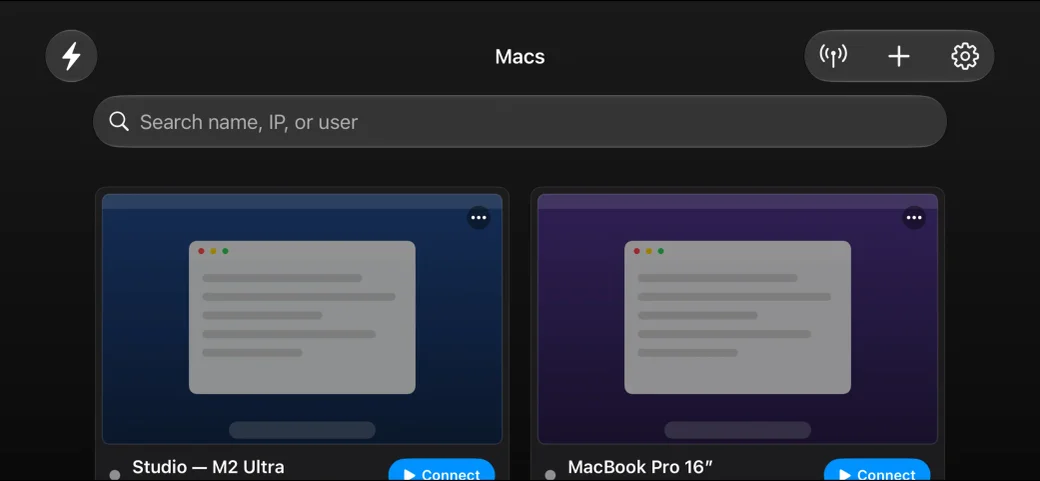
Captures d’écran


À propos
Le développeur n’a pas fourni ce texte dans votre langue.
Mirrox is the remote desktop for your Mac that feels truly native.
Connect to your Mac’s built-in Screen Sharing (VNC) over your local network or Tailscale and control it from your iPad or iPhone.
Built entirely with native SwiftUI, Mirrox implements the complete VNC protocol in Swift with no third-party libraries, no cloud relay, and no account required. Your screen never leaves your network.
// Find Your Mac Automatically
Stop typing IP addresses.
Mirrox automatically discovers Macs running Screen Sharing using Bonjour, fast local network scanning, and reachability checks for your Tailscale machines. Just tap your Mac and connect.
// A Remote That Feels Physical
• Trackpad mode with precise relative cursor movement and edge-detection haptics
• Tap to click, drag to drag, long press or two-finger tap to right-click
• Two-finger scrolling, pinch to zoom into Retina detail, and smooth panning
• Crisp haptic feedback for clicks, scrolling, and screen edges
• Full keyboard support, including ⌘ Command, ⌥ Option, ⌃ Control, function keys, and arrow keys
// Mirrox Pro Features — In-App Purchase Required
• Smart Zoom — Double-tap any macOS window to instantly zoom into it. (Requires Mirrox Pro)
• Picture in Picture — Float your Mac above other iPad apps. (Requires Mirrox Pro)
• Multi-Mac — Connect several Macs and switch between them with a three-finger swipe. (Requires Mirrox Pro)
• iCloud Sync — Your saved Macs and settings stay synchronized across all your Apple devices. (Requires Mirrox Pro)
// Private by Design
No accounts.
No analytics.
No middleman servers.
Mirrox talks directly to the Screen Sharing service built into macOS. Passwords are securely stored on your device and synchronized only through your private iCloud account.
// Works Everywhere
Native on iPad, iPhone, and Mac (Catalyst).
// Getting Started
On your Mac, enable Screen Sharing in:
System Settings → General → Sharing
Open Mirrox, tap your Mac, and you’re connected in seconds.
***
Terms of Use (EULA): https://www.apple.com/legal/internet-services/itunes/dev/stdeula/
Confidentialité de l’application
Ce que Allwomenstalk déclare sur l’App Store au sujet du traitement des données par cette application.
-
Données non collectées
Le développeur ne collecte aucune donnée à partir de cette application.
Les pratiques en matière de confidentialité peuvent varier, notamment en fonction des fonctionnalités que vous utilisez ou de votre âge.
Informations
- Vendeur
- Vyacheslav Kaushan
- Catégorie
- Utilitaires
- Version
- 1.7
- Mis à jour
- 29/07/2026
- Publié
- 29/07/2026
- Taille
- 2,0 Mo
- Nécessite
- iOS 18.6 ou version ultérieure
- Classification d’âge
- 4+
- Prix
- Gratuit
- Langues
- Anglais
- Copyright
- © Agnit Inc
Vous aimerez peut-être aussi
-
 Glassy Desk: Remote DesktopUtilitaires
-
 PosKVM - Remote Desktop VNCUtilitaires
-
 ShortSheetsUtilitaires
-
 TapStory - Spatial CopilotUtilitaires
-
 Fluxion Feeder - RSS ReaderUtilitaires
-
 PrompterGoUtilitaires
-
 Flicker CheckUtilitaires
-
 OmniGateUtilitaires
-
 Argly Remote DesktopUtilitaires
-
 Headroom: Remote DesktopVotre agent IA, sur le canapé