
- Classification d’âge4+
- CatégorieGraphisme et design
- DéveloppeurNathan Johnson
- LanguesAnglais
- Taille38,5 Mo
OG Paper n’est peut-être pas disponible sur App Store pour le moment
La fiche de la boutique était inaccessible lors de notre dernière vérification. Le lien mène toujours à la page App Store officielle.
Captures d’écran



À propos
Le développeur n’a pas fourni ce texte dans votre langue.
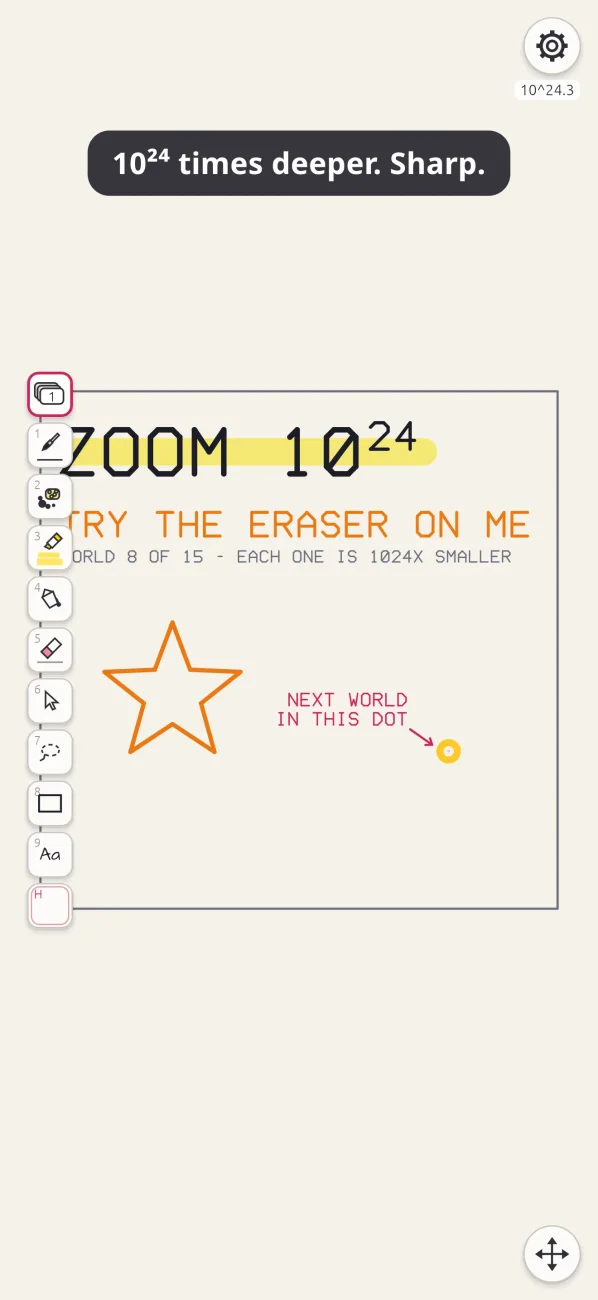
OG Paper is an endless canvas: sketch, write, paste and arrange anything, then zoom in forever. There is no edge and no bottom: draw a city, zoom into a window, and write a note inside it a trillion times smaller. Everything stays sharp at any depth.
DRAW YOUR WAY
• A brush with pressure, dashes and opacity, or a full brush engine: pencil, charcoal, watercolor, airbrush, ink, neon and more, with every setting behind them
• Highlighter, eraser, bucket fill, textures and stamps
• Shapes with hand-drawn or clean outlines, and a pen for smooth curves
• Text in bundled fonts, with letter spacing, line height and words that follow any curve
• Text boxes whose words wrap and shrink to fit, and spell check as you type
• Write by hand and turn it into text
DESIGN
• Layers you can hide, lock, reorder, fade, blend (multiply, screen and more) and clip to the layer below
• Linear and radial gradients, saved swatches
• Combine shapes: union, subtract, intersect, exclude
• Group things, align and spread them out, snap to what's around, type exact sizes and positions, show rulers
• Frames for pages and artboards, and components whose copies update with the original
DIAGRAMS
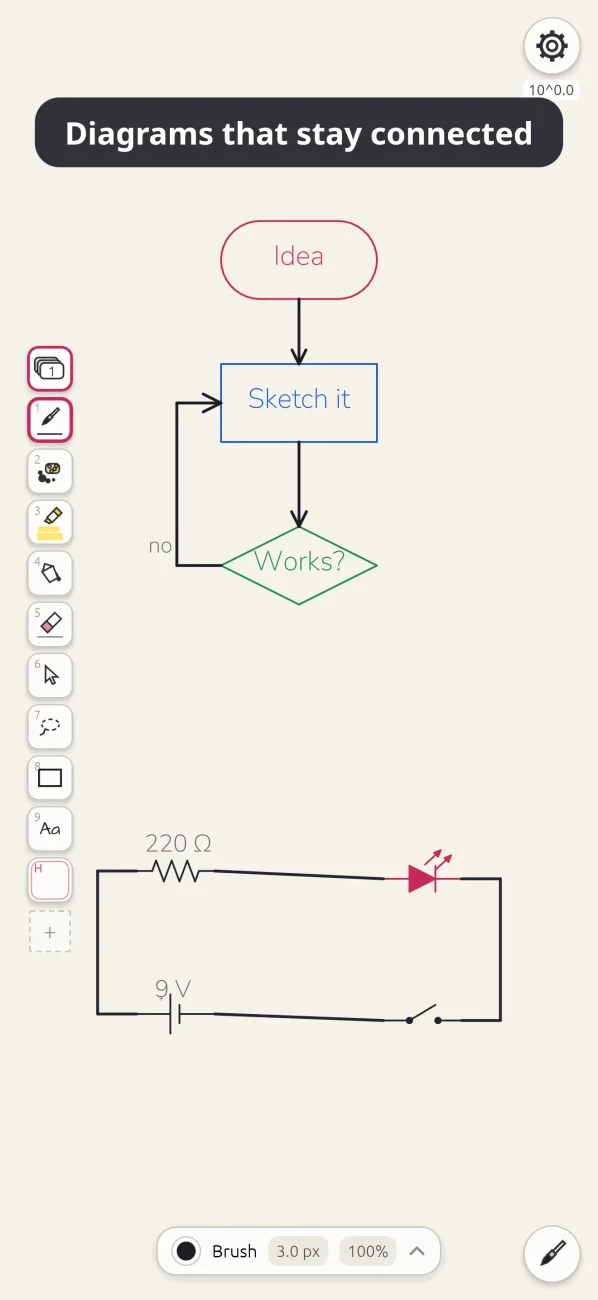
Turn on diagram mode and lines and arrows stay joined to what they connect. Place flowchart, electrical and mechanical symbols with pins: wires stay on their pins as you move and turn them.
PORTALS
Draw a window that shows another part of your canvas, live. Zoom into it and you go through it. Put a portal at the end of a street that shows the street itself and the zoom never ends.
KEEP YOUR TOOLS AT HAND
Save tools with their exact settings in toolbars and an inventory, give each toolbar a press-and-hold tool, and switch toolbars in a tap. Resize the whole interface, hide what you don't need, or go dark.
FIND YOUR WAY
Search every word on the canvas, save views and fly back to them across any zoom depth.
YOURS, AND PRIVATE
Your canvases are files on your device in an open, documented format. No account, no ads, no tracking: OG Paper collects no data.
DRAW TOGETHER, WHEN YOU WANT
Share a canvas live with end-to-end encryption, or host it yourself. Offline work joins in when you reconnect.
FREE AND OPEN SOURCE
OG Paper is free and open source (MPL-2.0), and runs on iPhone, iPad and Mac.
Nouveautés
Version 1.2 · 19/11/2026
Menus work by tap again: items in Settings, the main menu and the toolbar menu now do what you tap instead of closing the menu.
Confidentialité de l’application
Ce que Nathan Johnson déclare sur l’App Store au sujet du traitement des données par cette application.
-
Données non collectées
Le développeur ne collecte aucune donnée à partir de cette application.
Les pratiques en matière de confidentialité peuvent varier, notamment en fonction des fonctionnalités que vous utilisez ou de votre âge.
Informations
- Vendeur
- Nathan Johnson
- Catégorie
- Graphisme et design
- Version
- 1.2
- Mis à jour
- 19/11/2026
- Publié
- 31/10/2026
- Taille
- 38,5 Mo
- Nécessite
- iOS 15.0 ou version ultérieure
- Classification d’âge
- 4+
- Langues
- Anglais
- Copyright
- © 2026 OmegaGiven
Vous aimerez peut-être aussi
-
 InfiniaGraphisme et design
-
 Clio Infinite PaintGraphisme et design
-
 Moodboard & références : MicaDesign UI, mockup et prototype
-
 Toile minimalisteDessin, croquis, création
-
 Blocked—Block MosaicsGraphisme et design
-
 Proref: Art Reference BoardsGraphisme et design
-
 Dessin : Infinite CanvasPeindre, croquis & zoom infini
-
 Esquisse: Architect NotebookGraphisme et design
-
 ArtDeck : planche de référenceMoodboard, notan et palette
-
 Letter Set TypographyGraphisme et design