
Pyre: Visual Focus Timer
Pomodoro & Deep Work
Conçue pour iPhone, iPad, iPod touch
Gratuit
- Classification d’âge4+
- CatégorieProductivité
- DéveloppeurPeppertree
- LanguesAnglais+ 4 de plus
- Taille24,0 Mo
Renvoie vers la page App Store officielle
Download.org n’héberge aucun fichier de Pyre: Visual Focus Timer. Le bouton ouvre la page de l’application sur App Store, où Peppertree la publie. Fiche vérifiée pour la dernière fois le 18/11/2026.
Captures d’écran


À propos
Le développeur n’a pas fourni ce texte dans votre langue.
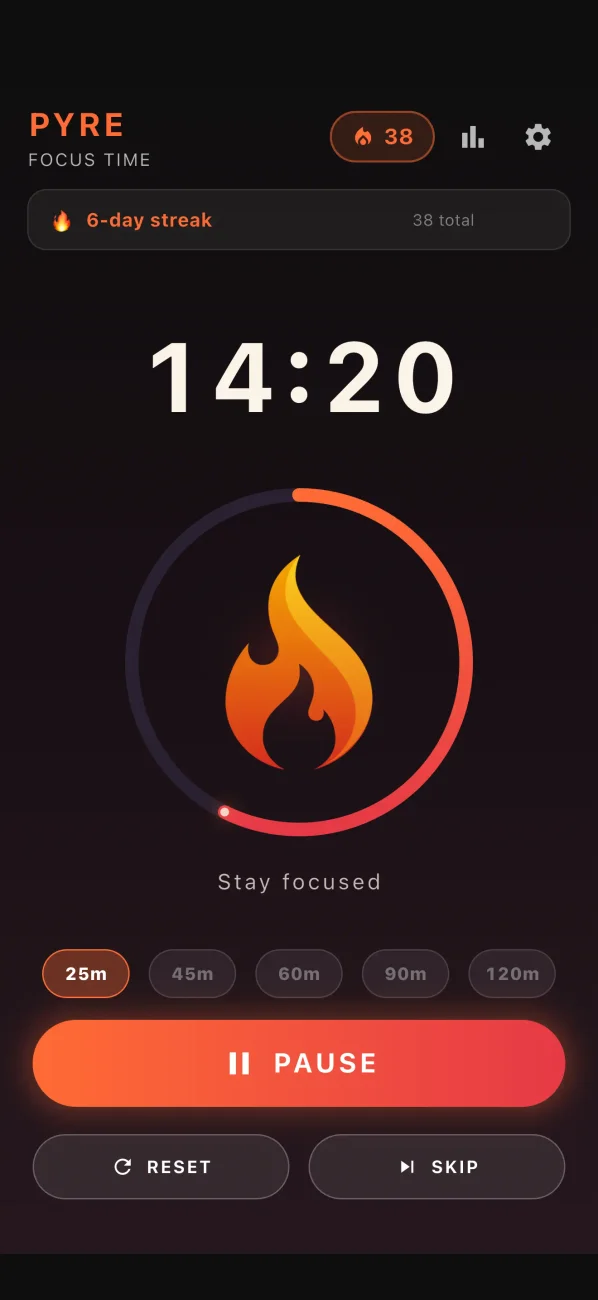
Ten minutes into a work block, can you say how much time is left without checking a number? Pyre turns the clock into a ring of flame. It burns down as your session runs, and what is left of the ring is the time you have left.
The countdown digits sit in the middle of the ring, but you do not have to read them: one glance from across the desk tells you where you are.
PICK A RHYTHM
- Classic 25: a 25 minute focus sprint with a 5 minute break
- Deep 45 and Deep 60: one long block, no break built in
- Deep 90 and Deep 120: long blocks with a 15 or 20 minute break afterwards
- Breaks can start by themselves when a session ends, or wait for your tap
- A notification tells you when a session or break is over, even with the screen locked
SETTINGS FOR WANDERING ATTENTION
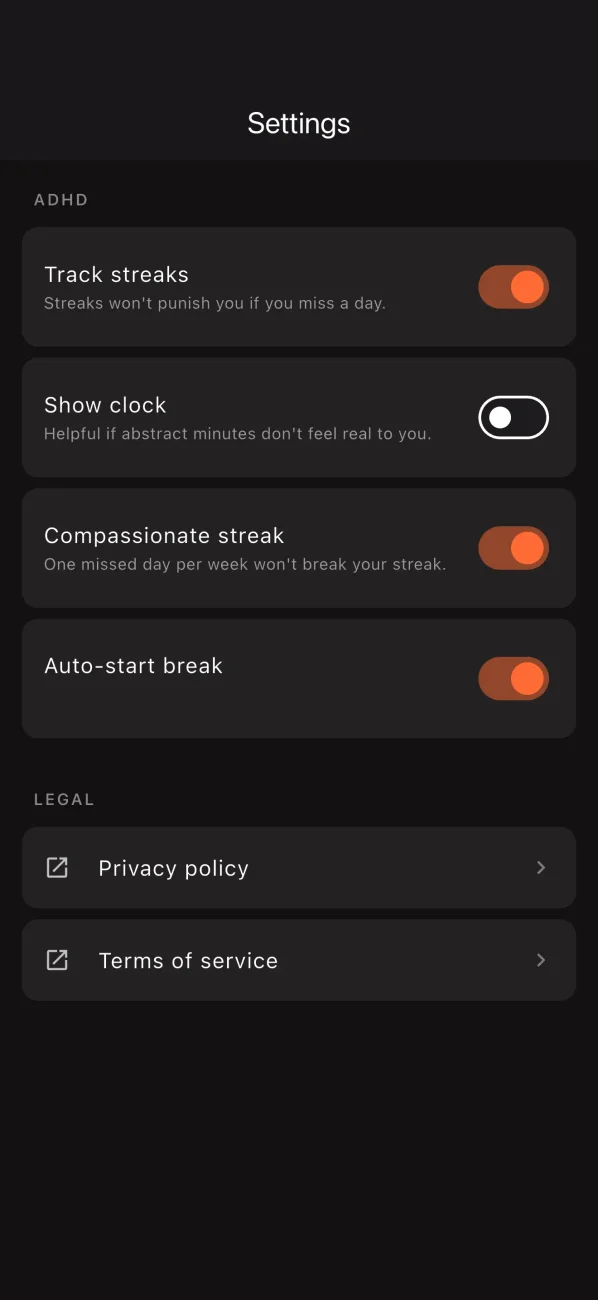
- Show the wall clock beside the timer when minutes feel abstract
- Streaks are off by default. Turn them on only if a streak motivates you
- Compassionate streak: one missed day per week does not break it
- Stats show lifetime sessions, plus your current and best streak when streaks are on
ADHD-friendly here means gentle defaults and a visual cue. Pyre is a productivity tool, not a medical device. It does not diagnose, treat or manage ADHD or any other condition.
THE AD, AND YOUR DATA
Pyre is free. It shows a single small banner at the bottom of the Stats screen, and nowhere else. The timer screen is where your session runs, so it stays clear.
Where the law requires it (the EEA and UK), a consent form asks about ads before any load, and Settings gets an Ad privacy options row so you can change your answer later. On iPhone and iPad the system tracking prompt appears only if that step allows it. Say no to the form or to the prompt and nothing in Pyre gets locked.
Your settings, session totals and streaks are stored on your device and there is no Pyre account. The only network traffic Pyre starts itself is the ad request.
The notification prompt appears when you start your first session, not when you open the app.
WHERE IT HELPS
Writers, students, developers and anyone who loses the thread of time while working. If a plain countdown never felt real to you, watch it burn.
Questions or feedback: contact+pyre@peppertree.so
Nouveautés
Version 1.1.1 · 29/10/2026
Pyre 1.1.1
- With Auto-start break off, the break now waits for your Start instead of being skipped
- New in Settings: switch the 9:00 daily reminder on or off
- The session-end alert now sounds while Pyre is open on screen
- Your streak updates as soon as you come back to Pyre on a new day
- Turning streaks on after a session counts today right away
- Stats show the streak cards only when streaks are on
- The wall clock follows your device's 12 or 24-hour setting
- Streak wording now matches the rule: with compassionate streak on, one missed day a week is forgiven
- The flame ring stops animating while the timer is idle, which saves battery
Confidentialité de l’application
Ce que Peppertree déclare sur l’App Store au sujet du traitement des données par cette application.
-
Données utilisées pour vous suivre
Peuvent être utilisées pour vous suivre sur des applications et des sites web appartenant à d’autres sociétés.
- Identifiants
-
Données établissant un lien avec vous
Peuvent être collectées et liées à votre identité.
- Emplacement
- Identifiants
- Données d’utilisation
-
Données n’établissant aucun lien avec vous
Peuvent être collectées, mais ne sont pas liées à votre identité.
- Diagnostic
Les pratiques en matière de confidentialité peuvent varier, notamment en fonction des fonctionnalités que vous utilisez ou de votre âge.
Informations
- Vendeur
- Peppertree
- Catégorie
- Productivité
- Version
- 1.1.1
- Mis à jour
- 29/10/2026
- Publié
- 18/05/2026
- Taille
- 24,0 Mo
- Nécessite
- iOS 15.0 ou version ultérieure
- Classification d’âge
- 4+
- Prix
- Gratuit
- Langues
- Anglais, Japonais, Coréen, Chinois simplifié, Chinois traditionnel
- Copyright
- © 2026 Peppertree
Vous aimerez peut-être aussi
-
 Pomodoro: Focus & BreakProductivité
-
 25-5 Timer - Focus TimerProductivité
-
 FocusPomo: Pomodoro TimerProductivité
-
 Pomodoro Timer - Multi StyleProductivité
-
 Cozy Focus - Visual TimerProductivité
-
 Task Organizer todo list dailyProductivité
-
 Focus Timer: Pomodoro; TasksProductivité
-
 TabPadProductivité
-
 TimeSee: Visual Timer for ADHDProductivité
-
 time[Box]Productivité