
Pyre: Visual Focus Timer
Pomodoro & Deep Work
Designed for iPhone, iPad, iPod touch
Free
- Age rating4+
- CategoryProductivity
- DeveloperPeppertree
- LanguagesEnglish+ 4 more
- Size24.0 MB
Links to the official App Store page
Download.org hosts no file of Pyre: Visual Focus Timer. The button opens its official App Store page, published by Peppertree. Listing last checked on Nov 18, 2026.
Screenshots


About
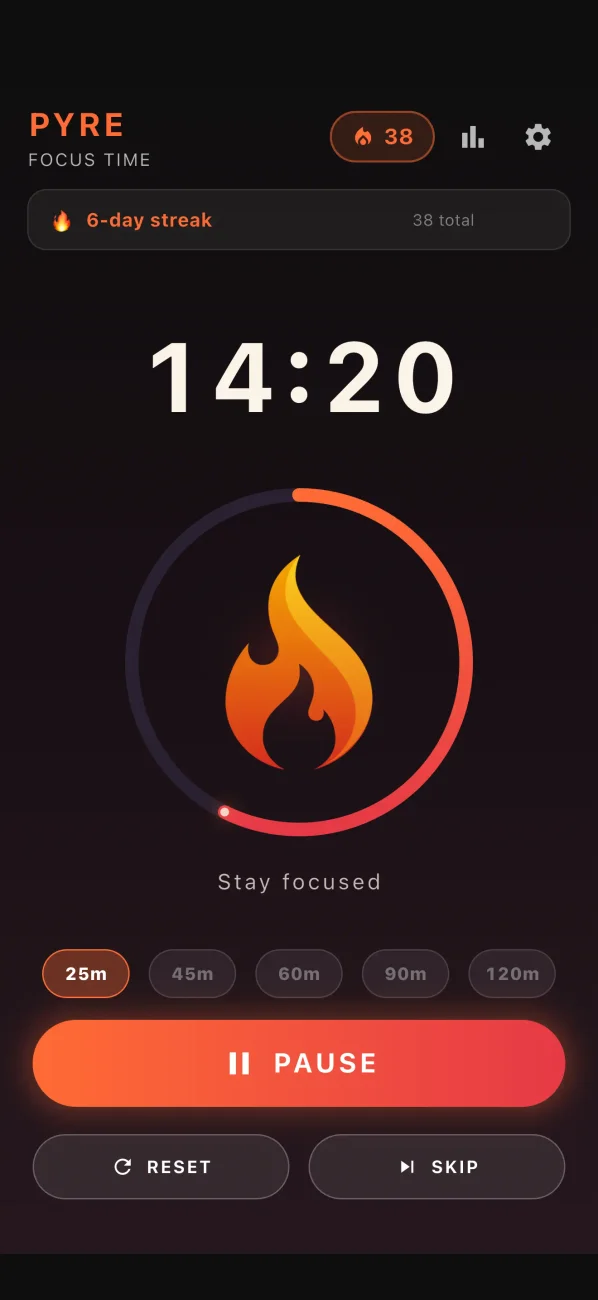
Ten minutes into a work block, can you say how much time is left without checking a number? Pyre turns the clock into a ring of flame. It burns down as your session runs, and what is left of the ring is the time you have left.
The countdown digits sit in the middle of the ring, but you do not have to read them: one glance from across the desk tells you where you are.
PICK A RHYTHM
- Classic 25: a 25 minute focus sprint with a 5 minute break
- Deep 45 and Deep 60: one long block, no break built in
- Deep 90 and Deep 120: long blocks with a 15 or 20 minute break afterwards
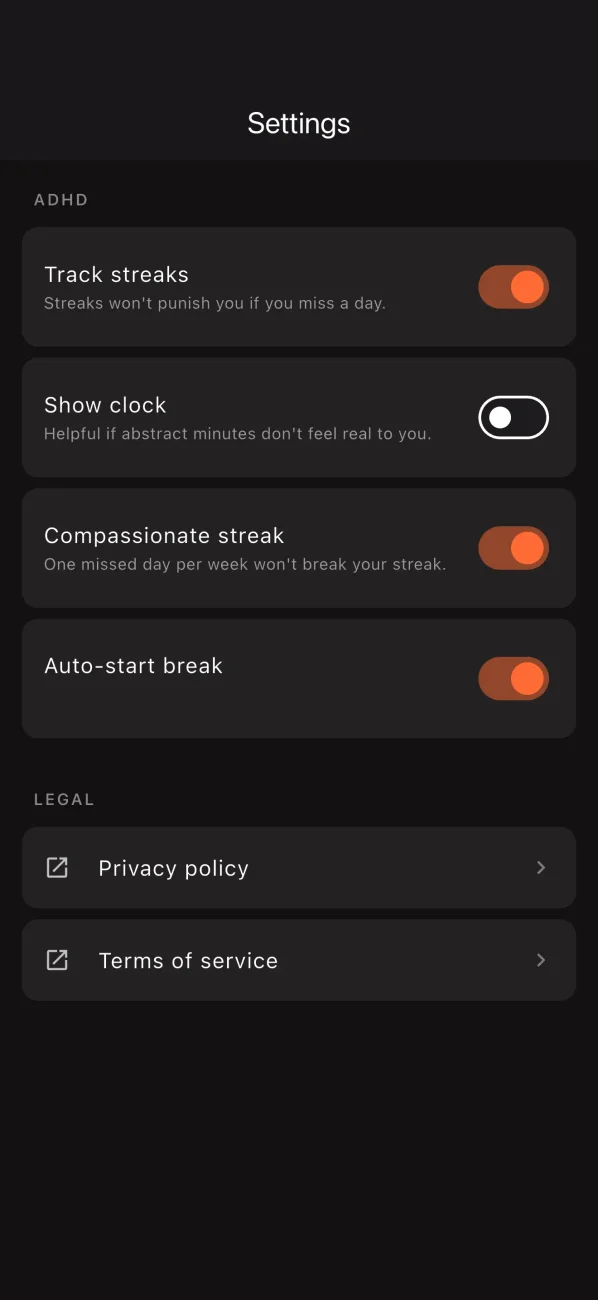
- Breaks can start by themselves when a session ends, or wait for your tap
- A notification tells you when a session or break is over, even with the screen locked
SETTINGS FOR WANDERING ATTENTION
- Show the wall clock beside the timer when minutes feel abstract
- Streaks are off by default. Turn them on only if a streak motivates you
- Compassionate streak: one missed day per week does not break it
- Stats show lifetime sessions, plus your current and best streak when streaks are on
ADHD-friendly here means gentle defaults and a visual cue. Pyre is a productivity tool, not a medical device. It does not diagnose, treat or manage ADHD or any other condition.
THE AD, AND YOUR DATA
Pyre is free. It shows a single small banner at the bottom of the Stats screen, and nowhere else. The timer screen is where your session runs, so it stays clear.
Where the law requires it (the EEA and UK), a consent form asks about ads before any load, and Settings gets an Ad privacy options row so you can change your answer later. On iPhone and iPad the system tracking prompt appears only if that step allows it. Say no to the form or to the prompt and nothing in Pyre gets locked.
Your settings, session totals and streaks are stored on your device and there is no Pyre account. The only network traffic Pyre starts itself is the ad request.
The notification prompt appears when you start your first session, not when you open the app.
WHERE IT HELPS
Writers, students, developers and anyone who loses the thread of time while working. If a plain countdown never felt real to you, watch it burn.
Questions or feedback: contact+pyre@peppertree.so
What’s new
Version 1.1.1 · Oct 29, 2026
Pyre 1.1.1
- With Auto-start break off, the break now waits for your Start instead of being skipped
- New in Settings: switch the 9:00 daily reminder on or off
- The session-end alert now sounds while Pyre is open on screen
- Your streak updates as soon as you come back to Pyre on a new day
- Turning streaks on after a session counts today right away
- Stats show the streak cards only when streaks are on
- The wall clock follows your device's 12 or 24-hour setting
- Streak wording now matches the rule: with compassionate streak on, one missed day a week is forgiven
- The flame ring stops animating while the timer is idle, which saves battery
App privacy
What Peppertree declares on the App Store about how this app handles data.
-
Data used to track you
May be used to track you across apps and websites owned by other companies.
- Identifiers
-
Data linked to you
May be collected and linked to your identity.
- Location
- Identifiers
- Usage data
-
Data not linked to you
May be collected but is not linked to your identity.
- Diagnostics
Privacy practices may vary, for example with the features you use or your age.
Information
- Seller
- Peppertree
- Category
- Productivity
- Version
- 1.1.1
- Updated
- Oct 29, 2026
- Released
- May 18, 2026
- Size
- 24.0 MB
- Requires
- iOS 15.0 or later
- Age rating
- 4+
- Price
- Free
- Languages
- English, Japanese, Korean, Simplified Chinese, Traditional Chinese
- Copyright
- © 2026 Peppertree
You might also like
-
 Pomodoro: Focus & BreakFocus, Break, Achieve More
-
 25-5 Timer - Focus TimerFocus Timer
-
 FocusPomo: Pomodoro TimerADHD focus & study timer
-
 Pomodoro Timer - Multi StyleFocus, Study & Deep Work
-
 Cozy Focus - Visual TimerStudy Planner & Lofi Music
-
 Task Organizer todo list dailyreminders grocery list planner
-
 Focus Timer: Pomodoro; TasksADHD Study & Deep Work
-
 TabPadCloud notepad with tabs
-
 TimeSee: Visual Timer for ADHDBeat Time Blindness & Focus
-
 time[Box]Minimalist Timer for Focus