
- Classification d’âge4+
- CatégorieProductivité
- DéveloppeurChristian Faur
- LanguesAnglais
- Taille10,5 Mo
Renvoie vers la page App Store officielle
Download.org n’héberge aucun fichier de RoomSlate. Le bouton ouvre la page de l’application sur App Store, où Christian Faur la publie. Fiche vérifiée pour la dernière fois le 12/11/2026.
Captures d’écran



À propos
Le développeur n’a pas fourni ce texte dans votre langue.
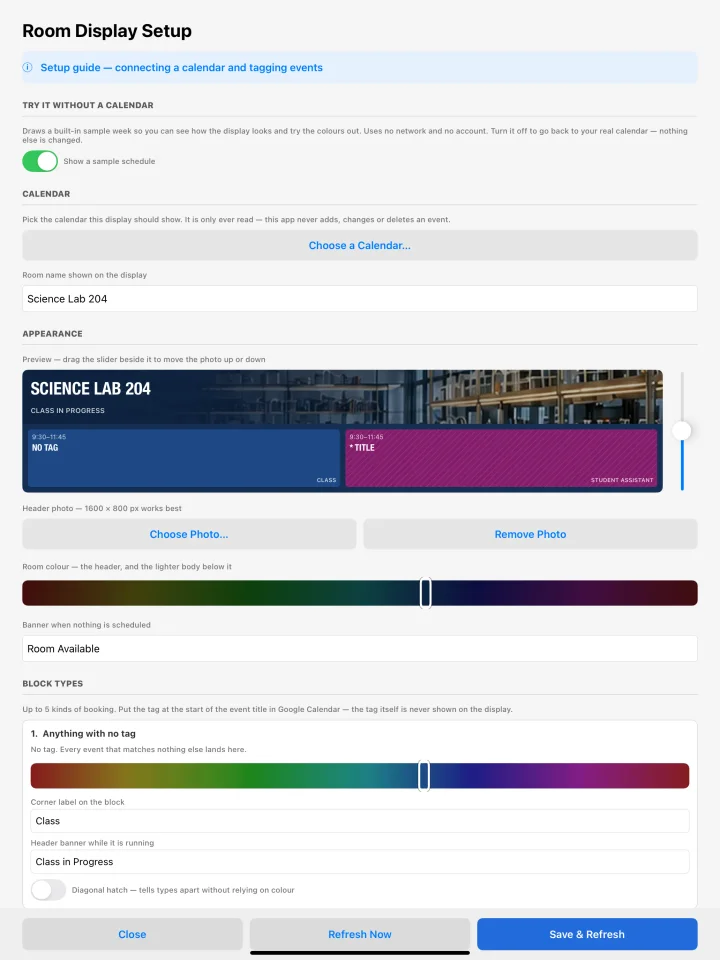
Room Slate turns an iPad into a clear, always-on display for any room — a classroom, lab, studio, meeting room, or workshop.
It is completely free. No subscription, no account, no ads, and nothing is collected.
REPURPOSE AN IPAD YOU ALREADY OWN
Room Slate runs on iOS 12 and later, so an iPad that is too old for much else is ideal for this. Mount it by the door, plug it in, and it earns its keep again.
SIMPLE TO SET UP
Add the room's calendar to the iPad once in the Settings app — Google, iCloud, Outlook, Microsoft 365, Exchange, or any subscribed feed. Open Room Slate, pick that calendar from a list, and name the room. That is the whole setup. There is no server, no script, and no service to sign up for.
READS YOUR CALENDAR, NEVER CHANGES IT
The app only ever reads. It cannot add, edit, or delete an event, so it is safe to point at a calendar other people rely on.
ON THE DISPLAY
• What is happening right now, and the time it ends
• Today plus the next two days, side by side
• A live "now" line across the schedule
• Your room's name, your colour, and a photo of the space
COLOUR-CODE DIFFERENT KINDS OF BOOKING
Define up to five block types. Put a tag such as * or # at the start of an event title and that booking gets its own colour, its own corner label, and its own header wording — "Class in Progress", "Student Hours", "Maintenance", whatever fits. The tag itself never appears on screen.
BUILT TO STAY ON A WALL
• Energy saver dims the screen overnight and brings it back by itself — it never sleeps
• Choose the hours shown, so a 9-to-6 room does not waste space on empty mornings
• Works with Guided Access, so nobody wanders off into other apps
• A plain "last checked" readout tells you at a glance whether the display is healthy
NO ACCOUNT, NO DATA COLLECTION
There is no login, no analytics, and no tracking. Everything stays on the iPad.
Want to see it first? Switch on the sample schedule in Setup — it needs no calendar and no network at all.
Confidentialité de l’application
Ce que Christian Faur déclare sur l’App Store au sujet du traitement des données par cette application.
-
Données non collectées
Le développeur ne collecte aucune donnée à partir de cette application.
Les pratiques en matière de confidentialité peuvent varier, notamment en fonction des fonctionnalités que vous utilisez ou de votre âge.
Informations
- Vendeur
- Christian Faur
- Catégorie
- Productivité
- Version
- 1.0
- Mis à jour
- 13/08/2026
- Publié
- 13/08/2026
- Taille
- 10,5 Mo
- Nécessite
- iOS 12.0 ou version ultérieure
- Classification d’âge
- 4+
- Prix
- Gratuit
- Langues
- Anglais
- Copyright
- © 2026 Christian Faur
Vous aimerez peut-être aussi
-
 HoldspaceProductivité
-
 RemindMe! - Dementia CalendarProductivité
-
 Plandy : agenda et tâchesDes titres, pas des pastilles
-
 Enregistreur pour RéunionsEnregistre, transcrit, résume
-
 3D Model Viewer: STL & USDZProductivité
-
 OptiSigns Digital SignageProductivité
-
 WebWatch : Monitoring site webAlertes Prix et Changements
-
 Simple Whiteboard: TableauTableau blanc simple et rapide
-
 Meeting OwlProductivité
-
 Make for iOSProductivité