- Classification d’âge4+
- CatégorieUtilitaires
- DéveloppeurDragos Gavrilovici
- LanguesAnglais
- Taille42,8 Mo
Renvoie vers la page App Store officielle
Download.org n’héberge aucun fichier de SwiftConvert. Le bouton ouvre la page de l’application sur App Store, où Dragos Gavrilovici la publie. Fiche vérifiée pour la dernière fois le 26/11/2026.
Captures d’écran
À propos
Le développeur n’a pas fourni ce texte dans votre langue.
Convert video and audio right on your iPhone or iPad. No account, no tracking, no analytics, and nothing you convert is uploaded.
SYNC BETWEEN YOUR DEVICES
Pair with your Mac, Apple TV or another iPhone or iPad once with a QR or 6-digit code. While SwiftConvert is open on both, presets, batch reports, notes and your list of converted files stay in step over your local network. Queue jobs and source files are never shared.
LISTEN & TAKE NOTES
SwiftConvert captures what your iPhone or iPad is playing and transcribes it on-device. Notes save to Library to read or share as timestamped Markdown. With Apple Intelligence, Visual Notes turns a transcript into key ideas, cards and recall questions.
APPLE WATCH
Your Apple Watch is a remote for your iPhone: start or stop Listen & Take Notes, or start, stop and retry a batch. Needs a reachable iPhone; not for iPad.
THE CASSETTE AND dragON
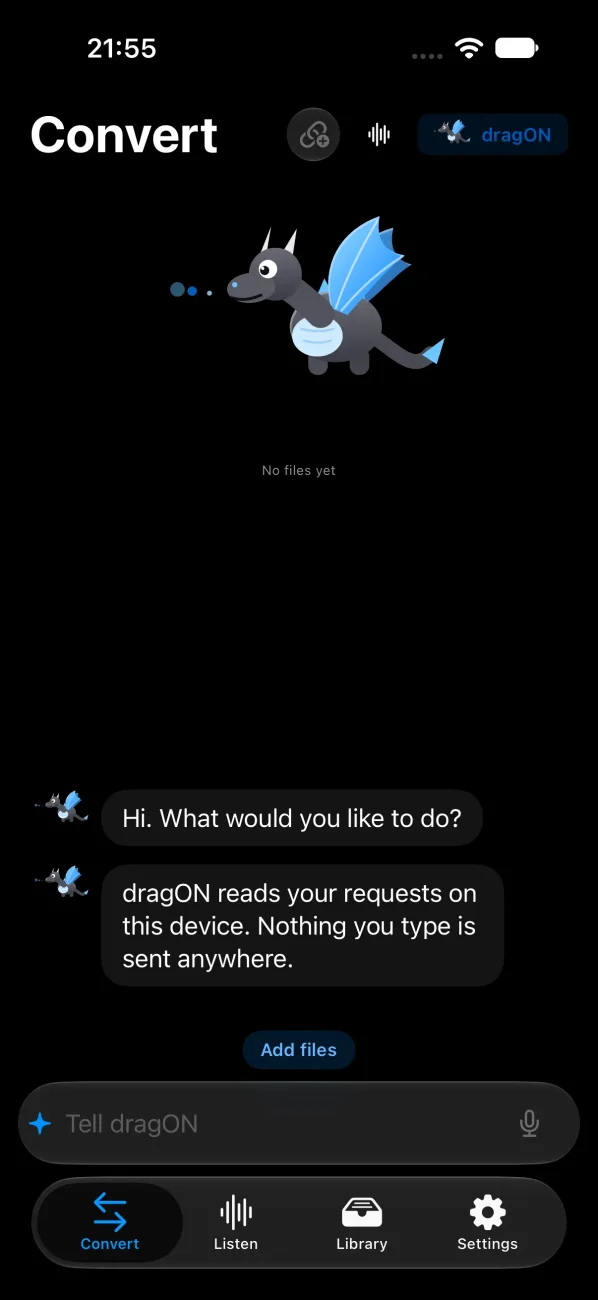
In Classic mode your queue is a cassette: tap it to add files, start, stop or retry. Switch to dragON mode and say what you need instead: "just the audio", "trim Road Trip to the first minute". It shows a plan, asks before starting, and reports back. Both modes share one queue.
A COMPANION, NOT JUST A COMMAND BOX
dragON chats too, and can talk hands-free: it listens, replies aloud, and stops when you talk over it. Speech is understood on your device. Chat uses Apple Intelligence when it's ready, or an optional offline model (a one-time 2.28 GB download, for devices with enough memory), or built-in replies. Memories it keeps can be viewed, edited or forgotten, and stay on this device.
PRACTISE INTERVIEWS
Choose Practice interview and ask technical questions out loud. dragON transcribes them on your device and answers on screen: algorithm steps with complexity, Swift code, or a system design laid out as components, data flow and trade-offs. Hints come when you ask, or switch them on for every question. Sessions are saved on this device to review or delete. Answers can be wrong, so check them. Needs Apple Intelligence or the offline model, and pauses while a batch runs. It's for practice and study; follow any rules your interviewer or employer sets.
IT LOOKS AFTER THE QUEUE
While SwiftConvert is open, let dragON start queued files, retry a failure once or clear finished files. It never stops a batch, changes formats or deletes files.
PLAY THE MKVs THAT WOULDN'T PLAY
iPhone and iPad can't open MKV files. SwiftConvert reads them itself and rebuilds them as MP4. H.264, HEVC and AV1 video is copied across untouched, while AC-3 and E-AC-3 soundtracks become AAC with 5.1 channels intact. Keep the audio and subtitle track you pick, or every one as alternates. Chapters come across too.
TRIM, CROP AND ROTATE
Set a start and end point, straighten a sideways clip, or crop to 16:9, 9:16, square, 4:3 or 21:9. Smart Crop suggests where to center. Trimming and rotating are lossless; only cropping re-encodes.
FORMATS AND PRESETS
Leave everything on Auto and SwiftConvert matches each file: H.264 or HEVC video is copied across untouched, lossless audio stays lossless as ALAC, and everything else becomes HEVC and AAC. Or choose MP4 or MOV, H.264 or HEVC, AAC or ALAC yourself, or pull the audio out as M4A. Pick which soundtrack to keep from any file with several. Four presets are built in, and you can save your own.
ENHANCE WHILE YOU CONVERT
Super Resolution, Motion Smoothing, Motion Blur, Noise Reduction and frame interpolation run on your device's media hardware where supported, one per conversion.
SHORTCUTS AND BATCHES
Add files from the share sheet in any app. In Shortcuts, Convert Files runs a preset without opening the app; Add Files to SwiftConvert Queue lines them up. Stop anytime and retry failures, even from the notification.
PRIVATE BY DEFAULT
Every conversion happens on your device, and sync stays on your local network between devices you pair. The only downloads are ones you ask for: a language's speech model and the optional offline model for dragON.
Nouveautés
Version 4.8 · 25/11/2026
Practice interviews with dragON, and smarter Auto format.
- Practice interview: ask technical questions out loud and dragON answers on screen with algorithm steps, Swift code or a system-design outline. Hints come on request, or switch them on for every question. Sessions are saved on this device to look back over or delete. Needs Apple Intelligence or the offline model.
- New Auto option for container, codecs and quality, now the default. It keeps MOV files as MOV, copies H.264 and HEVC video across untouched, and keeps lossless audio lossless.
- When the video already uses the codec you picked, SwiftConvert copies it across and converts only the audio, so those files finish sooner with no loss in picture quality.
- Choosing ALAC now produces Apple Lossless audio in M4A files and inside MP4 and MOV videos.
- MP4 and MOV files with several audio tracks now let you pick the one to keep, as MKV files already did.
- M4V is no longer offered as an output; choose MP4 instead.
Confidentialité de l’application
Ce que Dragos Gavrilovici déclare sur l’App Store au sujet du traitement des données par cette application.
-
Données non collectées
Le développeur ne collecte aucune donnée à partir de cette application.
Les pratiques en matière de confidentialité peuvent varier, notamment en fonction des fonctionnalités que vous utilisez ou de votre âge.
Informations
- Vendeur
- Dragos Gavrilovici
- Catégorie
- Utilitaires
- Version
- 4.8
- Mis à jour
- 25/11/2026
- Publié
- 19/03/2025
- Taille
- 42,8 Mo
- Nécessite
- iOS 27.0 ou version ultérieure
- Classification d’âge
- 4+
- Prix
- 0,99 €
- Langues
- Anglais
- Copyright
- © Dragos Gavrilovici
Vous aimerez peut-être aussi
-
 Eluna Media : convertisseurHors ligne, sans publicité
-
 MediaCut: Video & Audio ToolsUtilitaires
-
 AudioText : Voix en TexteTranscription Audio & Notes
-
 Video Compressor Utilitaires
-
 Keymoji – Emoji KeyboardUtilitaires
-
 Convert Everything - UniversalUtilitaires
-
 Height Measure - TrueTallUtilitaires
-
 Private Docs VaultCoffre chiffré hors ligne
-
 Métadonnées et infos fichierEXIF, médias et documents
-
 AI Chatbot: open GPT botUtilitaires