- Age rating4+
- CategoryUtilities
- DeveloperDragos Gavrilovici
- LanguagesEnglish
- Size44.1 MB
Links to the official App Store page
Download.org hosts no file of SwiftConvert. The button opens its official App Store page, published by Dragos Gavrilovici. Listing last checked on Nov 23, 2026.
Screenshots
About
Convert video and audio right on your iPhone or iPad. The whole job is done on-device. No account, no tracking, no analytics, and nothing you convert is uploaded.
SYNC BETWEEN YOUR DEVICES
Pair with your Mac, Apple TV or another iPhone or iPad once with a QR or 6-digit code. While SwiftConvert is open on both, presets, batch reports, notes and your list of converted files stay in step over your local network. Files converted on another device can be downloaded from Library. Queue jobs and source files are never shared.
LISTEN & TAKE NOTES
SwiftConvert captures what your iPhone or iPad is playing and transcribes it on-device. Notes save to Library to read or share as timestamped Markdown. A language's speech model may need a one-time download. With Apple Intelligence, Visual Notes turns a transcript into key ideas, cards and recall questions.
APPLE WATCH
Your Apple Watch is a remote for your iPhone: start or stop Listen & Take Notes, or start, stop and retry a batch. Needs a reachable iPhone; not for iPad.
THE CASSETTE AND dragON
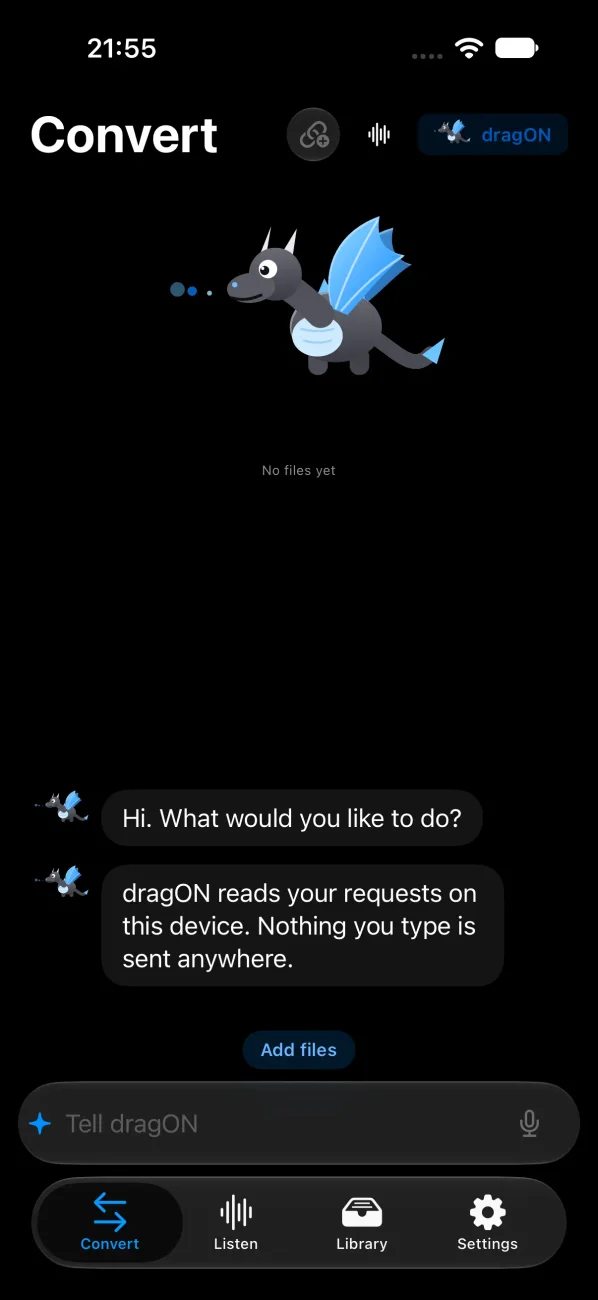
In Classic mode your queue is a cassette: tap it to add files, start, stop or retry. Switch to dragON mode and say what you need instead: "just the audio", "trim Road Trip to the first minute". It shows a plan with estimated sizes, asks before starting, and reports back. Type, or tap the mic and speak. Both modes share one queue.
A COMPANION, NOT JUST A COMMAND BOX
dragON chats too. Ask a question and it answers; when it has an idea, it offers a card and waits for your tap. Start a conversation to talk hands-free: it listens, replies aloud, and stops when you talk over it. Speech is understood on your device. Give it a name, a tone and a colour. Chat uses Apple Intelligence when it's ready, or an optional offline model (a one-time 2.28 GB download, for devices with enough memory), or built-in replies.
MEMORY YOU CAN SEE
Say "remember that I archive in HEVC" and dragON keeps it. View, edit or forget any memory in dragON Settings, or switch memory off. Memories stay on this device and are not synced.
IT LOOKS AFTER THE QUEUE
While SwiftConvert is open, let dragON start queued files, retry a failure once, clear finished files from the list, or give a weekly check-in. Set each to Ask first or Do it; an activity list shows what it did. It never stops a batch, changes formats or deletes files.
PLAY THE MKVs THAT WOULDN'T PLAY
iPhone and iPad can't open MKV files. SwiftConvert reads them itself and rebuilds them as MP4. H.264 and HEVC video is copied across untouched, while AC-3 and E-AC-3 soundtracks become AAC with 5.1 channels intact. Keep the audio and subtitle track you pick, or every one as alternates. Chapters come across too.
TRIM, CROP AND ROTATE
Set a start and end point, straighten a sideways clip, or crop to 16:9, 9:16, square, 4:3 or 21:9. Smart Crop suggests where to center. Trimming and rotating are lossless; only cropping re-encodes.
FORMATS AND PRESETS
Output MP4, MOV or M4V with H.264 or HEVC video and AAC audio, or pull the audio out as M4A in AAC or lossless ALAC. Four presets are built in, and you can save your own. All options live in the Settings tab. With Apple Intelligence, Smart Convert picks settings from a sentence such as "archive at the best quality".
ENHANCE WHILE YOU CONVERT
Super Resolution, Motion Smoothing, Motion Blur, Noise Reduction and frame interpolation run on your device's media hardware where it supports them, one per conversion.
SHORTCUTS AND BATCHES
Add files from the share sheet in Photos, Files or any app. In Shortcuts, Convert Files runs a preset without opening the app; Add Files to SwiftConvert Queue lines them up to review first. Queue any number of files, stop anytime, and retry failures, even from the notification.
PRIVATE BY DEFAULT
Every conversion happens on your device, and sync stays on your local network between devices you pair. The only downloads are ones you ask for: a language's speech model and the optional offline model for dragON.
What’s new
Version 4.5 · Nov 22, 2026
A new Settings tab gathers everything you set up in one place:
- Presets: pick a built-in or saved preset, save the current settings as a preset, or manage your presets.
- Format: container, video codec, quality and audio.
- Subtitles, Save to, Video Enhancement with its fine-tuning controls, and the MKV track and chapter options.
- Sync status and your dragON settings.
- Choose whether the Sync shortcut shows in the header on iPhone or the sidebar on iPad.
- The Sync icon turns green while your paired devices are connected.
The preset button beside the composer is gone; pick presets in Settings or just ask dragON.
App privacy
What Dragos Gavrilovici declares on the App Store about how this app handles data.
-
Data not collected
The developer does not collect any data from this app.
Privacy practices may vary, for example with the features you use or your age.
Information
- Seller
- Dragos Gavrilovici
- Category
- Utilities
- Version
- 4.5
- Updated
- Nov 22, 2026
- Released
- Mar 19, 2025
- Size
- 44.1 MB
- Requires
- iOS 27.0 or later
- Age rating
- 4+
- Price
- $0.99
- Languages
- English
- Copyright
- © Dragos Gavrilovici
You might also like
-
 Eluna Media: Video ConverterCompress offline, no ads
-
 MediaCut: Video & Audio ToolsTrim, Convert, Extract & Merge
-
 AudioText: Voice to TextAudio Transcriber & Notes
-
 Video Compressor Compress videos, Save space
-
 Keymoji – Emoji KeyboardYour favorite emoji, top row
-
 Convert Everything - UniversalMP3, JPEG, PDF, WAV, MP4 More
-
 Height Measure - TrueTallPhoto height measurement Ruler
-
 Private Docs Vault: Photo LockHide Photos, Videos & Files
-
 Metadata Viewer: File InfoEXIF, Media & Document Details
-
 AI Chatbot: open GPT botPrivate, GPT powered, infinite