
VDO.Ninja
Video capture for VDO.Ninja
Conçue pour iPhone, iPad, iPod touch
Gratuit
- Classification d’âge4+
- CatégoriePhoto et vidéo
- DéveloppeurSteve Seguin
- LanguesAnglais
- Taille38,1 Mo
Renvoie vers la page App Store officielle
Download.org n’héberge aucun fichier de VDO.Ninja. Le bouton ouvre la page de l’application sur App Store, où Steve Seguin la publie. Fiche vérifiée pour la dernière fois le 20/11/2026.
Captures d’écran


À propos
Le développeur n’a pas fourni ce texte dans votre langue.
This is Peer-to-peer based, capable of working locally on a LAN or via the Internet by means of webRTC encrypted streaming technology.
This is the official native iOS app version of VDO.Ninja. It has limited features compared to the web-based version that's accessible in Safari at https://vdo.ninja. The benefits of this iOS app version is it offers background VoiP support and background screen sharing support. These features are not available via the web version.
To use this app:
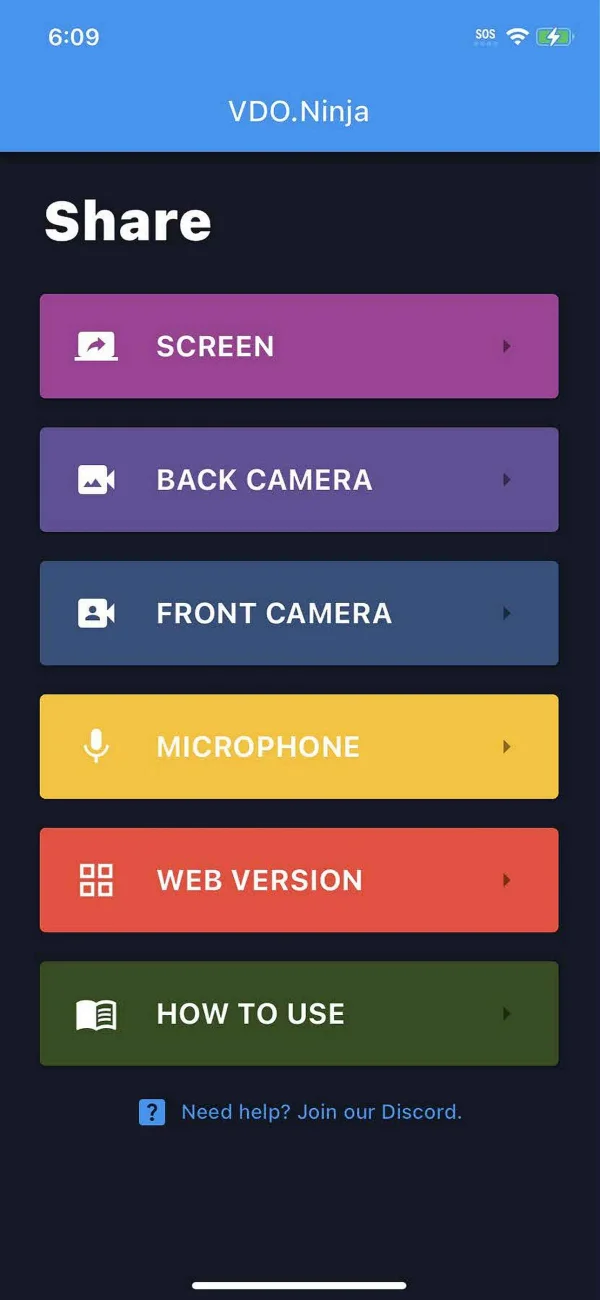
1. Select the camera you wish to use, or select the microphone, or select the Screen share option. This will take you to the setup page.
2. All settings on the setup page are optional and can be left alone. You can enter a custom Stream ID value if you wish to*, but a default one will be provided if left blank.
3. Next, click Connect, and then allow any Cam/Mic Permissions when prompted. If using the Screen option instead, select the VDO.Ninja broadcast service when you start screen sharing.
4. Enter the URL provided at the top of the page into OBS an browser source or other any remote browser to view the video/audio stream. It will load within seconds.
* Stream IDs must be alphanumeric, must not already be in use, and contain no spaces. Capitalization matters.
** If using the Screen option, instead of a selecting camera, select the VDO.Ninja broadcast service when you start screen sharing.
Video guide here: https://youtu.be/iLGkGHJCpBo
Permissions to allow the app to run while in the background is needed for screen sharing and background VoiP capabilities.
You can refer to https://docs.vdo.ninja for information on configuring bitrate, codec, and more there. These options can be configured via the viewer-side in the browser. ie: Adding &stats to the viewer URL can show you details about bitrate, resolution, and frame rate.
If you would like to have two-way calling, please access VDO.Ninja instead with Safari at https://vdo.ninja/. The web app is performant and feature rich, with the ability to join group chat.
Nouveautés
Version 5.0.112 · 14/11/2026
- Fixed passwords containing special characters such as @.
- Improved stream ID, room name and viewer-link compatibility.
- Added a "Dim screen" option while streaming.
- Fixed iOS microphone meters so they work before a viewer connects.
- Reduced recording startup stalls and improved recorded audio/video timing.
- Improved reconnection when the network returns.
- Fixed automatic startup issues with RTMP and SRT.
- Added clearer audio capture diagnostics.
Confidentialité de l’application
Ce que Steve Seguin déclare sur l’App Store au sujet du traitement des données par cette application.
-
Données non collectées
Le développeur ne collecte aucune donnée à partir de cette application.
Les pratiques en matière de confidentialité peuvent varier, notamment en fonction des fonctionnalités que vous utilisez ou de votre âge.
Informations
- Vendeur
- Steve Seguin
- Catégorie
- Photo et vidéo
- Version
- 5.0.112
- Mis à jour
- 14/11/2026
- Publié
- 27/05/2022
- Taille
- 38,1 Mo
- Nécessite
- iOS 15.0 ou version ultérieure
- Classification d’âge
- 4+
- Prix
- Gratuit
- Langues
- Anglais
- Copyright
- © Steve Seguin
Vous aimerez peut-être aussi
-
 MoblinIRL Streaming
-
 Larix Broadcaster: Live StreamEncodeur direct: SRT,NDI,RTMP
-
 Phonecam for OBS StudioPhoto et vidéo
-
 CameraFi LiveAll-in-one live streaming app
-
 Switcher: Live Streaming AppPhoto et vidéo
-
 Stream Studio NDI CameraCaméra pro pour OBS
-
 Shoot Pro Camera SourcePhoto et vidéo
-
 Elgato Control CenterPhoto et vidéo
-
 Eklipse.ggInstant Highlights
-
 Omnistream Live Video CreatorPhoto et vidéo