
VDO.Ninja
Video capture for VDO.Ninja
Dirancang untuk iPhone, iPad, iPod touch
Gratis
- Batasan usia4+
- KategoriFoto & Video
- PengembangSteve Seguin
- BahasaInggris
- Ukuran38,1 MB
Tertaut ke halaman resmi App Store
Download.org tidak menyimpan file VDO.Ninja apa pun. Tombol ini membuka halaman aplikasi di App Store, tempat Steve Seguin menerbitkannya. Halaman terakhir diperiksa pada 20/11/2026.
Tangkapan layar


Tentang
Pengembang belum menyediakan teks ini dalam bahasa Anda.
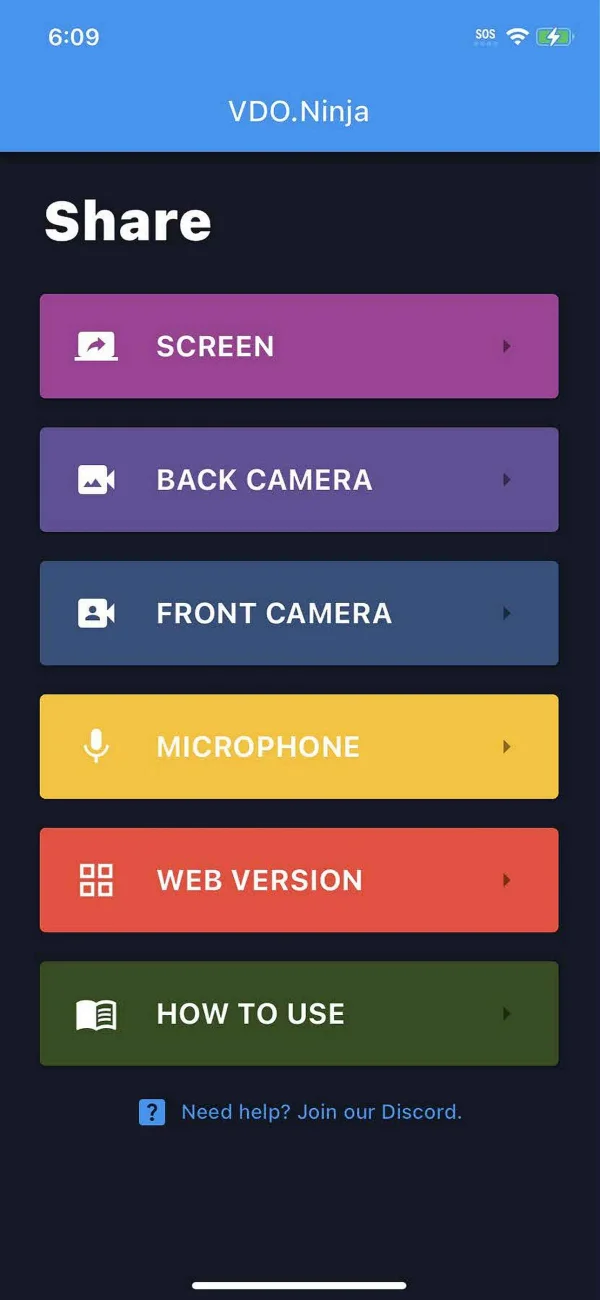
This is Peer-to-peer based, capable of working locally on a LAN or via the Internet by means of webRTC encrypted streaming technology.
This is the official native iOS app version of VDO.Ninja. It has limited features compared to the web-based version that's accessible in Safari at https://vdo.ninja. The benefits of this iOS app version is it offers background VoiP support and background screen sharing support. These features are not available via the web version.
To use this app:
1. Select the camera you wish to use, or select the microphone, or select the Screen share option. This will take you to the setup page.
2. All settings on the setup page are optional and can be left alone. You can enter a custom Stream ID value if you wish to*, but a default one will be provided if left blank.
3. Next, click Connect, and then allow any Cam/Mic Permissions when prompted. If using the Screen option instead, select the VDO.Ninja broadcast service when you start screen sharing.
4. Enter the URL provided at the top of the page into OBS an browser source or other any remote browser to view the video/audio stream. It will load within seconds.
* Stream IDs must be alphanumeric, must not already be in use, and contain no spaces. Capitalization matters.
** If using the Screen option, instead of a selecting camera, select the VDO.Ninja broadcast service when you start screen sharing.
Video guide here: https://youtu.be/iLGkGHJCpBo
Permissions to allow the app to run while in the background is needed for screen sharing and background VoiP capabilities.
You can refer to https://docs.vdo.ninja for information on configuring bitrate, codec, and more there. These options can be configured via the viewer-side in the browser. ie: Adding &stats to the viewer URL can show you details about bitrate, resolution, and frame rate.
If you would like to have two-way calling, please access VDO.Ninja instead with Safari at https://vdo.ninja/. The web app is performant and feature rich, with the ability to join group chat.
Yang baru
Versi 5.0.112 · 14/11/2026
- Fixed passwords containing special characters such as @.
- Improved stream ID, room name and viewer-link compatibility.
- Added a "Dim screen" option while streaming.
- Fixed iOS microphone meters so they work before a viewer connects.
- Reduced recording startup stalls and improved recorded audio/video timing.
- Improved reconnection when the network returns.
- Fixed automatic startup issues with RTMP and SRT.
- Added clearer audio capture diagnostics.
Privasi aplikasi
Yang dinyatakan Steve Seguin di App Store tentang cara aplikasi ini menangani data.
-
Data tidak dikumpulkan
Pengembang tidak mengumpulkan data apa pun dari aplikasi ini.
Praktik privasi dapat bervariasi, misalnya berdasarkan fitur yang Anda gunakan atau usia Anda.
Informasi
- Penjual
- Steve Seguin
- Kategori
- Foto & Video
- Versi
- 5.0.112
- Diperbarui
- 14/11/2026
- Dirilis
- 27/5/2022
- Ukuran
- 38,1 MB
- Memerlukan
- iOS 15.0 atau yang lebih baru
- Batasan usia
- 4+
- Harga
- Gratis
- Bahasa
- Inggris
- Hak cipta
- © Steve Seguin
Mungkin Anda juga suka
-
 MoblinFoto & Video
-
 Larix Broadcaster: Live StreamFoto & Video
-
 Phonecam for OBS StudioFoto & Video
-
 CameraFi LiveAll-in-one live streaming app
-
 Switcher: Live Streaming AppFoto & Video
-
 Stream Studio NDI OBS CameraFoto & Video
-
 Shoot Pro Camera SourceFoto & Video
-
 Elgato Control CenterFoto & Video
-
 Eklipse.ggFoto & Video
-
 Omnistream Live Video CreatorFoto & Video