AE AVIATOR
Alithir Elements (Malaysia)- Rating 3+Batasan usia
- PersonalisasiKategori
- 12/10/2026Diperbarui
- Rp 17.000Harga
Tertaut ke halaman resmi com.watchfacestudio.aviator2 di Google Play. Terakhir diperiksa pada 26/11/2026.
Tentang aplikasi ini
Terjemahan otomatis oleh Google. Bahasa asli: Inggris (Amerika Serikat).
Wear OS dibuat dan diuji di Watch Face Studio yang diberdayakan oleh Samsung.
AE AVIATOR
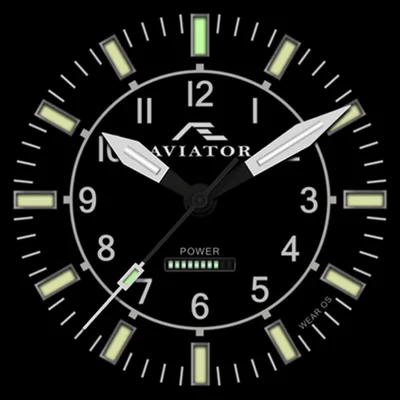
Mode ganda, tampilan jam aktivitas kesehatan bergaya penerbangan. Komplikasi aktivitas utama diintegrasikan ke dalam rendisi Subdial yang realistis, tersembunyi di dial sekunder. Enam pilihan dial utama, karya seni murni yang hadir dengan luminositas Always ON Display (AOD) khas AE.
FITUR
• Modus Ganda
• Hari tanggal
• Subdial Detak Jantung
• Subdial langkah harian
• Bilah status baterai
• Lima jalan pintas
• Aktif Selalu di layar
PINTASAN PRESET
• Kalender (acara)
• Alarm
• Pesan
• Menyegarkan Subdial Detak Jantung
• Beralih antara Main dan Active Dial
SEGARKAN DETARJANTUNG
Selama penginstalan, izinkan akses ke data sensor di jam tangan. Dipasangkan dengan aplikasi ponsel, letakkan jam tangan dengan kuat di pergelangan tangan dan tunggu beberapa saat hingga aplikasi menginisialisasi Detak Jantung, atau ketuk dua kali pintasan dan beri waktu sejenak untuk mengukur jam tangan. Lihat tangkapan layar cantuman toko untuk mengidentifikasi lokasi pintasan.
TENTANG ELEMEN ALITHIR
Alithir Elements bertanggung jawab atas desain, fungsi, fitur, dan kualitas Aplikasi ini, diuji pada jam tangan Samsung Wear OS, dan semua fitur dan fungsi berfungsi sebagaimana mestinya. Hal yang sama mungkin tidak berlaku untuk perangkat Wear OS lainnya. Aplikasi dapat berubah untuk peningkatan kualitas dan fungsional.
Wear OS ini dibuat dengan Watch Face Studio yang ditenagai oleh Samsung dengan API 28+, sehingga aplikasi Wear OS ini tidak akan terlihat di Google Play Store saat diakses melalui sekitar 13.840 perangkat Android. Jika perangkat Android Anda terpengaruh, silakan telusuri dan unduh dari jam tangan atau dari browser web di komputer pribadi Anda. Lihat panduan instalasi milik SAMSUNG Developer: https://youtu.be/vMM4Q2-rqoM
Tampilkan teks asli
AE AVIATOR
Dual mode, aviation-styled health activity watch face. Key activity complications are integrated into a realistic Subdial rendition, hidden away on a secondary dial. Six choices of the main dial, sheer work of art that comes with AE’s signature Always ON Display (AOD) luminosity.
FEATURES
• Dual Mode
• Day & Date
• Heartrate Subdial
• Daily steps Subdial
• Battery status bar
• Five shortcuts
• Active Always ON display
PRESET SHORTCUTS
• Calendar (events)
• Alarm
• Message
• Refresh Heartrate Subdial
• Switch between Main and Active Dial
REFRESH HEARTRATE
During installation, allow access to sensor data on the watch. Paired with the phone app, place the watch firmly on the wrist and wait a moment for the app to initialize the Heartrate, or double tap the shortcut and give it a moment for the watch to measure. Refer to store listings screenshots to identify the shortcut locations.
ABOUT ALITHIR ELEMENTS
Alithir Elements holds the responsibility for the design, functions, features, and quality of this App, tested on Samsung Wear OS watches, and all features and functions worked as intended. The same may not apply to other Wear OS devices. The app is subject to change for quality and functional improvements.
This Wear OS was built with Watch Face Studio powered by Samsung with an API of 28+, as such this Wear OS app will not be visible on Google Play Store when accessed via some 13,840 Android devices. If your Android device is affected, please browse and download from the watch or from the web browser on your personal computer. Refer to the installation guide courtesy of SAMSUNG Developer: https://youtu.be/vMM4Q2-rqoM
Keamanan data
Yang dinyatakan Alithir Elements (Malaysia) di Google Play tentang data yang dikumpulkan dan dibagikan aplikasi ini.
- Tidak ada data yang dibagikan kepada pihak ketigaPelajari lebih lanjut cara developer menyatakan pembagian data
- Tidak ada data yang dikumpulkanPelajari lebih lanjut cara developer menyatakan pengumpulan data
Yang baru
Versi Aviator · 12/10/2026
Annual compliance to update Wear OS app to target Android 15 (API level 35).
Kontak pengembang
- Situs webfacebook.com
- Emailalithome@gmail.com
- Kebijakan Privasialithir-elements.wixsite.com
- AlamatNO 59, Jalan USJ 1/24, USJ 1 47500 Subang Jaya Selangor Malaysia
Informasi
- Ditawarkan oleh
- Alithir Elements (Malaysia)
- Kategori
- Personalisasi
- Versi
- Aviator
- Diperbarui
- 12/10/2026
- Dirilis
- 16/5/2023
- Batasan usia
- Rating 3+
- Harga
- Rp 17.000
- Nama paket
- com.watchfacestudio.aviator2