AE AVIATOR
Alithir Elements (Malaysia)- 3 歳以上対象年齢
- カスタマイズカテゴリ
- 2026/10/12更新日
- ¥170価格
com.watchfacestudio.aviator2のGoogle Play公式ページにリンクしています。最終確認:2026/11/26。
このアプリについて
Googleによる英語 (アメリカ合衆国)からの自動翻訳です。
Wear OS は、Samsung 製の Watch Face Studio で構築およびテストされています。
AE アビエイター
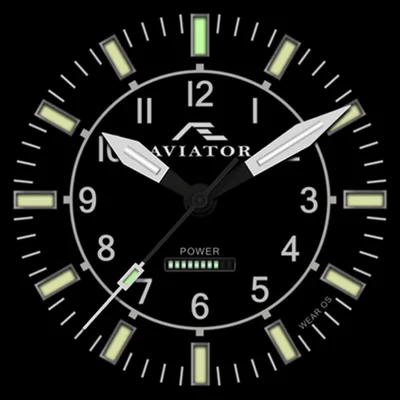
デュアルモード、航空スタイルの健康活動ウォッチフェイス。主要なアクティビティのコンプリケーションは、サブダイヤルのリアルな演出に統合され、セカンダリ ダイヤルに隠されています。メイン ダイヤルは 6 種類から選択でき、AE の特徴である Always ON Display (AOD) の明るさを備えた純粋な芸術品です。
特徴
• デュアルモード
• 曜日と日付
• 心拍数サブダイヤル
• 毎日の歩数サブダイヤル
• バッテリーステータスバー
• 5 つのショートカット
• アクティブ常時オン表示
プリセットのショートカット
• カレンダー (イベント)
• 警報
• メッセージ
• 心拍数サブダイヤルを更新
• メインダイヤルとアクティブダイヤルの切り替え
心拍数をリフレッシュ
インストール中に、時計のセンサー データへのアクセスを許可します。電話アプリとペアリングし、時計を手首にしっかりと置き、アプリが心拍数を初期化するまでしばらく待つか、ショートカットをダブルタップして時計が測定するまでしばらく待ちます。ショートカットの場所を特定するには、ストアの掲載情報のスクリーンショットを参照してください。
アリシールエレメントについて
Alithir Elements は、Samsung Wear OS ウォッチでテストされたこのアプリのデザイン、機能、機能、品質、およびすべての機能が意図したとおりに動作することについて責任を負います。同じことが他の Wear OS デバイスには当てはまらない場合があります。アプリは品質および機能向上のため変更される場合があります。
この Wear OS は、28 以上の API を備えた Samsung の Watch Face Studio で構築されているため、この Wear OS アプリは、約 13,840 台の Android デバイスからアクセスした場合、Google Play ストアには表示されません。 Android端末が影響を受ける場合は、時計またはパソコンのWebブラウザから閲覧・ダウンロードしてください。 SAMSUNG Developer 提供のインストール ガイドを参照してください: https://youtu.be/vMM4Q2-rqoM
原文を表示
AE AVIATOR
Dual mode, aviation-styled health activity watch face. Key activity complications are integrated into a realistic Subdial rendition, hidden away on a secondary dial. Six choices of the main dial, sheer work of art that comes with AE’s signature Always ON Display (AOD) luminosity.
FEATURES
• Dual Mode
• Day & Date
• Heartrate Subdial
• Daily steps Subdial
• Battery status bar
• Five shortcuts
• Active Always ON display
PRESET SHORTCUTS
• Calendar (events)
• Alarm
• Message
• Refresh Heartrate Subdial
• Switch between Main and Active Dial
REFRESH HEARTRATE
During installation, allow access to sensor data on the watch. Paired with the phone app, place the watch firmly on the wrist and wait a moment for the app to initialize the Heartrate, or double tap the shortcut and give it a moment for the watch to measure. Refer to store listings screenshots to identify the shortcut locations.
ABOUT ALITHIR ELEMENTS
Alithir Elements holds the responsibility for the design, functions, features, and quality of this App, tested on Samsung Wear OS watches, and all features and functions worked as intended. The same may not apply to other Wear OS devices. The app is subject to change for quality and functional improvements.
This Wear OS was built with Watch Face Studio powered by Samsung with an API of 28+, as such this Wear OS app will not be visible on Google Play Store when accessed via some 13,840 Android devices. If your Android device is affected, please browse and download from the watch or from the web browser on your personal computer. Refer to the installation guide courtesy of SAMSUNG Developer: https://youtu.be/vMM4Q2-rqoM
データ セーフティ
このアプリが収集・共有するデータについて、Alithir Elements (Malaysia)がGoogle Playで申告している内容です。
- 第三者と共有されるデータはありません詳しくは、デベロッパーが共有を申告する方法についての説明をご覧ください
- データは収集されません詳しくは、デベロッパーが収集を申告する方法についての説明をご覧ください
新機能
バージョン Aviator · 2026/10/12
Annual compliance to update Wear OS app to target Android 15 (API level 35).
開発元の連絡先
- ウェブサイトfacebook.com
- メールalithome@gmail.com
- プライバシーポリシーalithir-elements.wixsite.com
- 住所NO 59, Jalan USJ 1/24, USJ 1 47500 Subang Jaya Selangor Malaysia
情報
- 提供元
- Alithir Elements (Malaysia)
- カテゴリ
- カスタマイズ
- バージョン
- Aviator
- 更新日
- 2026/10/12
- リリース
- 2023/5/16
- 対象年齢
- 3 歳以上
- 価格
- ¥170
- パッケージ名
- com.watchfacestudio.aviator2