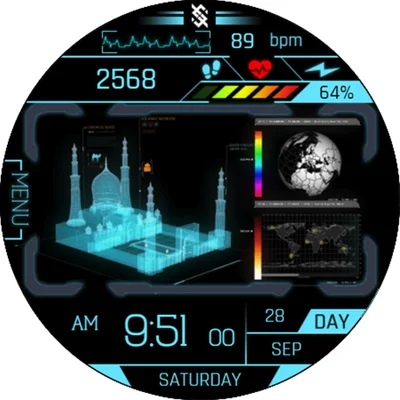
BFF30- Technology Mosque & Map
BFF-KING STORM- Rating 3+Batasan usia
- PersonalisasiKategori
- 30/9/2026Diperbarui
- Rp 24.000Harga
Tertaut ke halaman resmi com.BFF.watchfacestudio.bff30_animationbfftechnology_hud di Google Play. Terakhir diperiksa pada 14/11/2026.
Tentang aplikasi ini
Terjemahan otomatis oleh Google. Bahasa asli: Inggris (Amerika Serikat).
Teknologi Animasi untuk Wear OS oleh BFF-Storm (Kecuali tampilan jam persegi)
CATATAN : Anda perlu memastikan akun Google Play di ponsel dan jam tangan Anda sama. Untuk menghindari situasi: "Perangkat Anda tidak kompatibel".
CATATAN: Tampilan jam yang dijual oleh BFF-Storm di Play Store saat ini sedang dalam proses penyelesaian fitur berdasarkan sistem operasi Wear Os Google/One UI baru dari Samsung. Jadi kami berkomitmen untuk memperbarui tampilan jam sesegera mungkin jika fungsi baru telah selesai. Dan apabila anda mempunyai kendala dalam menggunakannya, anda dapat menghubungi kami melalui gmail:
dukungan@bffstormwatchface.com
Kami akan mendukung dan menjawab pertanyaan 24/7.
CATATAN: Pastikan Anda telah mengaktifkan semua izin dari pengaturan -> Aplikasi.
CATATAN: Bagaimana cara memasang tampilan jam?
1 - Pastikan jam tangan terhubung ke listrik melalui bluetooth, buka halaman aplikasi tampilan jam untuk menginstal.
Buka opsi "Instal di lebih banyak perangkat" (ikon segitiga di sebelah kanan tombol instal atau beli gratis).
Matikan pengaturan di ponsel hanya untuk mengaturnya di jam tangan. Dan lakukan instalasi.
Setelah instalasi berhasil, akan muncul notifikasi di jam tangan, Anda dapat mencari aplikasi di jam tangan.
Jika aplikasi tidak muncul di jam tangan, buka aplikasi Galaxy Wearable di ponsel Anda, pilih tampilan jam dan gulir ke bawah ke bagian aplikasi yang diunduh dan pilih tampilan jam agar muncul di jam tangan.
2 - Jika Anda tidak sengaja memasang aplikasi pendamping di ponsel, Anda dapat menghapusnya setelah tampilan jam dipasang.
3 - Jika Anda memiliki masalah sinkronisasi antara ponsel, Play Store, dan jam tangan, pasang tampilan jam langsung dari jam tangan Anda, atau Anda dapat mencoba dari browser web PC Anda atau kunjungi situs web kami untuk mencari produk.
Tampilan jam ini mendukung semua perangkat Wear OS dengan API Level 30+.
CATATAN: Tombol Kustomisasi:
-Ketuk untuk memilih pintasan aplikasi
-Ketuk untuk membuka pintasan aplikasi
CATATAN : Anda dapat mengetuk ikon baterai untuk membuka Menu. Dan ketuk lagi jika Anda ingin kembali. Menu akan membantu Anda menggunakan pintasan yang telah kami instal. (Anda dapat melihat petunjuknya di bagian gambar)
CATATAN : Beberapa fitur mungkin tidak tersedia di beberapa jam tangan. Tampilan jam ini tidak berlaku untuk jam tangan berbentuk persegi.
BFF30- Masjid & Peta Teknologi oleh BFF-Storm.
Fitur Tampilan Jam: (Anda dapat melihatnya pada deskripsi gambar)
- 12/24 jam berdasarkan pengaturan telepon
- Informasi waktu: Hari, bulan.
- Informasi kesehatan: Jumlah langkah, Detak jantung.
- Baterai
Informasi khusus lainnya
- Warna opsional *16
- Batas Opsional *8
- Animasi Berhenti Opsional
Selalu dipajang mendukung:
- Layar AOD akan ditampilkan sepenuhnya sebagai layar normal yang telah Anda instal.
Pintasan aplikasi:
-7 menyesuaikan pintasan aplikasi. (Anda dapat melihat pada deskripsi gambar letak 7 tombol tersebut.)
Anda dapat melihat lebih detail pada deskripsi gambar kami.
Sesuaikan:
1 - Sentuh dan tahan layar
2 - Ketuk opsi penyesuaian
Silakan kunjungi kami di:
Facebook: https://www.facebook.com/BFFKINGSTORM
Instagram: https://www.instagram.com/bffstormer/
Halaman web: https://bffstormwatchface.com/
Terima kasih !!
Tampilkan teks asli
NOTE : You need to make sure the Google Play account on your phone and watch is the same. To avoid the situation: "Your devices are not compatible".
NOTE: The Watch faces sold by BFF-Storm on the Play Store are currently in the process of feature completion based on Samsung's new Wear Os Google / One UI operating system. So we are committed to update the watch face as soon as possible if a new function is completed. And when you have problems using it, you can contact us via gmail:
support@bffstormwatchface.com
We will support and answer questions 24/7.
NOTE: Make sure you have enabled all permissions from settings -> Applications.
NOTE: How to install watch face?
1 - Make sure the watch is connected to the electricity via bluetooth, open the watch face app page to install.
Open the "Install on more device" option (Triangle icon to the right of the free install or purchase button).
Turn off the settings on the phone just to set it on the watch. And do the installation.
After successful installation, a notification will be displayed on the watch, you can search the application on the watch.
If the app doesn't appear on the watch, open the Galaxy Wearable app on your phone, select watch faces and scroll down to the downloaded apps section and select watch faces to have them show up on the watch.
2 - If you have installed companion apps on your phone by mistake, you can delete them once the watch face has been installed.
3 - If you have sync problems between your phone, Play Store and watch, install watch face directly from your watch, or you can try from your PC web browser or visit our website to Search product.
This watch face supports all Wear OS devices with API Level 30+.
NOTE : Customize button:
-Tap to select app shortcut
-Tap to open the app shortcut
NOTE : You can tap the battery icon to open the Menu. And tap again if you want to back. The menu will assist you to use the shortcuts we have installed. (You can see the instructions in the picture section)
NOTE : Some features may not be available on some watches. This watch face will not apply to square face watches.
The BFF30- Technology Mosque & Map by BFF-Storm.
Watch Face Features: (You can see them on the picture description)
- 12/24Hr based on phone settings
- Time information: Day, month.
- Health information: Step counts, Heart rate.
- Battery
Other customized information
- Optional color *16
- Optional Border *8
- Optional Stop Animation
Always on display supports:
- The AOD screen will be fully displayed as the normal screen you have installed.
App shortcuts :
-7 customize app shortcuts. (You can see in the image description for where the 7 buttons are.)
You can see more details on our image description.
Customize :
1 - Touch and hold the screen
2 - Tap on customize option
Please visit us at:
Facebook: https://www.facebook.com/BFFKINGSTORM
Instagram: https://www.instagram.com/bffstormer/
Webpage: https://bffstormwatchface.com/
Thank You !!
Keamanan data
Yang dinyatakan BFF-KING STORM di Google Play tentang data yang dikumpulkan dan dibagikan aplikasi ini.
- Tidak ada data yang dibagikan kepada pihak ketigaPelajari lebih lanjut cara developer menyatakan pembagian data
- Tidak ada data yang dikumpulkanPelajari lebih lanjut cara developer menyatakan pengumpulan data
Yang baru
30/9/2026
BFF30- Technology Mosque & Map
Kontak pengembang
- Situs webbffstormwatchface.com
- Email13kdollarmonth@gmail.com
- Kebijakan Privasibffstormwatchface.com
- AlamatT. Dong Vien - X. Phu Dong - H. Gia Lam - TP. Ha Noi Hà Nội 10000 Vietnam
Informasi
- Ditawarkan oleh
- BFF-KING STORM
- Kategori
- Personalisasi
- Diperbarui
- 30/9/2026
- Dirilis
- 5/9/2023
- Batasan usia
- Rating 3+
- Harga
- Rp 24.000
- Nama paket
- com.BFF.watchfacestudio.bff30_animationbfftechnology_hud