BFF30- Technology Mosque & Map
BFF-KING STORM- PEGI 3Yaş sınırı
- KişiselleştirmeKategori
- 30.09.2026Güncellendi
- ₺73,99Fiyat
com.BFF.watchfacestudio.bff30_animationbfftechnology_hud için resmi Google Play sayfasına bağlanır. Son kontrol: 14.11.2026.
Bu uygulama hakkında
Google tarafından otomatik çeviri. Orijinal dil: İngilizce (Amerika Birleşik Devletleri).
BFF-Storm'un Wear OS için Animasyon Teknolojisi (Kare saat yüzü hariç)
NOT: Telefonunuzdaki ve saatinizdeki Google Play hesabının aynı olduğundan emin olmanız gerekmektedir. Durumu önlemek için: "Cihazlarınız uyumlu değil".
NOT: BFF-Storm tarafından Play Store'da satılan Saat yüzleri şu anda Samsung'un yeni Wear Os Google / One UI işletim sistemine dayalı olarak özellik tamamlama sürecindedir. Bu nedenle, yeni bir işlev tamamlanırsa saat görünümünü mümkün olan en kısa sürede güncellemeye kararlıyız. Kullanımında sorun yaşadığınızda bizimle gmail aracılığıyla iletişime geçebilirsiniz:
destek@bffstormwatchface.com
7/24 destek vereceğiz ve sorularınızı yanıtlayacağız.
NOT: Ayarlar -> Uygulamalar bölümünden tüm izinleri etkinleştirdiğinizden emin olun.
NOT: Saat yüzü nasıl kurulur?
1 - Saatin bluetooth üzerinden elektriğe bağlı olduğundan emin olun, yüklemek için saat yüzü uygulama sayfasını açın.
"Daha fazla cihaza yükle" seçeneğini açın (Ücretsiz yükleme veya satın alma düğmesinin sağındaki üçgen simgesi).
Sadece saatte ayarlamak için telefondaki ayarları kapatın. Ve kurulumu yapın.
Başarılı kurulumdan sonra saatte bir bildirim görüntülenecektir, uygulamayı saatte arayabilirsiniz.
Uygulama saatte görünmüyorsa telefonunuzda Galaxy Wearable uygulamasını açın, saat yüzlerini seçin ve indirilen uygulamalar bölümüne ilerleyin ve bunların saatte görünmesi için saat yüzlerini seçin.
2 - Telefonunuza yanlışlıkla tamamlayıcı uygulamalar yüklediyseniz, saat yüzü yüklendikten sonra bunları silebilirsiniz.
3 - Telefonunuz, Play Store ve saatiniz arasında senkronizasyon sorunu yaşıyorsanız, saat yüzünü doğrudan saatinizden yükleyin veya PC'nizin web tarayıcısından deneyebilir veya ürün aramak için web sitemizi ziyaret edebilirsiniz.
Bu saat yüzü, API Seviyesi 30+ olan tüm Wear OS cihazlarını destekler.
NOT : Özelleştir düğmesi:
-Uygulama kısayolunu seçmek için dokunun
-Uygulama kısayolunu açmak için dokunun
NOT: Menüyü açmak için pil simgesine dokunabilirsiniz. Ve geri dönmek istiyorsanız tekrar dokunun. Menü, yüklediğimiz kısayolları kullanmanıza yardımcı olacaktır. (Talimatları resim bölümünde görebilirsiniz)
NOT : Bazı özellikler bazı saatlerde bulunmayabilir. Bu saat kadranı kare kadranlı saatlerde geçerli olmayacaktır.
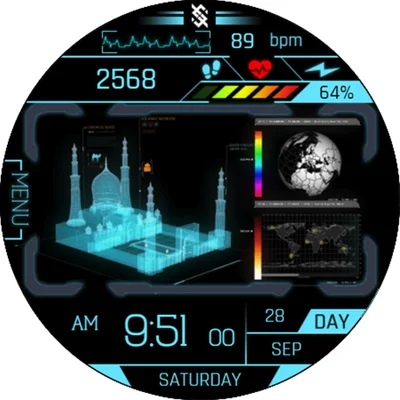
BFF-Storm'un BFF30- Teknoloji Camisi ve Haritası.
Saat Yüzü Özellikleri: (Resim açıklamasında görebilirsiniz)
- Telefon ayarlarına bağlı olarak 12/24 saat
- Zaman bilgisi: Gün, ay.
- Sağlık bilgileri: Adım sayıları, Kalp atış hızı.
- Pil
Diğer özelleştirilmiş bilgiler
- İsteğe bağlı renk *16
- Opsiyonel Kenarlık *8
- İsteğe Bağlı Durdurma Animasyonu
Her zaman ekranda aşağıdaki destekler:
- AOD ekranı, kurduğunuz normal ekran gibi tamamen görüntülenecektir.
Uygulama kısayolları:
-7 uygulama kısayollarını özelleştirin. (7 butonun nerede olduğunu resim açıklamasında görebilirsiniz.)
Resim açıklamamızda daha fazla ayrıntı görebilirsiniz.
Özelleştirmek :
1 - Ekrana dokunup basılı tutun
2 - Özelleştirme seçeneğine dokunun
Lütfen bizi şu adreste ziyaret edin:
Facebook: https://www.facebook.com/BFFKINGSTORM
İnstagram: https://www.instagram.com/bffstormer/
Web sayfası: https://bffstormwatchface.com/
Teşekkür ederim !!
Orijinal metni göster
NOTE : You need to make sure the Google Play account on your phone and watch is the same. To avoid the situation: "Your devices are not compatible".
NOTE: The Watch faces sold by BFF-Storm on the Play Store are currently in the process of feature completion based on Samsung's new Wear Os Google / One UI operating system. So we are committed to update the watch face as soon as possible if a new function is completed. And when you have problems using it, you can contact us via gmail:
support@bffstormwatchface.com
We will support and answer questions 24/7.
NOTE: Make sure you have enabled all permissions from settings -> Applications.
NOTE: How to install watch face?
1 - Make sure the watch is connected to the electricity via bluetooth, open the watch face app page to install.
Open the "Install on more device" option (Triangle icon to the right of the free install or purchase button).
Turn off the settings on the phone just to set it on the watch. And do the installation.
After successful installation, a notification will be displayed on the watch, you can search the application on the watch.
If the app doesn't appear on the watch, open the Galaxy Wearable app on your phone, select watch faces and scroll down to the downloaded apps section and select watch faces to have them show up on the watch.
2 - If you have installed companion apps on your phone by mistake, you can delete them once the watch face has been installed.
3 - If you have sync problems between your phone, Play Store and watch, install watch face directly from your watch, or you can try from your PC web browser or visit our website to Search product.
This watch face supports all Wear OS devices with API Level 30+.
NOTE : Customize button:
-Tap to select app shortcut
-Tap to open the app shortcut
NOTE : You can tap the battery icon to open the Menu. And tap again if you want to back. The menu will assist you to use the shortcuts we have installed. (You can see the instructions in the picture section)
NOTE : Some features may not be available on some watches. This watch face will not apply to square face watches.
The BFF30- Technology Mosque & Map by BFF-Storm.
Watch Face Features: (You can see them on the picture description)
- 12/24Hr based on phone settings
- Time information: Day, month.
- Health information: Step counts, Heart rate.
- Battery
Other customized information
- Optional color *16
- Optional Border *8
- Optional Stop Animation
Always on display supports:
- The AOD screen will be fully displayed as the normal screen you have installed.
App shortcuts :
-7 customize app shortcuts. (You can see in the image description for where the 7 buttons are.)
You can see more details on our image description.
Customize :
1 - Touch and hold the screen
2 - Tap on customize option
Please visit us at:
Facebook: https://www.facebook.com/BFFKINGSTORM
Instagram: https://www.instagram.com/bffstormer/
Webpage: https://bffstormwatchface.com/
Thank You !!
Veri güvenliği
Bu uygulamanın topladığı ve paylaştığı veriler hakkında BFF-KING STORM tarafından Google Play üzerinde yapılan beyan.
- Üçüncü taraflarla veri paylaşımı yokGeliştiricilerin, veri paylaşımını nasıl beyan ettikleri hakkında daha fazla bilgi edinin
- Veri toplanamadıGeliştiricilerin, veri toplamayı nasıl beyan ettikleri hakkında daha fazla bilgi edinin
Yenilikler
30.09.2026
BFF30- Technology Mosque & Map
Geliştirici iletişim bilgileri
- Web sitesibffstormwatchface.com
- E-posta13kdollarmonth@gmail.com
- Gizlilik politikasıbffstormwatchface.com
- AdresT. Dong Vien - X. Phu Dong - H. Gia Lam - TP. Ha Noi Hà Nội 10000 Vietnam
Bilgiler
- Sunan
- BFF-KING STORM
- Kategori
- Kişiselleştirme
- Güncellendi
- 30.09.2026
- Yayın tarihi
- 05.09.2023
- Yaş sınırı
- PEGI 3
- Fiyat
- ₺73,99
- Paket adı
- com.BFF.watchfacestudio.bff30_animationbfftechnology_hud