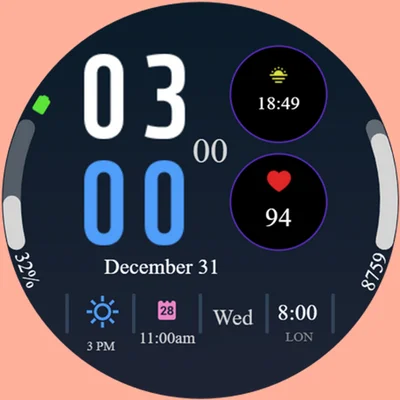
Digital Track Time
Xan Watchfaces- Rating 3+Batasan usia
- PersonalisasiKategori
- 23/7/2025Diperbarui
- Rp 15.000Harga
Tertaut ke halaman resmi com.watchfacestudio.digitaltracktime di Google Play. Terakhir diperiksa pada 14/11/2026.
Tentang aplikasi ini
Terjemahan otomatis oleh Google. Bahasa asli: Inggris (Amerika Serikat).
Tampilan jam digital sederhana
PANDUAN INSTALASI
Aplikasi tampilan jam kami telah diuji secara menyeluruh di perangkat asli dan "ditinjau dan disetujui" oleh Tim Google Play Store sebelum dipublikasikan. PERHATIAN
Tampilan jam akan otomatis terinstal di jam WEAR OS.
PASTIKAN JAM TERSINKRONISASI KE PONSEL ANDA MENGGUNAKAN WIFI YANG SAMA. MASUK KE AKUN GOOGLE ANDA "DI JAM" UNTUK INSTALASI YANG MUDAH.
Setelah diunduh, TUNGGU beberapa menit hingga tampilan jam ditransfer ke jam. (Akan ada notifikasi di jam Anda jika tampilan jam berhasil ditransfer.)
Jika tidak ada notifikasi, buka PLAYSTORE DI JAM ANDA dan ketik "Digital Track Time" di KOTAK PENCARIAN.
Tampilan jam akan muncul, lalu tekan tombol instal.
Tampilan jam tidak akan otomatis ditampilkan/berubah setelah instalasi berhasil. Kembali ke tampilan awal. Ketuk dan tahan tampilan, geser hingga akhir, lalu ketuk + untuk menambahkan tampilan jam. Putar Bezel atau gulir untuk menemukan tampilan jam.
Silakan lihat Grafik Fitur untuk detail selengkapnya tentang cara memasang.
IZINKAN / AKTIFKAN semua izin dari pengaturan -> aplikasi -> izin.
Pengembalian dana HANYA diperbolehkan dalam waktu 48 jam.
FITUR: -Jam Analog -Tanggal -Selalu Aktif (AOD) -Pintasan Aplikasi Preset -Pintasan Aplikasi yang Dapat Disesuaikan -Berbagai Gaya dan Warna Mendukung jam tangan Wear OS, tetapi beberapa fitur mungkin tidak tersedia di beberapa jam tangan.
Koleksi Lengkap: https://play.google.com/store/apps/dev?id=4851040747731239363
Hubungi kami di: xanwatchfaces@gmail.com
Tutorial Pemasangan YouTube: https://www.youtube.com/watch?v=vMM4Q2-rqoM
play.google.com
Tampilkan teks asli
INSTALLATION GUIDE
Our watch face apps are thoroughly tested in a real device and are "reviewed and approved" by the Google Play Store Team before publishing them. TAKE NOTE
Watch faces automatically install on WEAR OS watch.
MAKE SURE THE WATCH IS SYNCED TO YOUR PHONE USING THE SAME WIFI. LOG IN TO YOUR GOOGLE ACCOUNT "ON WATCH" FOR SEAMLESS INSTALLATION.
After download, WAIT for a few minutes for the watch face to be transferred on watch. (There will be a notification on your watch if the watch face was successfully transferred.)
If incase there is no notification, Go to PLAYSTORE ON YOUR WATCH and type on the SEARCH BOX "Digital Track Time"
The watch face will show up, then hit on install button.
Watch faces don't automatically display/change after successful installation. Go back to home display. Tap and hold display, swipe until the end and tap + to add the watch face. Rotate Bezel or scroll to find the watch face.
Please see Feature Graphics for more details how to install.
ALLOW / ENABLE all permissions from settings -> applications -> permissions.
Refund is ONLY allowed within 48 hours.
FEATURES: -Analog Clock -Date -Always-On (AOD) -Preset App Shortcuts -Customizable App Shortcuts -Different Styles and Colors Supports Wear OS watches, but some features may not be available on some watches.
Full Collection: https://play.google.com/store/apps/dev?id=4851040747731239363
Contact us at: xanwatchfaces@gmail.com
Youtube Installation Tutorial: https://www.youtube.com/watch?v=vMM4Q2-rqoM
play.google.com
Keamanan data
Yang dinyatakan Xan Watchfaces di Google Play tentang data yang dikumpulkan dan dibagikan aplikasi ini.
- Tidak ada data yang dibagikan kepada pihak ketigaPelajari lebih lanjut cara developer menyatakan pembagian data
- Tidak ada data yang dikumpulkanPelajari lebih lanjut cara developer menyatakan pengumpulan data
Kontak pengembang
- Emailxanwatchfaces@gmail.com
- Kebijakan Privasisites.google.com
- AlamatBlk 7 Lot 21 Brgy. Burol I Phase II Dasmariñas 4114 Philippines
Informasi
- Ditawarkan oleh
- Xan Watchfaces
- Kategori
- Personalisasi
- Versi
- 1.0.2
- Diperbarui
- 23/7/2025
- Dirilis
- 23/7/2025
- Batasan usia
- Rating 3+
- Harga
- Rp 15.000
- Nama paket
- com.watchfacestudio.digitaltracktime