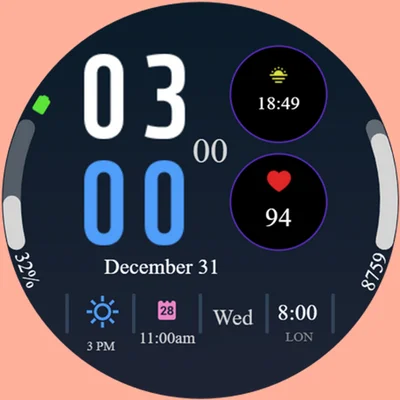
Digital Track Time
Xan Watchfaces- 3 歳以上対象年齢
- カスタマイズカテゴリ
- 2025/7/23更新日
- ¥140価格
com.watchfacestudio.digitaltracktimeのGoogle Play公式ページにリンクしています。最終確認:2026/11/14。
このアプリについて
Googleによる英語 (アメリカ合衆国)からの自動翻訳です。
シンプルなデジタルウォッチフェイス
インストールガイド
当社のウォッチフェイスアプリは、実機で徹底的にテストされ、公開前にGoogle Playストアチームによる「審査と承認」を受けています。ご注意
ウォッチフェイスはWear OSウォッチに自動的にインストールされます。
ウォッチが同じWi-Fiを使用してスマートフォンと同期されていることを確認してください。スムーズにインストールするには、ウォッチでGoogleアカウントにログインしてください。
ダウンロード後、ウォッチフェイスがウォッチに転送されるまで数分間お待ちください。(ウォッチフェイスが正常に転送されると、ウォッチに通知が表示されます。)
通知がない場合は、ウォッチでPlayストアを開き、検索ボックスに「Digital Track Time」と入力してください。
ウォッチフェイスが表示されたら、インストールボタンを押してください。
インストールが成功した後、ウォッチフェイスは自動的に表示/変更されません。ホーム画面に戻ってください。画面を長押しし、最後までスワイプして「+」をタップすると、ウォッチフェイスが追加されます。ベゼルを回転するかスクロールしてウォッチフェイスを見つけてください。
インストール方法の詳細については、フィーチャーグラフィックをご覧ください。
設定 -> アプリケーション -> 権限から、すべての権限を許可/有効化してください。
返金は48時間以内のみ可能です。
機能: - アナログ時計 - 日付 - 常時表示(AOD) - プリセットアプリショートカット - カスタマイズ可能なアプリショートカット - さまざまなスタイルとカラー - Wear OSウォッチに対応していますが、一部の機能は一部のウォッチではご利用いただけない場合があります。
フルコレクション:https://play.google.com/store/apps/dev?id=4851040747731239363
お問い合わせ:xanwatchfaces@gmail.com
YouTubeインストールチュートリアル:https://www.youtube.com/watch?v=vMM4Q2-rqoM
play.google.com
原文を表示
INSTALLATION GUIDE
Our watch face apps are thoroughly tested in a real device and are "reviewed and approved" by the Google Play Store Team before publishing them. TAKE NOTE
Watch faces automatically install on WEAR OS watch.
MAKE SURE THE WATCH IS SYNCED TO YOUR PHONE USING THE SAME WIFI. LOG IN TO YOUR GOOGLE ACCOUNT "ON WATCH" FOR SEAMLESS INSTALLATION.
After download, WAIT for a few minutes for the watch face to be transferred on watch. (There will be a notification on your watch if the watch face was successfully transferred.)
If incase there is no notification, Go to PLAYSTORE ON YOUR WATCH and type on the SEARCH BOX "Digital Track Time"
The watch face will show up, then hit on install button.
Watch faces don't automatically display/change after successful installation. Go back to home display. Tap and hold display, swipe until the end and tap + to add the watch face. Rotate Bezel or scroll to find the watch face.
Please see Feature Graphics for more details how to install.
ALLOW / ENABLE all permissions from settings -> applications -> permissions.
Refund is ONLY allowed within 48 hours.
FEATURES: -Analog Clock -Date -Always-On (AOD) -Preset App Shortcuts -Customizable App Shortcuts -Different Styles and Colors Supports Wear OS watches, but some features may not be available on some watches.
Full Collection: https://play.google.com/store/apps/dev?id=4851040747731239363
Contact us at: xanwatchfaces@gmail.com
Youtube Installation Tutorial: https://www.youtube.com/watch?v=vMM4Q2-rqoM
play.google.com
データ セーフティ
このアプリが収集・共有するデータについて、Xan WatchfacesがGoogle Playで申告している内容です。
- 第三者と共有されるデータはありません詳しくは、デベロッパーが共有を申告する方法についての説明をご覧ください
- データは収集されません詳しくは、デベロッパーが収集を申告する方法についての説明をご覧ください
開発元の連絡先
- メールxanwatchfaces@gmail.com
- プライバシーポリシーsites.google.com
- 住所Blk 7 Lot 21 Brgy. Burol I Phase II Dasmariñas 4114 Philippines
情報
- 提供元
- Xan Watchfaces
- カテゴリ
- カスタマイズ
- バージョン
- 1.0.2
- 更新日
- 2025/7/23
- リリース
- 2025/7/23
- 対象年齢
- 3 歳以上
- 価格
- ¥140
- パッケージ名
- com.watchfacestudio.digitaltracktime