Flicky Opal
Titanium Cyborg Systems (TCS) Services- Rating 3+Batasan usia
- PersonalisasiKategori
- 20/8/2023Diperbarui
- GratisHarga
Tertaut ke halaman resmi com.rajcolab.flickyopal di Google Play. Terakhir diperiksa pada 24/11/2026.
Tentang aplikasi ini
Terjemahan otomatis oleh Google. Bahasa asli: Inggris (Amerika Serikat).
Wajah Bulan bertema opal
Opal yang berkedip-kedip
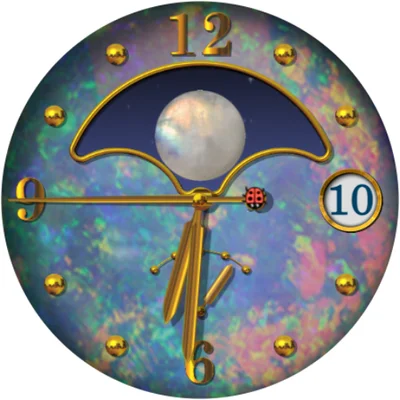
Wajah analog cantik yang memancarkan cahaya batin saat memutar pergelangan tangan Anda. Bulan yang cemerlang berkilau di latar belakang siang/malam sepanjang bulan memberi Anda representasi visual dari fase bulan saat ini.
Tangan baterai untuk mengawasi daya cadangan Anda.
INSTALASI:
1. Pastikan jam tangan Anda terhubung ke ponsel Anda melalui Bluetooth
2. Anda juga dapat menginstal tampilan jam ini dengan mengakses Google Play Store di browser web di PC atau Laptop dengan akun yang sama tempat Anda melakukan pembelian untuk menghindari biaya ganda.
3. Jika PC/laptop tidak tersedia, Anda dapat menggunakan browser web ponsel. Buka aplikasi Play Store, lalu ke tampilan jam. Klik 3 titik di pojok kanan atas lalu Bagikan. Gunakan browser yang tersedia, saya sarankan aplikasi Samsung Internet, login akun tempat Anda melakukan pembelian dan instal di sana.
4. Anda juga dapat memeriksa video Samsung Developers yang memasang tampilan jam Wear OS dengan berbagai cara: https://youtu.be/vMM4Q2-rqoM
Harap bersabar dengan kami sampai Play Store memperbaiki masalah ini. Harap dipahami bahwa kami tidak memiliki kendali atas masalah pemasangan. Aplikasi tampilan jam kami diuji secara menyeluruh di perangkat nyata (Galaxy Watch 4 Classic) dan ditinjau serta disetujui oleh tim Google Play Store sebelum menerbitkannya. Kami senang berbagi pekerjaan kami dan memastikan pengguna akan menikmati tampilan jam kami.
FITUR:
- Wajah Analog dengan Jarum Detik
- Jendela Tanggal
- Fase Bulan Visual
- Latar Belakang Siang/Malam (berubah seiring waktu)
- Tangan Tingkat Baterai
- Tindakan pergelangan tangan!
* Dibuat untuk WearOS
Nikmatilah!
Lihat pembaruan RAJ CoLab di:
Laman Pengembang: https://play.google.com/web/store/apps/dev?id=5910798788508387665
Halaman Facebook: https://www.facebook.com/RAJCoLab/
Untuk dukungan dan permintaan, Anda dapat mengirim email kepada saya di TiBorg.iot@gmail.com
Tampilkan teks asli
Flicky Opal
Beautiful analog face that gives off an inner glow at the twist of your wrist. Brillant moon shimmers across day/ night background all month long giving you a visual representation of the current moon phase.
Battery hand to keep an eye on your reserve power.
INSTALLATION:
1. Please make sure you watch is connected to your phone via Bluetooth
2. You can also install this watch face by accessing the Google Play Store in the web browser in a PC or Laptop with the same account you made the purchase from to avoid double charge.
3. If PC/laptop not available, you can use the phone web browser. Head over to the Play Store app, then to the watch face. Click the 3 dots in the upper right hand corner then Share. Use the available browser, I suggest Samsung Internet app, login the account you made the purchase from and install it there.
4. You can also check the Samsung Developers video installing Wear OS watch face in so many ways: https://youtu.be/vMM4Q2-rqoM
Please be patient with us until Play Store fixes this issue. Please understant that we don't have control over the installation issue. Our watch face apps are thoroughly tested in a real device (Galaxy Watch 4 Classic) and are reviewed and approved by the Google Play Store team before publishing them. We love to share our work and make sure users will enjoy our watch faces.
FEATURES:
- Analog Face with Seconds Hand
- Date Window
- Visual Moon Phase
- Day/ Night Background (changes with time)
- Battery Level Hand
- Wrist action!
*Made for WearOS
Please enjoy!
Check out RAJ CoLab updates at:
Developer Page: https://play.google.com/web/store/apps/dev?id=5910798788508387665
Facebook page: https://www.facebook.com/RAJCoLab/
For support and request, you can email me at TiBorg.iot@gmail.com
Keamanan data
Yang dinyatakan Titanium Cyborg Systems (TCS) Services di Google Play tentang data yang dikumpulkan dan dibagikan aplikasi ini.
- Tidak ada data yang dibagikan kepada pihak ketigaPelajari lebih lanjut cara developer menyatakan pembagian data
- Tidak ada data yang dikumpulkanPelajari lebih lanjut cara developer menyatakan pengumpulan data
- Berkomitmen untuk mematuhi Kebijakan Keluarga Play
Kontak pengembang
- Emailtiborg.iot@gmail.com
- Kebijakan Privasifreeprivacypolicy.com
- Alamat2497 Highland Rd Roanoke, VA 24014-3911 United States
Informasi
- Ditawarkan oleh
- Titanium Cyborg Systems (TCS) Services
- Kategori
- Personalisasi
- Versi
- 1.0.0
- Diperbarui
- 20/8/2023
- Dirilis
- 3/2/2023
- Memerlukan
- Android 9 atau yang lebih baru
- Batasan usia
- Rating 3+
- Harga
- Gratis
- Nama paket
- com.rajcolab.flickyopal