Flicky Opal
Titanium Cyborg Systems (TCS) Services- Classificação LivreClassificação etária
- PersonalizaçãoCategoria
- 20/08/2023Atualizado
- GrátisPreço
Leva à página oficial de com.rajcolab.flickyopal na Google Play. Última verificação em 24/11/2026.
Sobre este app
Tradução automática do Google. Idioma original: Inglês (Estados Unidos).
Cara de lua com tema de opala
Flicky Opal
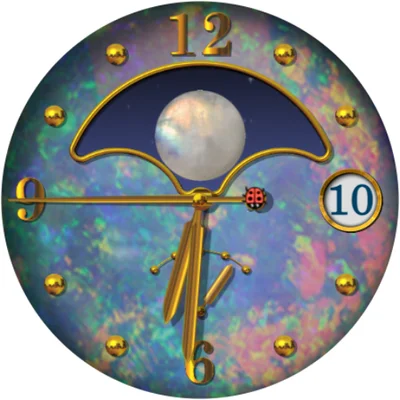
Lindo rosto analógico que emite um brilho interior com o giro do seu pulso. A lua brilhante brilha no fundo do dia / noite durante todo o mês, dando a você uma representação visual da fase atual da lua.
Mão de bateria para ficar de olho em sua energia de reserva.
INSTALAÇÃO:
1. Verifique se o relógio está conectado ao seu telefone via Bluetooth
2. Você também pode instalar este mostrador de relógio acessando a Google Play Store no navegador da Web em um PC ou laptop com a mesma conta com a qual fez a compra para evitar cobrança dupla.
3. Se o PC/laptop não estiver disponível, você pode usar o navegador da web do telefone. Vá para o aplicativo Play Store e, em seguida, para o mostrador do relógio. Clique nos 3 pontos no canto superior direito e em Compartilhar. Use o navegador disponível, sugiro o aplicativo Samsung Internet, faça o login na conta de onde você fez a compra e instale-o lá.
4. Você também pode verificar o vídeo Samsung Developers instalando o mostrador do relógio Wear OS de várias maneiras: https://youtu.be/vMM4Q2-rqoM
Seja paciente conosco até que a Play Store corrija esse problema. Por favor, entenda que não temos controle sobre o problema de instalação. Nossos aplicativos de mostrador de relógio são exaustivamente testados em um dispositivo real (Galaxy Watch 4 Classic) e são revisados e aprovados pela equipe da Google Play Store antes de serem publicados. Adoramos compartilhar nosso trabalho e garantir que os usuários gostem de nossos mostradores de relógio.
RECURSOS:
- Mostrador analógico com ponteiro de segundos
- Janela de Data
- Visual Fase da Lua
- Plano de fundo diurno/noturno (muda com o tempo)
- Indicador de nível de bateria
- Ação de pulso!
*Feito para WearOS
Por favor aproveite!
Confira as atualizações do RAJ CoLab em:
Página do desenvolvedor: https://play.google.com/web/store/apps/dev?id=5910798788508387665
Página do Facebook: https://www.facebook.com/RAJCoLab/
Para suporte e solicitação, você pode me enviar um e-mail para TiBorg.iot@gmail.com
Mostrar o texto original
Flicky Opal
Beautiful analog face that gives off an inner glow at the twist of your wrist. Brillant moon shimmers across day/ night background all month long giving you a visual representation of the current moon phase.
Battery hand to keep an eye on your reserve power.
INSTALLATION:
1. Please make sure you watch is connected to your phone via Bluetooth
2. You can also install this watch face by accessing the Google Play Store in the web browser in a PC or Laptop with the same account you made the purchase from to avoid double charge.
3. If PC/laptop not available, you can use the phone web browser. Head over to the Play Store app, then to the watch face. Click the 3 dots in the upper right hand corner then Share. Use the available browser, I suggest Samsung Internet app, login the account you made the purchase from and install it there.
4. You can also check the Samsung Developers video installing Wear OS watch face in so many ways: https://youtu.be/vMM4Q2-rqoM
Please be patient with us until Play Store fixes this issue. Please understant that we don't have control over the installation issue. Our watch face apps are thoroughly tested in a real device (Galaxy Watch 4 Classic) and are reviewed and approved by the Google Play Store team before publishing them. We love to share our work and make sure users will enjoy our watch faces.
FEATURES:
- Analog Face with Seconds Hand
- Date Window
- Visual Moon Phase
- Day/ Night Background (changes with time)
- Battery Level Hand
- Wrist action!
*Made for WearOS
Please enjoy!
Check out RAJ CoLab updates at:
Developer Page: https://play.google.com/web/store/apps/dev?id=5910798788508387665
Facebook page: https://www.facebook.com/RAJCoLab/
For support and request, you can email me at TiBorg.iot@gmail.com
Segurança dos dados
O que Titanium Cyborg Systems (TCS) Services declara na Google Play sobre os dados que este app coleta e compartilha.
- Os dados não são compartilhados com terceirosSaiba mais sobre como os desenvolvedores declaram o compartilhamento
- Nenhum dado foi coletadoSaiba mais sobre como os desenvolvedores declaram a coleta
- Compromisso com a Política para famílias do Google Play
Contato do desenvolvedor
- E-mailtiborg.iot@gmail.com
- Política de privacidadefreeprivacypolicy.com
- Endereço2497 Highland Rd Roanoke, VA 24014-3911 United States
Informações
- Oferecido por
- Titanium Cyborg Systems (TCS) Services
- Categoria
- Personalização
- Versão
- 1.0.0
- Atualizado
- 20/08/2023
- Lançamento
- 03/02/2023
- Requer
- Android 9 ou posterior
- Classificação etária
- Classificação Livre
- Preço
- Grátis
- Nome do pacote
- com.rajcolab.flickyopal