FoxBox
UserLAnd Technologies- Rating 3+Batasan usia
- Alat Kategori
- 17/11/2026Diperbarui
- Rp 31.000Harga
Tertaut ke halaman resmi tech.ula.foxbox_pro di Google Play. Terakhir diperiksa pada 19/11/2026.

Tangkapan layar
Tentang aplikasi ini
Terjemahan otomatis oleh Google. Bahasa asli: Inggris (Amerika Serikat).
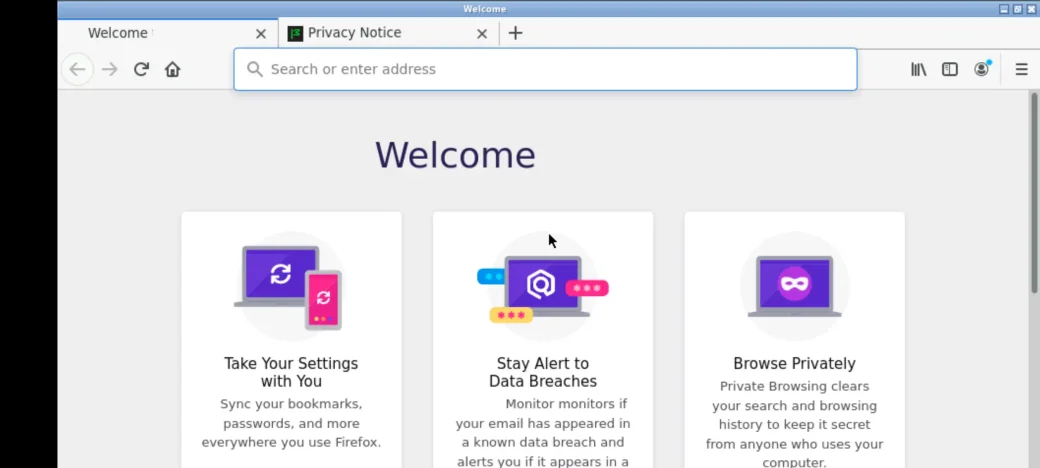
FoxBox: Menjalankan Firefox Edisi Desktop di Android
FoxBox memungkinkan Anda menjalankan Firefox® di perangkat Android.
Apa itu FoxBox?
FoxBox bukanlah Firefox itu sendiri dan bukan proyek Mozilla, melainkan lapisan kompatibilitas yang menyiapkan versi Firefox desktop Linux, meluncurkannya, merendernya, dan menyediakan cara untuk berinteraksi dengannya.
Fitur apa saja yang disediakannya?
*Rendering halaman web
*Ekstensi Firefox desktop standar
*Pengelola file bawaan. Dapat berinteraksi dengan file di kartu SD, setelah Anda memberikan izin.
*Alat pengembang.
*Dukungan suara.
*Dll.
Bagaimana Cara Menggunakan FoxBox?
Gunakan seperti biasa. Tetapi berikut beberapa hal khusus tentang aplikasi ini.
* Ketuk dengan satu jari untuk mengklik.
* Cubit untuk memperbesar.
* Geser dua jari ke atas dan ke bawah untuk menggulir.
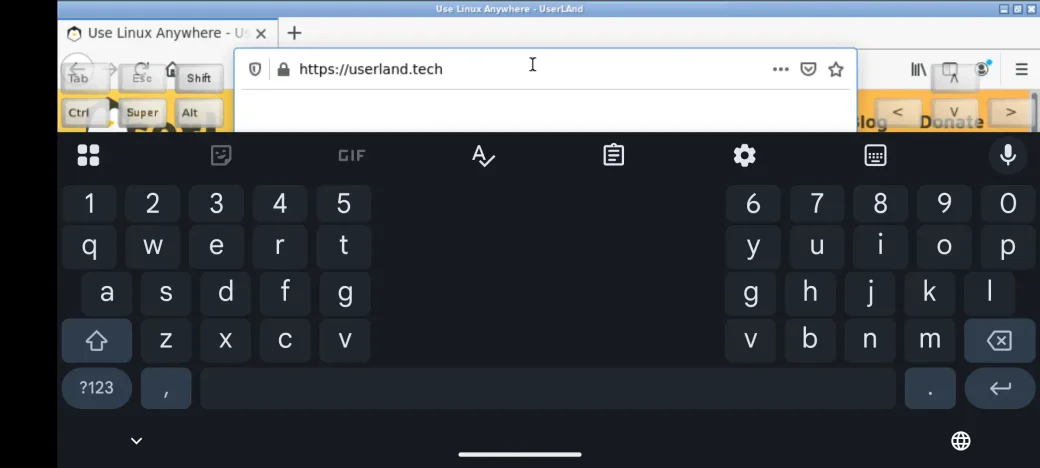
* Jika Anda ingin memunculkan keyboard, ketuk layar untuk memunculkan serangkaian ikon, lalu klik ikon keyboard.
* Tahan dan geser satu jari untuk menggeser (berguna saat diperbesar).
* Jika Anda ingin melakukan hal yang setara dengan klik kanan, ketuk dengan dua jari.
* Jika Anda ingin mengubah pengaturan skala atau DNS, temukan layanan notifikasi Android dan klik pengaturan. Anda harus menghentikan dan memulai ulang aplikasi setelah mengubah pengaturan ini agar perubahan tersebut berlaku.
Mengapa Menggunakan FoxBox?
Firefox versi desktop memiliki serangkaian fitur yang berbeda dari aplikasi seluler Android. Selain itu, situs web berperilaku berbeda saat dibuka di browser desktop dibandingkan dengan browser seluler (bahkan ketika Anda mengatakan ingin versi desktop dari sebuah situs web).
Tampilkan teks asli
FoxBox allows you to run Firefox® on an Android device.
What is FoxBox?
FoxBox is not Firefox itself and is not a Mozilla project, but instead is a compatibility layer that sets up a Linux desktop Firefox build, launches it, renders it and provides a way to interact with it.
What features does it provide?
*Web page rendering
*Standard desktop Firefox extensions
*Built-in file manager. Can interact with files on sdcard, after you give it permissions.
*Developer tools.
*Sound support.
*Etc
How to Use FoxBox?
Use it just like normal. But here are some specifics to the app.
* Tap with one figure to click.
* Pinch to zoom.
* Slide to fingers up and down to scroll.
* If you want to bring up a keyboard, tap on the screen to get a set of icons to appear and then click the keyboard icon.
* Hold and slide one finger to pan (useful when zoomed in).
* If you want to do the equivalent to a right click, tap with two fingers.
* If you want to change the scaling or the dns settings, find the service android notification and click the settings. You have to stop and restart the app after changing these settings for them to take effect.
Why Use FoxBox?
Desktop Firefox has a different set of features than the Android mobile app. Also, websites behave different when opened in a desktop browser vs a mobile browser (even when you say you want the desktop version of a website).
Keamanan data
Yang dinyatakan UserLAnd Technologies di Google Play tentang data yang dikumpulkan dan dibagikan aplikasi ini.
- Tidak ada data yang dibagikan kepada pihak ketigaPelajari lebih lanjut cara developer menyatakan pembagian data
- Tidak ada data yang dikumpulkanPelajari lebih lanjut cara developer menyatakan pengumpulan data
Yang baru
Versi 26.11.17 · 17/11/2026
Your app's Linux system is now built fresh from our new image pipeline, with up-to-date packages and a faster, more reliable download. Opening files in your phone's shared storage no longer fails the first time, and more programs run correctly. Already installed? Your existing setup is kept; reinstall to get the new system.
Kontak pengembang
- Situs webuserland.tech
- Emailsupport@userland.tech
- Kebijakan Privasiuserland.tech
- Alamat10258 SW 67th Ave Portland, OR 97223 United States
Informasi
- Ditawarkan oleh
- UserLAnd Technologies
- Kategori
- Alat
- Versi
- 26.11.17
- Diperbarui
- 17/11/2026
- Dirilis
- 8/1/2023
- Memerlukan
- Android 7.0 atau yang lebih baru
- Batasan usia
- Rating 3+
- Harga
- Rp 31.000
- Nama paket
- tech.ula.foxbox_pro
Aplikasi serupa
-
 TeamViewer Remote Control
Bisnis
-
 BeenVerified Background Search
Komunikasi
-
 Startpage Private Browser
Komunikasi
-
 RealVNC Viewer: Remote Desktop
Produktivitas
-
 pCloud: Cloud Storage
Produktivitas
-
 Zoiper IAX SIP VOIP Softphone
Komunikasi
-
 Square Home Launcher - Tile UI
Personalisasi
-
 Arc Search – Find it, Faster
Alat
-
 Ever Accountable
Produktivitas
-
 Stargon Browser
Komunikasi
-
 Power Browser-Block Ads & Earn
Komunikasi
-
 Collectibles.com: Scan + Value
Alat