KTbm
KocaTurk Watch Faces- Rating 3+Batasan usia
- PersonalisasiKategori
- 9/8/2026Diperbarui
- Rp 17.000Harga
Tertaut ke halaman resmi com.kocaturk.ktbm di Google Play. Terakhir diperiksa pada 13/11/2026.
Tentang aplikasi ini
Terjemahan otomatis oleh Google. Bahasa asli: Inggris (Amerika Serikat).
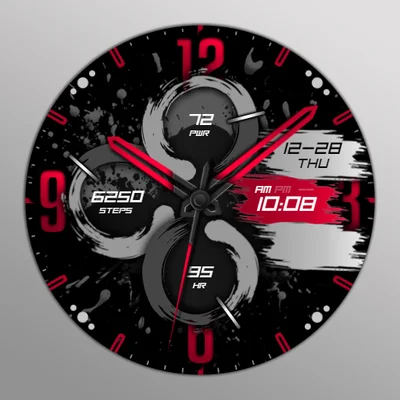
KTbm adalah tampilan jam yang dirancang oleh KocaTurk untuk Wear OS
KTbm adalah tampilan jam tangan hibrida untuk Wear OS.
* Data yang ditampilkan;
- waktu (12/24 jam)
- tanggal
- progres baterai
- detak jantung dan progres
- langkah dan progres
* Pintasan prasetel;
- baterai
- kalender
- langkah
- detak jantung
* Komplikasi dan pintasan;
- 5 pintasan (tanpa gambar)
- 1 komplikasi (ikon/teks)
* Opsi kustomisasi;
- 30 palet warna
- 4 opsi dial (berwarna/putih)
- 2 opsi indeks (berwarna/putih)
- 3 opsi pintasan (berwarna/putih/mati)
- opsi bentuk percikan latar belakang (berwarna/putih)
- 2 opsi progres (berwarna/putih)
- 3 opsi waktu digital dan latar belakang
- jarum 4x2 (berwarna/putih)
- Opsi peredupan AOD (30%/50%/75%)
* Catatan untuk kustomisasi; Mungkin ada penundaan dan gangguan selama penyesuaian dengan aplikasi yang dapat dikenakan.
Oleh karena itu, buat pengaturan personalisasi pada jam tangan Anda.
1. Tekan dan tahan di tengah layar jam tangan.
2. Ketuk tombol Kustomisasi.
3. Geser ke kiri atau kanan untuk menavigasi di antara elemen yang dapat disesuaikan.
4. Geser ke atas atau ke bawah untuk mengubah warna atau opsi untuk setiap elemen.
PERHATIAN:
MODEL JAM TANGAN KOTAK SAAT INI TIDAK DIDUKUNG! Selain itu, beberapa fitur mungkin tidak tersedia pada semua model jam tangan.
CATATAN INSTALASI:
1- Klik panah di sebelah kanan tombol Beli dan pastikan jam tangan Anda dipilih dari perangkat yang tercantum di menu tarik-turun.
Setelah unduhan selesai;
2- Jika Anda tidak memilih jam tangan selama instalasi, opsi instalasi kedua, "Aplikasi Pendamping", akan diinstal pada ponsel Anda. Buka aplikasi ini dan ketuk gambar, maka Anda akan melihat layar unduhan play store pada jam tangan Anda. Periksa apakah unduhan telah dimulai.
Setelah unduhan selesai;
Kembali ke layar beranda jam tangan Anda dan tekan lama layar tersebut. Pada layar pemilihan tampilan jam, klik opsi "tambahkan" di paling kanan dan temukan serta aktifkan tampilan jam yang Anda beli.
Catatan: Jangan khawatir jika Anda terjebak dalam lingkaran pembayaran, hanya satu pembayaran yang akan dilakukan meskipun Anda diminta untuk melakukan pembayaran kedua. Tunggu 5 menit atau mulai ulang jam tangan Anda dan coba lagi.
Mungkin ada masalah sinkronisasi antara perangkat Anda dan server Google.
Harap dicatat bahwa masalah di sisi ini tidak disebabkan oleh pengembang. Pengembang tidak memiliki kendali atas Play Store di sisi ini.
Terima kasih!
Ikuti kami di media sosial untuk mendapatkan diskon dan promosi.
Facebook: https://www.facebook.com/koca.turk.940
Instagram: https://www.instagram.com/kocaturk.wf/
Telegram: https://t.me/kocaturk_wf
Tampilkan teks asli
KTbm is a hybrid watch face for Wear OS.
* Displayed data;
- time (12/24h)
- date
- battery progress
- heart rate and progress
- steps and progress
* Preset shortcuts;
- battery
- calendar
- steps
- heart rate
* Complications and shortcuts;
- 5 shortcut (no image)
- 1 complication (icon/text)
* Customization options;
- 30 color palettes
- 4 dial options (colored/white)
- 2 index options (colored/white)
- 3 shortcut options (colored/white/off)
- background splash shape options (colored/white)
- 2 progress options (colored/white)
- 3 digiital time and background options
- 4x2 hands (colored/white)
- AOD dim out options (30%/50%/75%)
* Note for customization;
There may be delays and glitches during customization with the wearable app.
Therefore, make personalization settings on your watch.
1. Press and hold in the middle of the watch screen.
2. Tap the Customize button.
3. Swipe left or right to navigate between customizable elements.
4. Swipe up or down to change colors or options for each element.
ATTENTION:
SQUARE WATCH MODELS ARE NOT CURRENTLY SUPPORTED! Also, some features may not be available on all watch models.
INSTALLATION NOTES:
1- Click on the arrow to the right of the Buy button and make sure your watch is selected from the devices listed in the drop-down menu.
After the download is complete;
2- If you did not select your watch during the installation, a second installation option, "Companion App", will be installed on your phone. Open this application and tap on the image, then you will see the play store download screen on your watch. Check if the download has started.
After the download is complete;
Go back to the home screen of your watch and long-press the screen. On the watch face selection screen, click on the "add" option on the far right and find and activate the watch face you purchased.
Note: Don't worry if you get stuck in the payment loop, only one payment will be made even if you are asked to make a second payment. Wait 5 minutes or restart your watch and try again.
There may be a synchronization problem between your device and Google servers.
Please note that the issues on this side are not caused by the developer. The developer has no control over the Play Store on this side.
Thank you!
Follow us on social media for discounts and promotions.
Facebook: https://www.facebook.com/koca.turk.940
Instagram: https://www.instagram.com/kocaturk.wf/
Telegram: https://t.me/kocaturk_wf
Keamanan data
Yang dinyatakan KocaTurk Watch Faces di Google Play tentang data yang dikumpulkan dan dibagikan aplikasi ini.
- Tidak ada data yang dibagikan kepada pihak ketigaPelajari lebih lanjut cara developer menyatakan pembagian data
- Tidak ada data yang dikumpulkanPelajari lebih lanjut cara developer menyatakan pengumpulan data
Yang baru
9/8/2026
The target has been updated to SDK 36.
Kontak pengembang
- Emailkocaturk.wf@gmail.com
- Kebijakan Privasisites.google.com
- AlamatBÜYÜKKARIŞTIRAN BELDESİ FATİH MAH. GÜNDOĞU SK. NO: 11 İÇ KAPI NO: 2 39780 Lüleburgaz/Kırklareli Türkiye
Informasi
- Ditawarkan oleh
- KocaTurk Watch Faces
- Kategori
- Personalisasi
- Diperbarui
- 9/8/2026
- Dirilis
- 16/12/2023
- Batasan usia
- Rating 3+
- Harga
- Rp 17.000
- Nama paket
- com.kocaturk.ktbm