KTbm
KocaTurk Watch Faces- 3 歳以上対象年齢
- カスタマイズカテゴリ
- 2026/8/9更新日
- ¥170価格
com.kocaturk.ktbmのGoogle Play公式ページにリンクしています。最終確認:2026/11/13。
このアプリについて
Googleによる英語 (アメリカ合衆国)からの自動翻訳です。
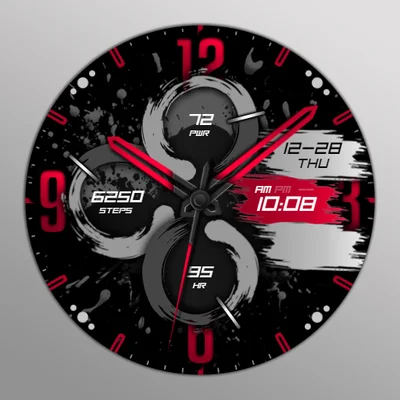
KTbm は KocaTurk が Wear OS 用にデザインしたウォッチフェイスです。
KTbmはWear OS用のハイブリッドウォッチフェイスです。
* 表示データ:
- 時刻(12時間/24時間表示)
- 日付
- バッテリー残量
- 心拍数と進捗状況
- 歩数と進捗状況
* プリセットショートカット:
- バッテリー
- カレンダー
- 歩数
- 心拍数
* コンプリケーションとショートカット:
- ショートカット5種類(画像なし)
- コンプリケーション1種類(アイコン/テキスト)
* カスタマイズオプション:
- 30種類のカラーパレット
- 文字盤オプション4種類(カラー/白)
- インデックスオプション2種類(カラー/白)
- ショートカットオプション3種類(カラー/白/オフ)
- 背景スプラッシュシェイプオプション(カラー/白)
- 進捗状況オプション2種類(カラー/白)
- デジタル時刻と背景オプション3種類
- 4x2針(カラー/白)
- AOD(自動消灯)オプション(30%/50%/75%)
* カスタマイズに関する注意事項:
ウェアラブルアプリでカスタマイズを行う際、遅延や不具合が発生する場合があります。
そのため、ウォッチ側でカスタマイズ設定を行ってください。
1. ウォッチ画面の中央を長押しします。
2. 「カスタマイズ」ボタンをタップします。
3. 左右にスワイプして、カスタマイズ可能な要素間を移動します。
4. 上下にスワイプして、各要素の色やオプションを変更します。
注意:
スクエアウォッチモデルは現在サポートされていません。また、一部の機能はウォッチモデルによってご利用いただけない場合があります。
インストールに関する注意事項:
1. 「購入」ボタンの右側にある矢印をクリックし、ドロップダウンメニューに表示されているデバイスからお使いのウォッチが選択されていることを確認してください。
ダウンロードが完了したら、以下の操作を行います。
2. インストール時にウォッチを選択しなかった場合は、2つ目のインストールオプションである「コンパニオンアプリ」がスマートフォンにインストールされます。このアプリケーションを開いて画像をタップすると、ウォッチにPlayストアのダウンロード画面が表示されます。ダウンロードが開始されているかご確認ください。
ダウンロードが完了したら、以下の操作を行ってください。
時計のホーム画面に戻り、画面を長押ししてください。ウォッチフェイス選択画面で、右端の「追加」オプションをクリックし、購入したウォッチフェイスを見つけて有効化してください。
注:お支払いがループして停止してもご安心ください。2回目のお支払いを求められても、実際に行われるのは1回のみです。5分ほどお待ちいただくか、時計を再起動してからもう一度お試しください。
デバイスとGoogleサーバー間の同期に問題がある可能性があります。
こちら側の問題は開発者によるものではありません。開発者はPlayストアを制御できません。
ありがとうございます!
割引やプロモーションについては、ソーシャルメディアでフォローしてください。
Facebook: https://www.facebook.com/koca.turk.940
Instagram: https://www.instagram.com/kocaturk.wf/
Telegram: https://t.me/kocaturk_wf
原文を表示
KTbm is a hybrid watch face for Wear OS.
* Displayed data;
- time (12/24h)
- date
- battery progress
- heart rate and progress
- steps and progress
* Preset shortcuts;
- battery
- calendar
- steps
- heart rate
* Complications and shortcuts;
- 5 shortcut (no image)
- 1 complication (icon/text)
* Customization options;
- 30 color palettes
- 4 dial options (colored/white)
- 2 index options (colored/white)
- 3 shortcut options (colored/white/off)
- background splash shape options (colored/white)
- 2 progress options (colored/white)
- 3 digiital time and background options
- 4x2 hands (colored/white)
- AOD dim out options (30%/50%/75%)
* Note for customization;
There may be delays and glitches during customization with the wearable app.
Therefore, make personalization settings on your watch.
1. Press and hold in the middle of the watch screen.
2. Tap the Customize button.
3. Swipe left or right to navigate between customizable elements.
4. Swipe up or down to change colors or options for each element.
ATTENTION:
SQUARE WATCH MODELS ARE NOT CURRENTLY SUPPORTED! Also, some features may not be available on all watch models.
INSTALLATION NOTES:
1- Click on the arrow to the right of the Buy button and make sure your watch is selected from the devices listed in the drop-down menu.
After the download is complete;
2- If you did not select your watch during the installation, a second installation option, "Companion App", will be installed on your phone. Open this application and tap on the image, then you will see the play store download screen on your watch. Check if the download has started.
After the download is complete;
Go back to the home screen of your watch and long-press the screen. On the watch face selection screen, click on the "add" option on the far right and find and activate the watch face you purchased.
Note: Don't worry if you get stuck in the payment loop, only one payment will be made even if you are asked to make a second payment. Wait 5 minutes or restart your watch and try again.
There may be a synchronization problem between your device and Google servers.
Please note that the issues on this side are not caused by the developer. The developer has no control over the Play Store on this side.
Thank you!
Follow us on social media for discounts and promotions.
Facebook: https://www.facebook.com/koca.turk.940
Instagram: https://www.instagram.com/kocaturk.wf/
Telegram: https://t.me/kocaturk_wf
データ セーフティ
このアプリが収集・共有するデータについて、KocaTurk Watch FacesがGoogle Playで申告している内容です。
- 第三者と共有されるデータはありません詳しくは、デベロッパーが共有を申告する方法についての説明をご覧ください
- データは収集されません詳しくは、デベロッパーが収集を申告する方法についての説明をご覧ください
新機能
2026/8/9
The target has been updated to SDK 36.
開発元の連絡先
- メールkocaturk.wf@gmail.com
- プライバシーポリシーsites.google.com
- 住所BÜYÜKKARIŞTIRAN BELDESİ FATİH MAH. GÜNDOĞU SK. NO: 11 İÇ KAPI NO: 2 39780 Lüleburgaz/Kırklareli Türkiye
情報
- 提供元
- KocaTurk Watch Faces
- カテゴリ
- カスタマイズ
- 更新日
- 2026/8/9
- リリース
- 2023/12/16
- 対象年齢
- 3 歳以上
- 価格
- ¥170
- パッケージ名
- com.kocaturk.ktbm