ORB-31 Grid
Orburis Watch- Rating 3+Batasan usia
- PersonalisasiKategori
- 22/8/2026Diperbarui
- Rp 19.000Harga
Tertaut ke halaman resmi com.watchfacestudio.orb31 di Google Play. Terakhir diperiksa pada 24/11/2026.
Tentang aplikasi ini
Terjemahan otomatis oleh Google. Bahasa asli: Inggris (Amerika Serikat).
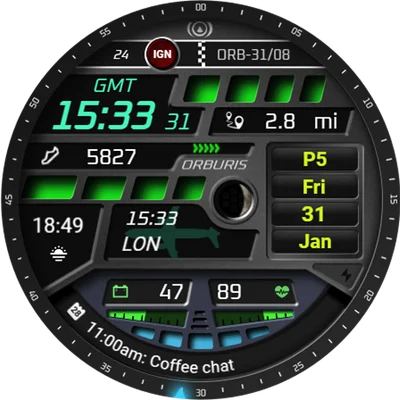
Tampilan jam tangan digital teknis dengan isyarat olahraga motor untuk Wear OS
Tampilan jam digital ini kaya akan detail dan informasi, sekaligus sangat berwarna dan dapat disesuaikan. Tampilan ini menampilkan beberapa isyarat olahraga motor untuk para penggemar balap, sama seperti beberapa tampilan jam Orburis lainnya.
Fitur utama:
Potongan tampilan grid terbuka ke warna latar belakang yang dapat dikonfigurasi secara terpisah.
Tampilan 3D multi-level
Papan pit bergaya dengan tampilan tanggal dan 'posisi balapan'
Pilihan warna halus untuk pelat muka
Mil dan km untuk pengukuran jarak
Kontrol kecerahan warna latar belakang
Kolom yang dapat disesuaikan
Detail:
Catatan: Item dalam deskripsi yang diberi anotasi '*' memiliki detail lebih lanjut di bagian 'Catatan Fungsionalitas'.
Kombinasi warna – diatur melalui opsi ‘Kustomisasi’, dapat diakses dengan menekan lama tampilan jam:
10 warna untuk tampilan waktu digital (menggunakan tema ‘Warna’)
9 warna untuk pelat muka (Warna Muka)
10 warna untuk setiap strip latar belakang yang diberi slot (Warna Garis Atas, Garis Tengah, dan Garis Bawah)
3 tingkat kecerahan warna latar belakang (Kecerahan Warna Bkg)
Data yang ditampilkan:
• Waktu (format digital 12 jam & 24 jam)
• Tanggal (Hari dalam seminggu, Hari dalam sebulan, Bulan)
• ‘Posisi Balapan’ P1 – P10. Anda mulai di posisi 10 (P10) dan seiring Anda mencapai Sasaran Langkah*, posisi balapan Anda meningkat hingga P1 pada 90% dari sasaran Anda, dengan bendera kotak-kotak juga ditampilkan ketika 100% sasaran tercapai. • Zona Waktu
• Indikator mode AM/PM/24 jam
• Waktu Dunia
• Jendela informasi singkat yang dapat dikonfigurasi pengguna, cocok untuk menampilkan hal-hal seperti cuaca atau waktu matahari terbit/terbenam
• Jendela informasi panjang yang dapat dikonfigurasi pengguna, ideal untuk menampilkan hal-hal seperti janji temu kalender berikutnya
• Persentase dan pengukur tingkat daya baterai
• Indikator pengisian daya baterai
• Jumlah Langkah
• Pengukur persentase Target Langkah* - 10 panah hijau yang menyala secara progresif
• Jarak tempuh (mil/km)*, dapat dikonfigurasi melalui menu kustomisasi
• Pengukur detak jantung (5 zona)
◦ <60 bpm, zona biru
◦ 60-99 bpm, zona hijau
◦ 100-139 bpm, zona ungu
◦ 140-169 bpm, zona kuning
◦ >=170 bpm, merah zona
Layar Selalu Aktif:
• Layar selalu aktif memastikan data penting selalu ditampilkan.
*Catatan Fungsionalitas:
- Target Langkah: Untuk pengguna perangkat yang menjalankan Wear OS 3.x, target ini ditetapkan pada 6000 langkah. Untuk perangkat Wear OS 4 atau yang lebih baru, target langkah ini disinkronkan dengan aplikasi kesehatan pilihan pengguna.
- Jarak tempuh: Jarak diestimasikan sebagai: 1 km = 1312 langkah, 1 mil = 2100 langkah.
Catatan – Sebaiknya pasang tampilan jam langsung ke jam tangan dari Play Store (di ponsel atau jam tangan Anda) dengan memilih jam tangan Anda sebagai perangkat target untuk pemasangan. Namun, jika Anda mau, 'aplikasi pendamping' juga tersedia untuk dipasang di ponsel Anda yang fungsinya hanya untuk memfasilitasi pemasangan tampilan jam di perangkat jam tangan Anda jika Anda mengalami masalah dengan metode langsung. Anda tidak memerlukan aplikasi pendamping agar tampilan jam berfungsi.
Mohon beri kami ulasan di Play Store.
Dukungan:
Jika Anda memiliki pertanyaan tentang tampilan jam ini, silakan hubungi support@orburis.com dan kami akan meninjau serta meresponsnya.
Informasi selengkapnya tentang tampilan jam ini dan tampilan jam Orburis lainnya:
Instagram: https://www.instagram.com/orburis.watch/
Facebook: https://www.facebook.com/orburiswatch/
Web: https://orburis.com
Halaman Pengembang: https://play.google.com/store/apps/dev?id=5545664337440686414
======
ORB-31 menggunakan font sumber terbuka berikut:
- Oxanium
Oxanium dilisensikan di bawah Lisensi Font Terbuka SIL, Versi 1.1. Lisensi ini tersedia dengan FAQ di http://scripts.sil.org/OFL
=====
Tampilkan teks asli
This digital watchface is high on detail and information content while being highly colourful and customisable. It features a few motorsport cues for racing enthusiasts in common with some other Orburis watchfaces.
Key features:
Grid-look cut-outs open onto separately configurable background colours.
Multi-level 3D look
Stylised pit-board with date and ‘race position’ display
Choice of subtle shades for the face plate
Mile and km for distance measure
Background colour brightness control
Customisable fields
Details:
Note: Items in the description annotated with a ‘*’ have further details in the ‘Functionality Notes’ section.
Colour combinations – set via the ‘Customise’ option, accessible by long-pressing the watch face:
10 colours for the digital time display (using the ‘Colour’ theme)
9 shades for the faceplate (Face Tint)
10 colours for each of the slotted background strips (Top Line, Mid Line and Bottom Line colours)
3 levels of background colour brightness (Bkg Colour Brightness)
Data displayed:
• Time (12h & 24h digital formats)
• Date (Day-of-week, Day-of-month, Month)
• ‘Race Position’ P1 – P10. You start in position 10 (P10) and as you work towards your Step Goal* your race position improves up to P1 at 90% of your goal, with the chequered flag also showing when 100% of the goal is reached.
• Time Zone
• AM/PM/24h mode indicator
• World Time
• Short user-configurable information window, suitable for displaying items such as weather or sunrise/sunset times
• Long user-configurable information window, ideal for displaying items such as the next calendar appointment
• Battery charge level percentage and meter
• Battery charging indicator
• Step Count
• Step Goal* percentage meter - 10 green arrows progressively light
• Distance travelled (miles/km)*, configurable via customisation menu
• Heart rate meter (5 zones)
◦ <60 bpm, blue zone
◦ 60-99 bpm, green zone
◦ 100-139 bpm, purple zone
◦ 140-169 bpm, yellow zone
◦ >=170bpm, red zone
Always on Display:
• An always-on display ensures that key data is always displayed.
*Functionality Notes:
- Step Goal: For users of devices running Wear OS 3.x, this is fixed at 6000 steps. For Wear OS 4 or later devices, it is the step goal sync’d with the wearer’s chosen health app.
- Distance travelled: Distance is approximated as: 1km = 1312 steps, 1 mile = 2100 steps.
Note – It is best to install the watchface directly to the watch from Play Store (on your phone or watch) by selecting your watch as the target device for installation. However, if you prefer, a 'companion app' is also available for installation on your phone whose sole function is to facilitate installation of the watchface on your watch device should you have trouble with the direct method. You don’t need the companion app for the watchface to function.
Please consider leaving us a review in Play Store.
Support:
If you have any questions about this watchface you can contact support@orburis.com and we will review and respond.
More information on this watch face and on other Orburis watch faces:
Instagram: https://www.instagram.com/orburis.watch/
Facebook: https://www.facebook.com/orburiswatch/
Web: https://orburis.com
Developer Page: https://play.google.com/store/apps/dev?id=5545664337440686414
======
ORB-31 uses the following open source fonts:
- Oxanium
Oxanium is licensed under the SIL Open Font License, Version 1.1. This license is available with a FAQ at http://scripts.sil.org/OFL
=====
Keamanan data
Yang dinyatakan Orburis Watch di Google Play tentang data yang dikumpulkan dan dibagikan aplikasi ini.
- Tidak ada data yang dibagikan kepada pihak ketigaPelajari lebih lanjut cara developer menyatakan pembagian data
- Tidak ada data yang dikumpulkanPelajari lebih lanjut cara developer menyatakan pengumpulan data
Yang baru
22/8/2026
Updated to API Level 36 as required by Google
Kontak pengembang
- Situs weborburis.com
- Emailsupport@orburis.com
- Kebijakan Privasisites.google.com
- Alamat38 Baxter Road SALE M33 3AL United Kingdom
Informasi
- Ditawarkan oleh
- Orburis Watch
- Kategori
- Personalisasi
- Diperbarui
- 22/8/2026
- Dirilis
- 24/10/2025
- Batasan usia
- Rating 3+
- Harga
- Rp 19.000
- Nama paket
- com.watchfacestudio.orb31