ORB-31 Grid
Orburis Watch- 3 歳以上対象年齢
- カスタマイズカテゴリ
- 2026/8/22更新日
- ¥150価格
com.watchfacestudio.orb31のGoogle Play公式ページにリンクしています。最終確認:2026/11/24。
このアプリについて
Googleによる英語 (アメリカ合衆国)からの自動翻訳です。
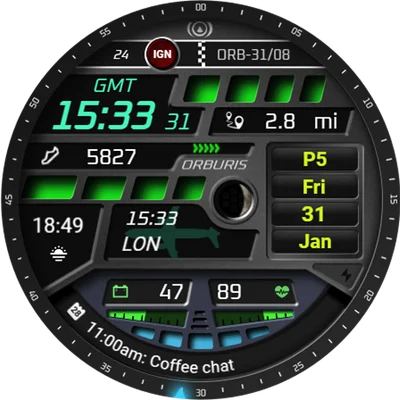
Wear OS向けのモータースポーツの雰囲気を醸し出すテクニカルデジタルウォッチフェイス
このデジタルウォッチフェイスは、豊富なディテールと豊富な情報量を備えながら、非常にカラフルでカスタマイズ性に優れています。他のOrburisウォッチフェイスと同様に、レーシングファン向けにモータースポーツ関連の要素をいくつか取り入れています。
主な特徴:
グリッド状のカットアウトを開くと、個別に設定可能な背景色が現れます。
マルチレベル3Dルック
日付と「レースポジション」表示を備えたスタイリッシュなピットボード
フェイスプレートの繊細な色合いを選択可能
距離表示はマイルとkmで表示
背景色の明るさ調整
カスタマイズ可能なフィールド
詳細:
注:説明欄に「*」印が付いている項目については、「機能に関する注記」セクションで詳細をご確認ください。
カラーコンビネーション – ウォッチフェイスを長押ししてアクセスできる「カスタマイズ」オプションで設定できます。
デジタル時刻表示:10色(「カラー」テーマを使用)
フェイスプレート:9色(フェイスティント)
スロット付き背景ストリップ:各10色(トップライン、ミッドライン、ボトムラインの色)
背景色の明るさ:3段階(背景色の明るさ)
表示データ:
• 時間(12時間制および24時間制デジタル形式)
• 日付(曜日、日、月)
• 「レースポジション」:P1~P10。スタートは10位(P10)で、ステップ目標*達成に向けて進むと、目標の90%でレースポジションがP1まで上がります。目標の100%達成時にはチェッカーフラッグも表示されます。
• タイムゾーン
• AM/PM/24時間表示
• ワールドタイム
• 天気や日の出/日の入り時刻などの表示に適した、ユーザー設定可能な短い情報ウィンドウ
• 次のカレンダーの予定などの表示に適した、ユーザー設定可能な長い情報ウィンドウ
• バッテリー充電レベル(パーセント)とメーター
• バッテリー充電インジケーター
• 歩数
• 歩数目標* パーセントメーター - 10本の緑色の矢印が徐々に点灯
• 移動距離(マイル/km)*(カスタマイズメニューで設定可能)
• 心拍数メーター(5ゾーン)
◦ 60 bpm未満:ブルーゾーン
◦ 60~99 bpm:グリーンゾーン
◦ 100~139 bpm:パープルゾーン
◦ 140~169 bpm:イエローゾーン
◦ 170 bpm以上:レッドゾーン
常時表示:
• 常時表示ディスプレイにより、重要なデータが常に表示されます。
*機能に関する注意事項:
- 歩数目標:Wear OS 3.x 搭載デバイスをご利用の場合、目標歩数は 6000 歩に固定されます。Wear OS 4 以降のデバイスをご利用の場合、お使いのヘルスケアアプリと同期された歩数目標となります。
- 移動距離:距離は、1 km = 1312 歩、1 マイル = 2100 歩として概算されます。
注:ウォッチフェイスは、Play ストア(スマートフォンまたはウォッチ)からウォッチに直接インストールすることをお勧めします。インストール先としてウォッチを選択してください。ただし、直接インストールで問題が発生した場合は、ウォッチへのウォッチフェイスのインストールを容易にする「コンパニオンアプリ」をスマートフォンにインストールすることもできます。ウォッチフェイスは、コンパニオンアプリがなくても動作します。
Play ストアでレビューを投稿していただけますようお願いいたします。
サポート:
このウォッチフェイスについてご質問がある場合は、support@orburis.com までご連絡ください。確認の上、ご返信いたします。
このウォッチフェイスとその他のOrburisウォッチフェイスに関する詳細情報:
Instagram: https://www.instagram.com/orburis.watch/
Facebook: https://www.facebook.com/orburiswatch/
Web: https://orburis.com
開発者ページ: https://play.google.com/store/apps/dev?id=5545664337440686414
======
ORB-31は以下のオープンソースフォントを使用しています:
- Oxanium
OxaniumはSIL Open Font License バージョン1.1に基づいてライセンスされています。このライセンスは、http://scripts.sil.org/OFL でFAQとともにご覧いただけます。
=====
原文を表示
This digital watchface is high on detail and information content while being highly colourful and customisable. It features a few motorsport cues for racing enthusiasts in common with some other Orburis watchfaces.
Key features:
Grid-look cut-outs open onto separately configurable background colours.
Multi-level 3D look
Stylised pit-board with date and ‘race position’ display
Choice of subtle shades for the face plate
Mile and km for distance measure
Background colour brightness control
Customisable fields
Details:
Note: Items in the description annotated with a ‘*’ have further details in the ‘Functionality Notes’ section.
Colour combinations – set via the ‘Customise’ option, accessible by long-pressing the watch face:
10 colours for the digital time display (using the ‘Colour’ theme)
9 shades for the faceplate (Face Tint)
10 colours for each of the slotted background strips (Top Line, Mid Line and Bottom Line colours)
3 levels of background colour brightness (Bkg Colour Brightness)
Data displayed:
• Time (12h & 24h digital formats)
• Date (Day-of-week, Day-of-month, Month)
• ‘Race Position’ P1 – P10. You start in position 10 (P10) and as you work towards your Step Goal* your race position improves up to P1 at 90% of your goal, with the chequered flag also showing when 100% of the goal is reached.
• Time Zone
• AM/PM/24h mode indicator
• World Time
• Short user-configurable information window, suitable for displaying items such as weather or sunrise/sunset times
• Long user-configurable information window, ideal for displaying items such as the next calendar appointment
• Battery charge level percentage and meter
• Battery charging indicator
• Step Count
• Step Goal* percentage meter - 10 green arrows progressively light
• Distance travelled (miles/km)*, configurable via customisation menu
• Heart rate meter (5 zones)
◦ <60 bpm, blue zone
◦ 60-99 bpm, green zone
◦ 100-139 bpm, purple zone
◦ 140-169 bpm, yellow zone
◦ >=170bpm, red zone
Always on Display:
• An always-on display ensures that key data is always displayed.
*Functionality Notes:
- Step Goal: For users of devices running Wear OS 3.x, this is fixed at 6000 steps. For Wear OS 4 or later devices, it is the step goal sync’d with the wearer’s chosen health app.
- Distance travelled: Distance is approximated as: 1km = 1312 steps, 1 mile = 2100 steps.
Note – It is best to install the watchface directly to the watch from Play Store (on your phone or watch) by selecting your watch as the target device for installation. However, if you prefer, a 'companion app' is also available for installation on your phone whose sole function is to facilitate installation of the watchface on your watch device should you have trouble with the direct method. You don’t need the companion app for the watchface to function.
Please consider leaving us a review in Play Store.
Support:
If you have any questions about this watchface you can contact support@orburis.com and we will review and respond.
More information on this watch face and on other Orburis watch faces:
Instagram: https://www.instagram.com/orburis.watch/
Facebook: https://www.facebook.com/orburiswatch/
Web: https://orburis.com
Developer Page: https://play.google.com/store/apps/dev?id=5545664337440686414
======
ORB-31 uses the following open source fonts:
- Oxanium
Oxanium is licensed under the SIL Open Font License, Version 1.1. This license is available with a FAQ at http://scripts.sil.org/OFL
=====
データ セーフティ
このアプリが収集・共有するデータについて、Orburis WatchがGoogle Playで申告している内容です。
- 第三者と共有されるデータはありません詳しくは、デベロッパーが共有を申告する方法についての説明をご覧ください
- データは収集されません詳しくは、デベロッパーが収集を申告する方法についての説明をご覧ください
新機能
2026/8/22
Updated to API Level 36 as required by Google
開発元の連絡先
- ウェブサイトorburis.com
- メールsupport@orburis.com
- プライバシーポリシーsites.google.com
- 住所38 Baxter Road SALE M33 3AL United Kingdom
情報
- 提供元
- Orburis Watch
- カテゴリ
- カスタマイズ
- 更新日
- 2026/8/22
- リリース
- 2025/10/24
- 対象年齢
- 3 歳以上
- 価格
- ¥150
- パッケージ名
- com.watchfacestudio.orb31