Pixel Watch Face
amoledwatchfaces™- Rating 3+Batasan usia
- PersonalisasiKategori
- 4/8/2026Diperbarui
- Rp 27.000Harga
Tertaut ke halaman resmi com.watchfacestudio.awfpixelface di Google Play. Terakhir diperiksa pada 21/11/2026.
Tentang aplikasi ini
Terjemahan otomatis oleh Google. Bahasa asli: Inggris (Inggris Raya).
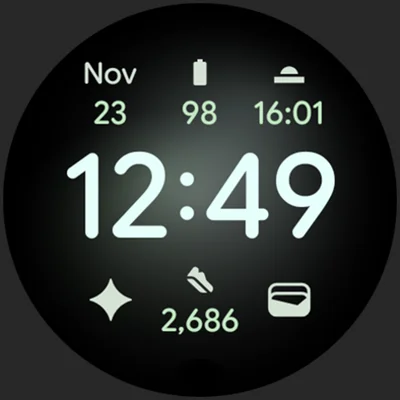
Tampilan jam bergaya piksel yang minimal, dapat disesuaikan, dan hemat baterai untuk Wear OS.
Hanya untuk perangkat Wear OS API 28+
Penafian
Semua nama produk, logo, merek, merek dagang, dan merek dagang terdaftar, yang bukan milik kami, adalah milik dari masing-masing pemiliknya. Semua nama perusahaan, produk, dan layanan yang digunakan dalam aplikasi ini hanya untuk tujuan identifikasi. Penggunaan nama, merek dagang, dan merek ini tidak menyiratkan dukungan. Harap diperhatikan bahwa Google Pixel, Google Pixel Watch, dan Wear OS adalah merek dagang Google LLC. Aplikasi Pixel Watch Face adalah milik kami dan bukan aplikasi resmi Google. Kami tidak berafiliasi, berasosiasi, diberi wewenang, didukung oleh, atau dengan cara apa pun terhubung secara resmi dengan Google LLC.
Didukung oleh Format Tampilan Jam 4
amoledwatchfaces.com
PENAWARAN BELI SATU GRATIS SATU
amoledwatchfaces.com/bogo
APLIKASI KOMPLIKASI KHUSUS
amoledwatchfaces.com/apps
FITUR
• Format Tampilan Jam 4
• Tampilan jam minimal piksel / desain sempurna piksel
• Ramah baterai
• Latar belakang hitam pekat
• Resolusi tinggi
• Banyak tema warna
• Sangat dioptimalkan / Ukuran .apk kecil
• 6 slot komplikasi kustom
• Indikator dering detik opsional
• Opsi untuk menonaktifkan efek kedipan titik dua
• Mode ambient dengan OPR rendah dan warna adaptif
KONFIGURASI PENGGUNA
• Tema Utama (60+)
• Tema Sekunder (60+)
• AOD (2x)
• Komplikasi Kustom (6x)
• Efek Gemini (Alihkan)
• Indikator Detik (Alihkan)
• Titik Dua Berkedip (Alihkan)
• AOD Berongga (Toggle)
Panduan Instalasi dan Pemecahan Masalah
amoledwatchfaces.com/guide
Silakan kirim laporan masalah atau permintaan bantuan ke alamat dukungan kami
support@amoledwatchfaces.com
Bergabunglah dengan grup Telegram kami untuk dukungan dan diskusi langsung
t.me/amoledwatchfaces
Buletin
amoledwatchfaces.com/contact#newsletter
amoledwatchfaces™ - Awf
Tampilkan teks asli
Only for Wear OS API 28+ devices
Disclaimer
All product names, logos, brands, trademarks and registered trademarks, which are not owned by us, are property of their respective owners. All company, product and service names used in this app are for identification purposes only. Use of these names, trademarks and brands does not imply endorsement. Please note that Google Pixel, Google Pixel Watch, and Wear OS are trademarks of Google LLC. The Pixel Watch Face application is owned by us and is not an official Google application. We are not affiliated, associated, authorized, endorsed by, or in any way officially connected with Google LLC.
Powered by Watch Face Format 4
amoledwatchfaces.com
BUY ONE GET ONE OFFER
amoledwatchfaces.com/bogo
CUSTOM COMPLICATION APPS
amoledwatchfaces.com/apps
FEATURES
• Watch Face Format 4
• pixel minimal watch face / pixel perfect design
• battery friendly
• true black background
• high resolution
• many color themes
• hugely optimized / small .apk size
• 6 custom complication slots
• optional seconds ring indicator
• option to turn off colon blinking effect
• ambient mode with low OPR and adaptive colors
USER CONFIGURATIONS
• Primary Theme (60+)
• Secondary Theme (60+)
• AOD (2x)
• Custom Complications (6x)
• Gemini Effect (Toggle)
• Seconds Indicator (Toggle)
• Blinking Colon (Toggle)
• Hollow AOD (Toggle)
Installation and troubleshooting guide
amoledwatchfaces.com/guide
Please send any issues reports or help requests to our support address
support@amoledwatchfaces.com
Join our Telegram group for live support and discussion
t.me/amoledwatchfaces
Newsletter
amoledwatchfaces.com/contact#newsletter
amoledwatchfaces™ - Awf
Keamanan data
Yang dinyatakan amoledwatchfaces™ di Google Play tentang data yang dikumpulkan dan dibagikan aplikasi ini.
- Tidak ada data yang dibagikan kepada pihak ketigaPelajari lebih lanjut cara developer menyatakan pembagian data
- Tidak ada data yang dikumpulkanPelajari lebih lanjut cara developer menyatakan pengumpulan data
Yang baru
4/8/2026
v1.7.0
• complete redesign with open source Google Sans Flex font
• added aurora gyro effect
• removed Wear OS logo config
• added text auto size feature (wff3+)
v1.6.4
• hollow AOD hotfix for Galaxy Watches with Wear OS 5
• optimizations
v1.6.2
• added Royal Blue color from Digital Informer (user request)
v1.6.1
• small optimizations
v1.6.0
• minified watchface.xml
...
NOTE: Please reinstall watch face in case there are some issues after recent update.
Kontak pengembang
- Situs webamoledwatchfaces.com
- Emailsupport@amoledwatchfaces.com
- Kebijakan Privasiamoledwatchfaces.com
- Alamat51 Nižný Kručov 09301 Nižný Kručov Slovakia
Informasi
- Ditawarkan oleh
- amoledwatchfaces™
- Kategori
- Personalisasi
- Diperbarui
- 4/8/2026
- Dirilis
- 7/9/2021
- Batasan usia
- Rating 3+
- Harga
- Rp 27.000
- Nama paket
- com.watchfacestudio.awfpixelface