Pixel Watch Face
amoledwatchfaces™- 3 歳以上対象年齢
- カスタマイズカテゴリ
- 2026/8/4更新日
- ¥240価格
com.watchfacestudio.awfpixelfaceのGoogle Play公式ページにリンクしています。最終確認:2026/11/21。
このアプリについて
Googleによる英語 (イギリス)からの自動翻訳です。
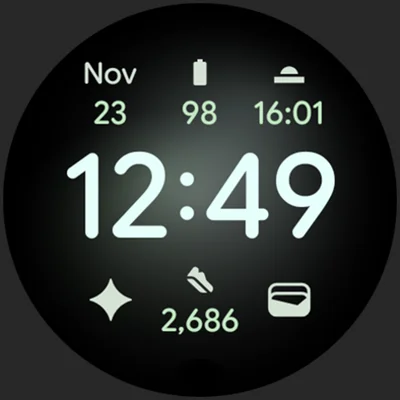
Wear OS 用の、ミニマルでカスタマイズ可能、バッテリーに優しいピクセル スタイルのウォッチ フェイス。
Wear OS API 28 以降のデバイスのみ
免責事項
当社が所有していないすべての製品名、ロゴ、ブランド、商標、登録商標は、それぞれの所有者の財産です。本アプリで使用されているすべての会社名、製品名、サービス名は、識別目的のみに使用されています。これらの名称、商標、ブランドの使用は、推奨を意味するものではありません。Google Pixel、Google Pixel Watch、Wear OS は Google LLC の商標です。Pixel Watch Face アプリケーションは当社が所有しており、Google の公式アプリケーションではありません。当社は、Google LLC と提携、関連、認可、推奨、またはいかなる形であれ公式な関係にはありません。
Watch Face Format 4 を搭載
amoledwatchfaces.com
1つ買うともう1つ無料オファー
amoledwatchfaces.com/bogo
カスタムコンプリケーションアプリ
amoledwatchfaces.com/apps
機能
• ウォッチフェイスフォーマット 4
• ピクセルミニマルウォッチフェイス / ピクセルパーフェクトデザイン
• バッテリー消費を抑える
• トゥルーブラック背景
• 高解像度
• 豊富なカラーテーマ
• 高度に最適化 / 小さな.apkサイズ
• 6つのカスタムコンプリケーションスロット
• 秒リングインジケーター(オプション)
• コロン点滅効果のオフ設定
• 低OPRとアダプティブカラーのアンビエントモード
ユーザー設定
• プライマリテーマ(60種類以上)
• セカンダリテーマ(60種類以上)
• AOD(2種類)
• カスタムコンプリケーション(6種類)
• ジェミニ効果(切り替え)
• 秒インジケーター(切り替え)
•点滅コロン(切り替え)
• 中空AOD(切り替え)
インストールとトラブルシューティングガイド
amoledwatchfaces.com/guide
問題報告やヘルプリクエストは、サポートアドレスまでお送りください。
support@amoledwatchfaces.com
ライブサポートとディスカッションのために、Telegramグループにご参加ください。
t.me/amoledwatchfaces
ニュースレター
amoledwatchfaces.com/contact#newsletter
amoledwatchfaces™ - Awf
原文を表示
Only for Wear OS API 28+ devices
Disclaimer
All product names, logos, brands, trademarks and registered trademarks, which are not owned by us, are property of their respective owners. All company, product and service names used in this app are for identification purposes only. Use of these names, trademarks and brands does not imply endorsement. Please note that Google Pixel, Google Pixel Watch, and Wear OS are trademarks of Google LLC. The Pixel Watch Face application is owned by us and is not an official Google application. We are not affiliated, associated, authorized, endorsed by, or in any way officially connected with Google LLC.
Powered by Watch Face Format 4
amoledwatchfaces.com
BUY ONE GET ONE OFFER
amoledwatchfaces.com/bogo
CUSTOM COMPLICATION APPS
amoledwatchfaces.com/apps
FEATURES
• Watch Face Format 4
• pixel minimal watch face / pixel perfect design
• battery friendly
• true black background
• high resolution
• many color themes
• hugely optimized / small .apk size
• 6 custom complication slots
• optional seconds ring indicator
• option to turn off colon blinking effect
• ambient mode with low OPR and adaptive colors
USER CONFIGURATIONS
• Primary Theme (60+)
• Secondary Theme (60+)
• AOD (2x)
• Custom Complications (6x)
• Gemini Effect (Toggle)
• Seconds Indicator (Toggle)
• Blinking Colon (Toggle)
• Hollow AOD (Toggle)
Installation and troubleshooting guide
amoledwatchfaces.com/guide
Please send any issues reports or help requests to our support address
support@amoledwatchfaces.com
Join our Telegram group for live support and discussion
t.me/amoledwatchfaces
Newsletter
amoledwatchfaces.com/contact#newsletter
amoledwatchfaces™ - Awf
データ セーフティ
このアプリが収集・共有するデータについて、amoledwatchfaces™がGoogle Playで申告している内容です。
- 第三者と共有されるデータはありません詳しくは、デベロッパーが共有を申告する方法についての説明をご覧ください
- データは収集されません詳しくは、デベロッパーが収集を申告する方法についての説明をご覧ください
新機能
2026/8/4
v1.7.0
• complete redesign with open source Google Sans Flex font
• added aurora gyro effect
• removed Wear OS logo config
• added text auto size feature (wff3+)
v1.6.4
• hollow AOD hotfix for Galaxy Watches with Wear OS 5
• optimizations
v1.6.2
• added Royal Blue color from Digital Informer (user request)
v1.6.1
• small optimizations
v1.6.0
• minified watchface.xml
...
NOTE: Please reinstall watch face in case there are some issues after recent update.
開発元の連絡先
- ウェブサイトamoledwatchfaces.com
- メールsupport@amoledwatchfaces.com
- プライバシーポリシーamoledwatchfaces.com
- 住所51 Nižný Kručov 09301 Nižný Kručov Slovakia
情報
- 提供元
- amoledwatchfaces™
- カテゴリ
- カスタマイズ
- 更新日
- 2026/8/4
- リリース
- 2021/9/7
- 対象年齢
- 3 歳以上
- 価格
- ¥240
- パッケージ名
- com.watchfacestudio.awfpixelface